# Hash tables
A hash table, also called a hash map, supports efficient lookup by mapping a `key` to a `value`. Given a key, it can retrieve the corresponding value in $O(1)$ time.
Suppose we have $n$ students, each with a name and a student ID. To support the query “given a student ID, return the corresponding name,” use the hash table shown below.

Arrays and linked lists also support lookup. The table below compares their efficiency.
- **Insertion**: append an element to the end of the array or linked list in $O(1)$ time.
- **Lookup**: because the array or list is unsorted, searching may require visiting every element, taking $O(n)$ time.
- **Deletion**: first find the element, then remove it from the array or list, taking $O(n)$ time.
Table Comparison of element-lookup efficiency
| | Array | Linked list | Hash table |
| -------- | ------ | ------ | ------ |
| Find an element | $O(n)$ | $O(n)$ | $O(1)$ |
| Insert an element | $O(1)$ | $O(1)$ | $O(1)$ |
| Delete an element | $O(n)$ | $O(n)$ | $O(1)$ |
**Hash-table insertion, deletion, lookup, and updating all take $O(1)$ time**, making them highly efficient.
## Common hash-table operations
Common operations include initialization, lookup, adding key-value pairs, and deleting pairs. Examples follow:
=== "Python"
```python title="hash_map.py"
# Initialize a hash table
hmap: dict = {}
# Insertion
# Add key-value pairs (key, value) to the hash table
hmap[12836] = "小哈"
hmap[15937] = "小啰"
hmap[16750] = "小算"
hmap[13276] = "小法"
hmap[10583] = "小鸭"
# Lookup
# Look up key in the hash table to obtain value
name: str = hmap[15937]
# Deletion
# Remove a key-value pair (key, value) from the hash table
hmap.pop(10583)
```
=== "C++"
```cpp title="hash_map.cpp"
/* Initialize a hash table */
unordered_map map;
/* Insertion */
// Add key-value pairs (key, value) to the hash table
map[12836] = "小哈";
map[15937] = "小啰";
map[16750] = "小算";
map[13276] = "小法";
map[10583] = "小鸭";
/* Lookup */
// Look up key in the hash table to obtain value
string name = map[15937];
/* Deletion */
// Remove a key-value pair (key, value) from the hash table
map.erase(10583);
```
=== "Java"
```java title="hash_map.java"
/* Initialize a hash table */
Map map = new HashMap<>();
/* Insertion */
// Add key-value pairs (key, value) to the hash table
map.put(12836, "小哈");
map.put(15937, "小啰");
map.put(16750, "小算");
map.put(13276, "小法");
map.put(10583, "小鸭");
/* Lookup */
// Look up key in the hash table to obtain value
String name = map.get(15937);
/* Deletion */
// Remove a key-value pair (key, value) from the hash table
map.remove(10583);
```
=== "C#"
```csharp title="hash_map.cs"
/* Initialize a hash table */
Dictionary map = new() {
/* Insertion */
// Add key-value pairs (key, value) to the hash table
{ 12836, "小哈" },
{ 15937, "小啰" },
{ 16750, "小算" },
{ 13276, "小法" },
{ 10583, "小鸭" }
};
/* Lookup */
// Look up key in the hash table to obtain value
string name = map[15937];
/* Deletion */
// Remove a key-value pair (key, value) from the hash table
map.Remove(10583);
```
=== "Go"
```go title="hash_map_test.go"
/* Initialize a hash table */
hmap := make(map[int]string)
/* Insertion */
// Add key-value pairs (key, value) to the hash table
hmap[12836] = "小哈"
hmap[15937] = "小啰"
hmap[16750] = "小算"
hmap[13276] = "小法"
hmap[10583] = "小鸭"
/* Lookup */
// Look up key in the hash table to obtain value
name := hmap[15937]
/* Deletion */
// Remove a key-value pair (key, value) from the hash table
delete(hmap, 10583)
```
=== "Swift"
```swift title="hash_map.swift"
/* Initialize a hash table */
var map: [Int: String] = [:]
/* Insertion */
// Add key-value pairs (key, value) to the hash table
map[12836] = "小哈"
map[15937] = "小啰"
map[16750] = "小算"
map[13276] = "小法"
map[10583] = "小鸭"
/* Lookup */
// Look up key in the hash table to obtain value
let name = map[15937]!
/* Deletion */
// Remove a key-value pair (key, value) from the hash table
map.removeValue(forKey: 10583)
```
=== "JS"
```javascript title="hash_map.js"
/* Initialize a hash table */
const map = new Map();
/* Insertion */
// Add key-value pairs (key, value) to the hash table
map.set(12836, '小哈');
map.set(15937, '小啰');
map.set(16750, '小算');
map.set(13276, '小法');
map.set(10583, '小鸭');
/* Lookup */
// Look up key in the hash table to obtain value
let name = map.get(15937);
/* Deletion */
// Remove a key-value pair (key, value) from the hash table
map.delete(10583);
```
=== "TS"
```typescript title="hash_map.ts"
/* Initialize a hash table */
const map = new Map();
/* Insertion */
// Add key-value pairs (key, value) to the hash table
map.set(12836, '小哈');
map.set(15937, '小啰');
map.set(16750, '小算');
map.set(13276, '小法');
map.set(10583, '小鸭');
console.info('\nAfter insertion, the hash table is\nKey -> Value');
console.info(map);
/* Lookup */
// Look up key in the hash table to obtain value
let name = map.get(15937);
console.info('\nLooking up student ID 15937 gives the name ' + name);
/* Deletion */
// Remove a key-value pair (key, value) from the hash table
map.delete(10583);
console.info('\nAfter deleting 10583, the hash table is\nKey -> Value');
console.info(map);
```
=== "Dart"
```dart title="hash_map.dart"
/* Initialize a hash table */
Map map = {};
/* Insertion */
// Add key-value pairs (key, value) to the hash table
map[12836] = "小哈";
map[15937] = "小啰";
map[16750] = "小算";
map[13276] = "小法";
map[10583] = "小鸭";
/* Lookup */
// Look up key in the hash table to obtain value
String name = map[15937];
/* Deletion */
// Remove a key-value pair (key, value) from the hash table
map.remove(10583);
```
=== "Rust"
```rust title="hash_map.rs"
use std::collections::HashMap;
/* Initialize a hash table */
let mut map: HashMap = HashMap::new();
/* Insertion */
// Add key-value pairs (key, value) to the hash table
map.insert(12836, "小哈".to_string());
map.insert(15937, "小啰".to_string());
map.insert(16750, "小算".to_string());
map.insert(13279, "小法".to_string());
map.insert(10583, "小鸭".to_string());
/* Lookup */
// Look up key in the hash table to obtain value
let _name: Option<&String> = map.get(&15937);
/* Deletion */
// Remove a key-value pair (key, value) from the hash table
let _removed_value: Option = map.remove(&10583);
```
=== "C"
```c title="hash_map.c"
// C provides no built-in hash table
```
=== "Kotlin"
```kotlin title="hash_map.kt"
/* Initialize a hash table */
val map = HashMap()
/* Insertion */
// Add key-value pairs (key, value) to the hash table
map[12836] = "小哈"
map[15937] = "小啰"
map[16750] = "小算"
map[13276] = "小法"
map[10583] = "小鸭"
/* Lookup */
// Look up key in the hash table to obtain value
val name = map[15937]
/* Deletion */
// Remove a key-value pair (key, value) from the hash table
map.remove(10583)
```
=== "Ruby"
```ruby title="hash_map.rb"
# Initialize a hash table
hmap = {}
# Insertion
# Add key-value pairs (key, value) to the hash table
hmap[12836] = "小哈"
hmap[15937] = "小啰"
hmap[16750] = "小算"
hmap[13276] = "小法"
hmap[10583] = "小鸭"
# Lookup
# Look up key in the hash table to obtain value
name = hmap[15937]
# Deletion
# Remove a key-value pair (key, value) from the hash table
hmap.delete(10583)
```
??? pythontutor "Visualize execution"
https://pythontutor.com/render.html#code=%22%22%22Driver%20Code%22%22%22%0Aif%20__name__%20%3D%3D%20%22__main__%22%3A%0A%20%20%20%20%23%20Initialize%20a%20hash%20table%0A%20%20%20%20hmap%20%3D%20%7B%7D%0A%20%20%20%20%0A%20%20%20%20%23%20Insertion%0A%20%20%20%20%23%20Add%20key-value%20pairs%20%28key%2C%20value%29%20to%20the%20hash%20table%0A%20%20%20%20hmap%5B12836%5D%20%3D%20%22%E5%B0%8F%E5%93%88%22%0A%20%20%20%20hmap%5B15937%5D%20%3D%20%22%E5%B0%8F%E5%95%B0%22%0A%20%20%20%20hmap%5B16750%5D%20%3D%20%22%E5%B0%8F%E7%AE%97%22%0A%20%20%20%20hmap%5B13276%5D%20%3D%20%22%E5%B0%8F%E6%B3%95%22%0A%20%20%20%20hmap%5B10583%5D%20%3D%20%22%E5%B0%8F%E9%B8%AD%22%0A%20%20%20%20%0A%20%20%20%20%23%20Lookup%0A%20%20%20%20%23%20Look%20up%20key%20in%20the%20hash%20table%20to%20obtain%20value%0A%20%20%20%20name%20%3D%20hmap%5B15937%5D%0A%20%20%20%20%0A%20%20%20%20%23%20Deletion%0A%20%20%20%20%23%20Remove%20a%20key-value%20pair%20%28key%2C%20value%29%20from%20the%20hash%20table%0A%20%20%20%20hmap.pop%2810583%29&cumulative=false&curInstr=2&heapPrimitives=nevernest&mode=display&origin=opt-frontend.js&py=311&rawInputLstJSON=%5B%5D&textReferences=false
There are three common ways to traverse a hash table: visit key-value pairs, keys only, or values only. Examples follow:
=== "Python"
```python title="hash_map.py"
# Traverse the hash table
# Traverse key-value pairs: key->value
for key, value in hmap.items():
print(key, "->", value)
# Traverse keys only: key
for key in hmap.keys():
print(key)
# Traverse values only: value
for value in hmap.values():
print(value)
```
=== "C++"
```cpp title="hash_map.cpp"
/* Traverse the hash table */
// Traverse key-value pairs: key->value
for (auto kv: map) {
cout << kv.first << " -> " << kv.second << endl;
}
// Use an iterator to traverse key->value pairs
for (auto iter = map.begin(); iter != map.end(); iter++) {
cout << iter->first << "->" << iter->second << endl;
}
```
=== "Java"
```java title="hash_map.java"
/* Traverse the hash table */
// Traverse key-value pairs: key->value
for (Map.Entry kv: map.entrySet()) {
System.out.println(kv.getKey() + " -> " + kv.getValue());
}
// Traverse keys only: key
for (int key: map.keySet()) {
System.out.println(key);
}
// Traverse values only: value
for (String val: map.values()) {
System.out.println(val);
}
```
=== "C#"
```csharp title="hash_map.cs"
/* Traverse the hash table */
// Traverse key-value pairs: Key->Value
foreach (var kv in map) {
Console.WriteLine(kv.Key + " -> " + kv.Value);
}
// Traverse keys only: key
foreach (int key in map.Keys) {
Console.WriteLine(key);
}
// Traverse values only: value
foreach (string val in map.Values) {
Console.WriteLine(val);
}
```
=== "Go"
```go title="hash_map_test.go"
/* Traverse the hash table */
// Traverse key-value pairs: key->value
for key, value := range hmap {
fmt.Println(key, "->", value)
}
// Traverse keys only: key
for key := range hmap {
fmt.Println(key)
}
// Traverse values only: value
for _, value := range hmap {
fmt.Println(value)
}
```
=== "Swift"
```swift title="hash_map.swift"
/* Traverse the hash table */
// Traverse key-value pairs: Key->Value
for (key, value) in map {
print("\(key) -> \(value)")
}
// Traverse keys only: Key
for key in map.keys {
print(key)
}
// Traverse values only: Value
for value in map.values {
print(value)
}
```
=== "JS"
```javascript title="hash_map.js"
/* Traverse the hash table */
console.info('\nTraverse key-value pairs: Key->Value');
for (const [k, v] of map.entries()) {
console.info(k + ' -> ' + v);
}
console.info('\nTraverse keys only: Key');
for (const k of map.keys()) {
console.info(k);
}
console.info('\nTraverse values only: Value');
for (const v of map.values()) {
console.info(v);
}
```
=== "TS"
```typescript title="hash_map.ts"
/* Traverse the hash table */
console.info('\nTraverse key-value pairs: Key->Value');
for (const [k, v] of map.entries()) {
console.info(k + ' -> ' + v);
}
console.info('\nTraverse keys only: Key');
for (const k of map.keys()) {
console.info(k);
}
console.info('\nTraverse values only: Value');
for (const v of map.values()) {
console.info(v);
}
```
=== "Dart"
```dart title="hash_map.dart"
/* Traverse the hash table */
// Traverse key-value pairs: Key->Value
map.forEach((key, value) {
print('$key -> $value');
});
// Traverse keys only: Key
map.keys.forEach((key) {
print(key);
});
// Traverse values only: Value
map.values.forEach((value) {
print(value);
});
```
=== "Rust"
```rust title="hash_map.rs"
/* Traverse the hash table */
// Traverse key-value pairs: Key->Value
for (key, value) in &map {
println!("{key} -> {value}");
}
// Traverse keys only: Key
for key in map.keys() {
println!("{key}");
}
// Traverse values only: Value
for value in map.values() {
println!("{value}");
}
```
=== "C"
```c title="hash_map.c"
// C provides no built-in hash table
```
=== "Kotlin"
```kotlin title="hash_map.kt"
/* Traverse the hash table */
// Traverse key-value pairs: key->value
for ((key, value) in map) {
println("$key -> $value")
}
// Traverse keys only: key
for (key in map.keys) {
println(key)
}
// Traverse values only: value
for (_val in map.values) {
println(_val)
}
```
=== "Ruby"
```ruby title="hash_map.rb"
# Traverse the hash table
# Traverse key-value pairs: key->value
hmap.entries.each { |key, value| puts "#{key} -> #{value}" }
# Traverse keys only: key
hmap.keys.each { |key| puts key }
# Traverse values only: value
hmap.values.each { |val| puts val }
```
??? pythontutor "Visualize execution"
https://pythontutor.com/render.html#code=%22%22%22Driver%20Code%22%22%22%0Aif%20__name__%20%3D%3D%20%22__main__%22%3A%0A%20%20%20%20%23%20Initialize%20a%20hash%20table%0A%20%20%20%20hmap%20%3D%20%7B%7D%0A%20%20%20%20%0A%20%20%20%20%23%20Insertion%0A%20%20%20%20%23%20Add%20key-value%20pairs%20%28key%2C%20value%29%20to%20the%20hash%20table%0A%20%20%20%20hmap%5B12836%5D%20%3D%20%22%E5%B0%8F%E5%93%88%22%0A%20%20%20%20hmap%5B15937%5D%20%3D%20%22%E5%B0%8F%E5%95%B0%22%0A%20%20%20%20hmap%5B16750%5D%20%3D%20%22%E5%B0%8F%E7%AE%97%22%0A%20%20%20%20hmap%5B13276%5D%20%3D%20%22%E5%B0%8F%E6%B3%95%22%0A%20%20%20%20hmap%5B10583%5D%20%3D%20%22%E5%B0%8F%E9%B8%AD%22%0A%20%20%20%20%0A%20%20%20%20%23%20Traverse%20the%20hash%20table%0A%20%20%20%20%23%20Traverse%20key-value%20pairs%3A%20key-%3Evalue%0A%20%20%20%20for%20key%2C%20value%20in%20hmap.items%28%29%3A%0A%20%20%20%20%20%20%20%20print%28key%2C%20%22-%3E%22%2C%20value%29%0A%20%20%20%20%23%20Traverse%20keys%20only%3A%20key%0A%20%20%20%20for%20key%20in%20hmap.keys%28%29%3A%0A%20%20%20%20%20%20%20%20print%28key%29%0A%20%20%20%20%23%20Traverse%20values%20only%3A%20value%0A%20%20%20%20for%20value%20in%20hmap.values%28%29%3A%0A%20%20%20%20%20%20%20%20print%28value%29&cumulative=false&curInstr=8&heapPrimitives=nevernest&mode=display&origin=opt-frontend.js&py=311&rawInputLstJSON=%5B%5D&textReferences=false
## A simple implementation
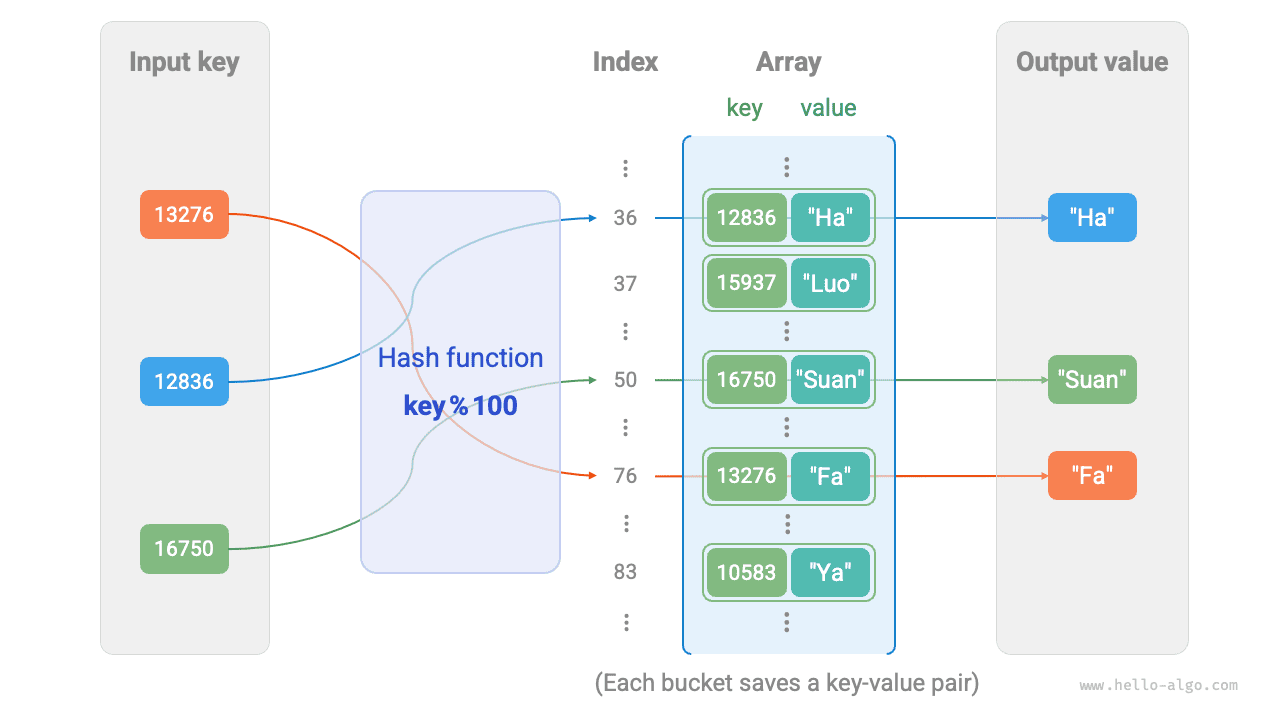
Start with the simplest case: **implement a hash table using just one array**. Each slot is called a bucket and holds one key-value pair. A lookup finds the bucket corresponding to `key` and retrieves its `value`.
How do we locate the bucket for a key? A hash function maps a larger input space into a smaller output space. Here, the inputs are all possible keys, and the outputs are bucket indices. **Given a key, the hash function tells us where its key-value pair is stored in the array**.
For an input `key`, the calculation has two steps.
1. Use a hash algorithm, `hash()`, to calculate a hash value.
2. Take that value modulo the number of buckets, the array length `capacity`, to obtain the bucket index `index`.
```shell
index = hash(key) % capacity
```
Use `index` to access the bucket and retrieve `value`.
If `capacity = 100` and `hash(key) = key`, the resulting hash function is `key % 100`. The figure below illustrates it with student IDs as keys and names as values.
The code below implements a simple hash table. The `Pair` class groups a `key` and `value` into a key-value pair.
```src
[file]{array_hash_map}-[class]{array_hash_map}-[func]{}
```
## Collisions and expansion
A hash function maps the input space of all possible keys into the output space of array indices. The input space is usually far larger, **so multiple inputs must theoretically map to the same output**.
For the function above, keys with the same last two digits produce the same output. Looking up student IDs 12836 and 20336 gives:
```shell
12836 % 100 = 36
20336 % 100 = 36
```
As shown below, both IDs point to the same name, which is clearly incorrect. This situation, where different inputs produce the same output, is called a hash collision.

A larger table capacity $n$ makes it less likely that several keys share a bucket, reducing collisions. **Expanding the hash table can therefore reduce hash collisions**.
In the example below, `(136, A)` and `(236, D)` collide before expansion but no longer collide afterward.

As with array expansion, expanding a hash table requires moving every pair into a new table, which is time-consuming. Because `capacity` changes, the hash function must also recalculate every pair's position, adding further computation. Programming languages therefore usually reserve enough capacity to avoid frequent expansion.
The load factor is the number of elements divided by the number of buckets. It measures how crowded the table is and **often serves as the trigger for expansion**. For example, in Java, a load factor above $0.75$ causes the capacity to grow to $2$ times its previous size.