mirror of
https://github.com/huggingface/deep-rl-class.git
synced 2026-03-31 17:21:01 +08:00

369 lines
16 KiB
Plaintext
369 lines
16 KiB
Plaintext
# Hands-on
|
||
|
||
<CourseFloatingBanner classNames="absolute z-10 right-0 top-0"
|
||
notebooks={[
|
||
{label: "Google Colab", value: "https://colab.research.google.com/github/huggingface/deep-rl-class/blob/main/notebooks/unit5/unit5.ipynb"}
|
||
]}
|
||
askForHelpUrl="http://hf.co/join/discord" />
|
||
|
||
|
||
We learned what ML-Agents is and how it works. We also studied the two environments we're going to use. Now we're ready to train our agents!
|
||
|
||
<img src="https://huggingface.co/datasets/huggingface-deep-rl-course/course-images/resolve/main/en/unit7/envs.png" alt="Environments" />
|
||
|
||
To validate this hands-on for the certification process, you **just need to push your trained models to the Hub.**
|
||
There are **no minimum results to attain** in order to validate this Hands On. But if you want to get nice results, you can try to reach the following:
|
||
|
||
- For [Pyramids](https://huggingface.co/spaces/unity/ML-Agents-Pyramids): Mean Reward = 1.75
|
||
- For [SnowballTarget](https://huggingface.co/spaces/ThomasSimonini/ML-Agents-SnowballTarget): Mean Reward = 15 or 30 targets shoot in an episode.
|
||
|
||
For more information about the certification process, check this section 👉 https://huggingface.co/deep-rl-course/en/unit0/introduction#certification-process
|
||
|
||
**To start the hands-on, click on Open In Colab button** 👇 :
|
||
|
||
[](https://colab.research.google.com/github/huggingface/deep-rl-class/blob/master/notebooks/unit5/unit5.ipynb)
|
||
|
||
We strongly **recommend students use Google Colab for the hands-on exercises** instead of running them on their personal computers.
|
||
|
||
By using Google Colab, **you can focus on learning and experimenting without worrying about the technical aspects** of setting up your environments.
|
||
|
||
# Unit 5: An Introduction to ML-Agents
|
||
|
||
<img src="https://huggingface.co/datasets/huggingface-deep-rl-course/course-images/resolve/main/en/unit7/thumbnail.png" alt="Thumbnail"/>
|
||
|
||
In this notebook, you'll learn about ML-Agents and train two agents.
|
||
|
||
- The first one will learn to **shoot snowballs onto spawning targets**.
|
||
- The second needs to press a button to spawn a pyramid, then navigate to the pyramid, knock it over, **and move to the gold brick at the top**. To do that, it will need to explore its environment, and we will use a technique called curiosity.
|
||
|
||
After that, you'll be able **to watch your agents playing directly on your browser**.
|
||
|
||
For more information about the certification process, check this section 👉 https://huggingface.co/deep-rl-course/en/unit0/introduction#certification-process
|
||
|
||
⬇️ Here is an example of what **you will achieve at the end of this unit.** ⬇️
|
||
|
||
<img src="https://huggingface.co/datasets/huggingface-deep-rl-course/course-images/resolve/main/en/unit7/pyramids.gif" alt="Pyramids"/>
|
||
|
||
<img src="https://huggingface.co/datasets/huggingface-deep-rl-course/course-images/resolve/main/en/unit7/snowballtarget.gif" alt="SnowballTarget"/>
|
||
|
||
### 🎮 Environments:
|
||
|
||
- [Pyramids](https://github.com/Unity-Technologies/ml-agents/blob/main/docs/Learning-Environment-Examples.md#pyramids)
|
||
- SnowballTarget
|
||
|
||
### 📚 RL-Library:
|
||
|
||
- [ML-Agents](https://github.com/Unity-Technologies/ml-agents)
|
||
|
||
We're constantly trying to improve our tutorials, so **if you find some issues in this notebook**, please [open an issue on the GitHub Repo](https://github.com/huggingface/deep-rl-class/issues).
|
||
|
||
## Objectives of this notebook 🏆
|
||
|
||
At the end of the notebook, you will:
|
||
|
||
- Understand how **ML-Agents** works and the environment library.
|
||
- Be able to **train agents in Unity Environments**.
|
||
|
||
## Prerequisites 🏗️
|
||
Before diving into the notebook, you need to:
|
||
|
||
🔲 📚 **Study [what ML-Agents is and how it works by reading Unit 5](https://huggingface.co/deep-rl-course/unit5/introduction)** 🤗
|
||
|
||
# Let's train our agents 🚀
|
||
|
||
## Set the GPU 💪
|
||
|
||
- To **accelerate the agent's training, we'll use a GPU**. To do that, go to `Runtime > Change Runtime type`
|
||
|
||
<img src="https://huggingface.co/datasets/huggingface-deep-rl-course/course-images/resolve/main/en/notebooks/gpu-step1.jpg" alt="GPU Step 1">
|
||
|
||
- `Hardware Accelerator > GPU`
|
||
|
||
<img src="https://huggingface.co/datasets/huggingface-deep-rl-course/course-images/resolve/main/en/notebooks/gpu-step2.jpg" alt="GPU Step 2">
|
||
|
||
## Clone the repository and install the dependencies 🔽
|
||
- We need to clone the repository that **contains the experimental version of the library that allows you to push your trained agent to the Hub.**
|
||
|
||
```bash
|
||
# Clone the repository
|
||
git clone --depth 1 https://github.com/Unity-Technologies/ml-agents
|
||
```
|
||
|
||
```bash
|
||
# Go inside the repository and install the package
|
||
cd ml-agents
|
||
pip install -e ./ml-agents-envs
|
||
pip install -e ./ml-agents
|
||
```
|
||
|
||
## SnowballTarget ⛄
|
||
|
||
If you need a refresher on how this environment works check this section 👉
|
||
https://huggingface.co/deep-rl-course/unit5/snowball-target
|
||
|
||
### Download and move the environment zip file in `./training-envs-executables/linux/`
|
||
|
||
- Our environment executable is in a zip file.
|
||
- We need to download it and place it to `./training-envs-executables/linux/`
|
||
- We use a linux executable because we use colab, and colab machines OS is Ubuntu (linux)
|
||
|
||
```bash
|
||
# Here, we create training-envs-executables and linux
|
||
mkdir ./training-envs-executables
|
||
mkdir ./training-envs-executables/linux
|
||
```
|
||
|
||
We downloaded the file SnowballTarget.zip from https://github.com/huggingface/Snowball-Target using `wget`
|
||
|
||
```bash
|
||
wget "https://github.com/huggingface/Snowball-Target/raw/main/SnowballTarget.zip" -O ./training-envs-executables/linux/SnowballTarget.zip
|
||
```
|
||
|
||
We unzip the executable.zip file
|
||
|
||
```bash
|
||
unzip -d ./training-envs-executables/linux/ ./training-envs-executables/linux/SnowballTarget.zip
|
||
```
|
||
|
||
Make sure your file is accessible
|
||
|
||
```bash
|
||
chmod -R 755 ./training-envs-executables/linux/SnowballTarget
|
||
```
|
||
|
||
### Define the SnowballTarget config file
|
||
- In ML-Agents, you define the **training hyperparameters in config.yaml files.**
|
||
|
||
There are multiple hyperparameters. To understand them better, you should read the explanation for each one in [the documentation](https://github.com/Unity-Technologies/ml-agents/blob/release_20_docs/docs/Training-Configuration-File.md)
|
||
|
||
|
||
You need to create a `SnowballTarget.yaml` config file in ./content/ml-agents/config/ppo/
|
||
|
||
We'll give you a preliminary version of this config (to copy and paste into your `SnowballTarget.yaml file`), **but you should modify it**.
|
||
|
||
```yaml
|
||
behaviors:
|
||
SnowballTarget:
|
||
trainer_type: ppo
|
||
summary_freq: 10000
|
||
keep_checkpoints: 10
|
||
checkpoint_interval: 50000
|
||
max_steps: 200000
|
||
time_horizon: 64
|
||
threaded: true
|
||
hyperparameters:
|
||
learning_rate: 0.0003
|
||
learning_rate_schedule: linear
|
||
batch_size: 128
|
||
buffer_size: 2048
|
||
beta: 0.005
|
||
epsilon: 0.2
|
||
lambd: 0.95
|
||
num_epoch: 3
|
||
network_settings:
|
||
normalize: false
|
||
hidden_units: 256
|
||
num_layers: 2
|
||
vis_encode_type: simple
|
||
reward_signals:
|
||
extrinsic:
|
||
gamma: 0.99
|
||
strength: 1.0
|
||
```
|
||
|
||
<img src="https://huggingface.co/datasets/huggingface-deep-rl-course/course-images/resolve/main/en/unit7/snowballfight_config1.png" alt="Config SnowballTarget"/>
|
||
<img src="https://huggingface.co/datasets/huggingface-deep-rl-course/course-images/resolve/main/en/unit7/snowballfight_config2.png" alt="Config SnowballTarget"/>
|
||
|
||
As an experiment, try to modify some other hyperparameters. Unity provides very [good documentation explaining each of them here](https://github.com/Unity-Technologies/ml-agents/blob/main/docs/Training-Configuration-File.md).
|
||
|
||
Now that you've created the config file and understand what most hyperparameters do, we're ready to train our agent 🔥.
|
||
|
||
### Train the agent
|
||
|
||
To train our agent, we need to **launch mlagents-learn and select the executable containing the environment.**
|
||
|
||
We define four parameters:
|
||
|
||
1. `mlagents-learn <config>`: the path where the hyperparameter config file is.
|
||
2. `--env`: where the environment executable is.
|
||
3. `--run_id`: the name you want to give to your training run id.
|
||
4. `--no-graphics`: to not launch the visualization during the training.
|
||
|
||
<img src="https://huggingface.co/datasets/huggingface-deep-rl-course/course-images/resolve/main/en/unit7/mlagentslearn.png" alt="MlAgents learn"/>
|
||
|
||
Train the model and use the `--resume` flag to continue training in case of interruption.
|
||
|
||
> It will fail the first time if and when you use `--resume`. Try rerunning the block to bypass the error.
|
||
|
||
The training will take 10 to 35min depending on your config. Go take a ☕️ you deserve it 🤗.
|
||
|
||
```bash
|
||
mlagents-learn ./config/ppo/SnowballTarget.yaml --env=./training-envs-executables/linux/SnowballTarget/SnowballTarget --run-id="SnowballTarget1" --no-graphics
|
||
```
|
||
|
||
### Push the agent to the Hugging Face Hub
|
||
|
||
- Now that we've trained our agent, we’re **ready to push it to the Hub and visualize it playing on your browser🔥.**
|
||
|
||
To be able to share your model with the community, there are three more steps to follow:
|
||
|
||
1️⃣ (If it's not already done) create an account to HF ➡ https://huggingface.co/join
|
||
|
||
2️⃣ Sign in and store your authentication token from the Hugging Face website.
|
||
- Create a new token (https://huggingface.co/settings/tokens) **with write role**
|
||
|
||
<img src="https://huggingface.co/datasets/huggingface-deep-rl-course/course-images/resolve/main/en/notebooks/create-token.jpg" alt="Create HF Token">
|
||
|
||
- Copy the token
|
||
- Run the cell below and paste the token
|
||
|
||
```python
|
||
from huggingface_hub import notebook_login
|
||
|
||
notebook_login()
|
||
```
|
||
|
||
If you don't want to use Google Colab or a Jupyter Notebook, you need to use this command instead: `huggingface-cli login`
|
||
|
||
Then we need to run `mlagents-push-to-hf`.
|
||
|
||
And we define four parameters:
|
||
|
||
1. `--run-id`: the name of the training run id.
|
||
2. `--local-dir`: where the agent was saved, it’s results/<run_id name>, so in my case results/First Training.
|
||
3. `--repo-id`: the name of the Hugging Face repo you want to create or update. It’s always <your huggingface username>/<the repo name>
|
||
If the repo does not exist **it will be created automatically**
|
||
4. `--commit-message`: since HF repos are git repositories you need to give a commit message.
|
||
|
||
<img src="https://huggingface.co/datasets/huggingface-deep-rl-course/course-images/resolve/main/en/unit7/mlagentspushtohub.png" alt="Push to Hub"/>
|
||
|
||
For instance:
|
||
|
||
`mlagents-push-to-hf --run-id="SnowballTarget1" --local-dir="./results/SnowballTarget1" --repo-id="ThomasSimonini/ppo-SnowballTarget" --commit-message="First Push"`
|
||
|
||
```python
|
||
mlagents-push-to-hf --run-id= # Add your run id --local-dir= # Your local dir --repo-id= # Your repo id --commit-message= # Your commit message
|
||
```
|
||
|
||
If everything worked you should see this at the end of the process (but with a different url 😆) :
|
||
|
||
|
||
|
||
```
|
||
Your model is pushed to the hub. You can view your model here: https://huggingface.co/ThomasSimonini/ppo-SnowballTarget
|
||
```
|
||
|
||
It's the link to your model. It contains a model card that explains how to use it, your Tensorboard, and your config file. **What's awesome is that it's a git repository, which means you can have different commits, update your repository with a new push, etc.**
|
||
|
||
But now comes the best: **being able to visualize your agent online 👀.**
|
||
|
||
### Watch your agent playing 👀
|
||
|
||
This step it's simple:
|
||
|
||
1. Remember your repo-id
|
||
|
||
2. Go here: https://huggingface.co/spaces/ThomasSimonini/ML-Agents-SnowballTarget
|
||
|
||
3. Launch the game and put it in full screen by clicking on the bottom right button
|
||
|
||
<img src="https://huggingface.co/datasets/huggingface-deep-rl-course/course-images/resolve/main/en/unit7/snowballtarget_load.png" alt="Snowballtarget load"/>
|
||
|
||
1. In step 1, choose your model repository, which is the model id (in my case ThomasSimonini/ppo-SnowballTarget).
|
||
|
||
2. In step 2, **choose what model you want to replay**:
|
||
- I have multiple ones since we saved a model every 500000 timesteps.
|
||
- But if I want the more recent I choose `SnowballTarget.onnx`
|
||
|
||
👉 It's nice to **try different model stages to see the improvement of the agent.**
|
||
|
||
And don't hesitate to share the best score your agent gets on discord in the #rl-i-made-this channel 🔥
|
||
|
||
Now let's try a more challenging environment called Pyramids.
|
||
|
||
## Pyramids 🏆
|
||
|
||
### Download and move the environment zip file in `./training-envs-executables/linux/`
|
||
- Our environment executable is in a zip file.
|
||
- We need to download it and place it into `./training-envs-executables/linux/`
|
||
- We use a linux executable because we're using colab, and the colab machine's OS is Ubuntu (linux)
|
||
|
||
Download the file Pyramids.zip from https://drive.google.com/uc?export=download&id=1UiFNdKlsH0NTu32xV-giYUEVKV4-vc7H using `wget`. Check out the full solution to download large files from GDrive [here](https://bcrf.biochem.wisc.edu/2021/02/05/download-google-drive-files-using-wget/)
|
||
|
||
```python
|
||
!wget --load-cookies /tmp/cookies.txt "https://docs.google.com/uc?export=download&confirm=$(wget --quiet --save-cookies /tmp/cookies.txt --keep-session-cookies --no-check-certificate 'https://docs.google.com/uc?export=download&id=1UiFNdKlsH0NTu32xV-giYUEVKV4-vc7H' -O- | sed -rn 's/.*confirm=([0-9A-Za-z_]+).*/\1\n/p')&id=1UiFNdKlsH0NTu32xV-giYUEVKV4-vc7H" -O ./training-envs-executables/linux/Pyramids.zip && rm -rf /tmp/cookies.txt
|
||
```
|
||
|
||
Unzip it
|
||
|
||
```python
|
||
%%capture
|
||
!unzip -d ./training-envs-executables/linux/ ./training-envs-executables/linux/Pyramids.zip
|
||
```
|
||
|
||
Make sure your file is accessible
|
||
|
||
```bash
|
||
chmod -R 755 ./training-envs-executables/linux/Pyramids/Pyramids
|
||
```
|
||
|
||
### Modify the PyramidsRND config file
|
||
|
||
- Contrary to the first environment, which was a custom one, **Pyramids was made by the Unity team**.
|
||
- So the PyramidsRND config file already exists and is in ./content/ml-agents/config/ppo/PyramidsRND.yaml
|
||
- You might ask why "RND" is in PyramidsRND. RND stands for *random network distillation* it's a way to generate curiosity rewards. If you want to know more about that, we wrote an article explaining this technique: https://medium.com/data-from-the-trenches/curiosity-driven-learning-through-random-network-distillation-488ffd8e5938
|
||
|
||
For this training, we’ll modify one thing:
|
||
- The total training steps hyperparameter is too high since we can hit the benchmark (mean reward = 1.75) in only 1M training steps.
|
||
👉 To do that, we go to config/ppo/PyramidsRND.yaml,**and change max_steps to 1000000.**
|
||
|
||
<img src="https://huggingface.co/datasets/huggingface-deep-rl-course/course-images/resolve/main/en/unit7/pyramids-config.png" alt="Pyramids config"/>
|
||
|
||
As an experiment, you should also try to modify some other hyperparameters. Unity provides very [good documentation explaining each of them here](https://github.com/Unity-Technologies/ml-agents/blob/main/docs/Training-Configuration-File.md).
|
||
|
||
We’re now ready to train our agent 🔥.
|
||
|
||
### Train the agent
|
||
|
||
The training will take 30 to 45min depending on your machine, go take a ☕️ you deserve it 🤗.
|
||
|
||
```python
|
||
mlagents-learn ./config/ppo/PyramidsRND.yaml --env=./training-envs-executables/linux/Pyramids/Pyramids --run-id="Pyramids Training" --no-graphics
|
||
```
|
||
|
||
### Push the agent to the Hugging Face Hub
|
||
|
||
- Now that we trained our agent, we’re **ready to push it to the Hub to be able to visualize it playing on your browser🔥.**
|
||
|
||
```python
|
||
mlagents-push-to-hf --run-id= # Add your run id --local-dir= # Your local dir --repo-id= # Your repo id --commit-message= # Your commit message
|
||
```
|
||
|
||
### Watch your agent playing 👀
|
||
|
||
👉 https://huggingface.co/spaces/unity/ML-Agents-Pyramids
|
||
|
||
### 🎁 Bonus: Why not train on another environment?
|
||
|
||
Now that you know how to train an agent using MLAgents, **why not try another environment?**
|
||
|
||
MLAgents provides 17 different environments and we’re building some custom ones. The best way to learn is to try things on your own, have fun.
|
||
|
||
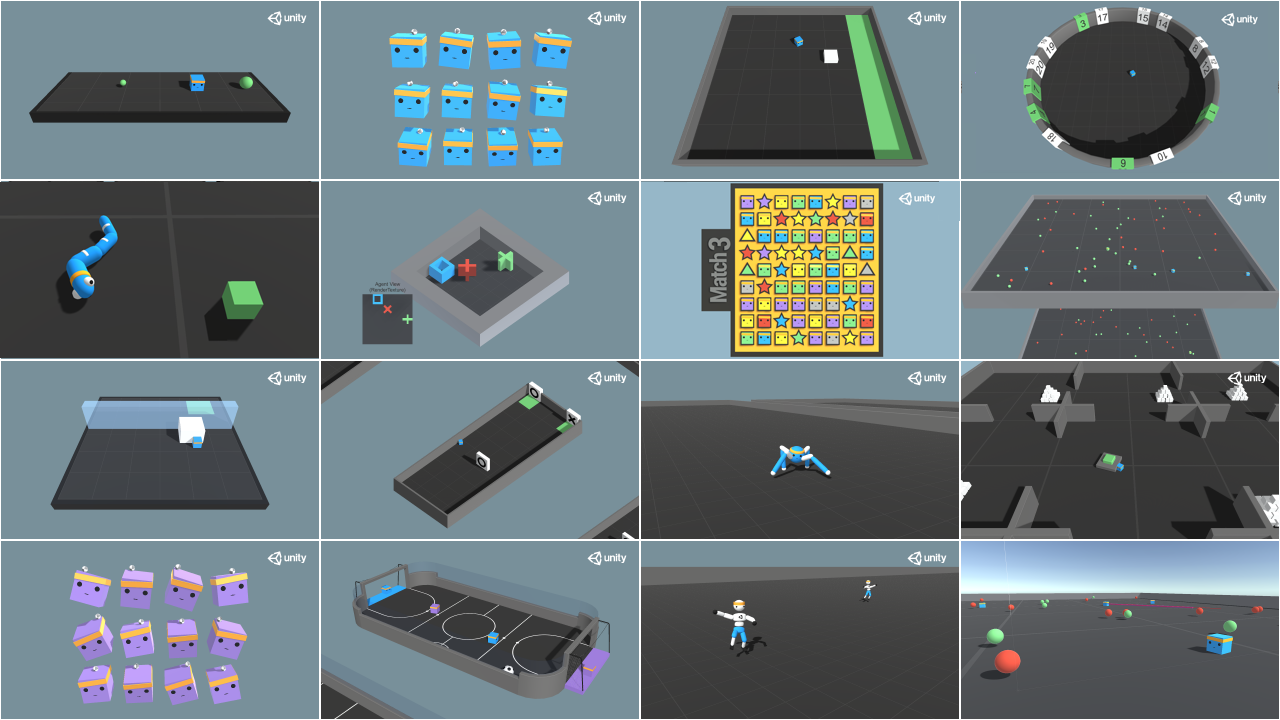
|
||
|
||
You have the full list of the one currently available environments on Hugging Face here 👉 https://github.com/huggingface/ml-agents#the-environments
|
||
|
||
For the demos to visualize your agent 👉 https://huggingface.co/unity
|
||
|
||
For now we have integrated:
|
||
- [Worm](https://huggingface.co/spaces/unity/ML-Agents-Worm) demo where you teach a **worm to crawl**.
|
||
- [Walker](https://huggingface.co/spaces/unity/ML-Agents-Walker) demo where you teach an agent **to walk towards a goal**.
|
||
|
||
That’s all for today. Congrats on finishing this tutorial!
|
||
|
||
The best way to learn is to practice and try stuff. Why not try another environment? ML-Agents has 18 different environments, but you can also create your own. Check the documentation and have fun!
|
||
|
||
See you on Unit 6 🔥,
|
||
|
||
## Keep Learning, Stay awesome 🤗
|