mirror of
https://github.com/WhaleFell/SMSBoom.git
synced 2026-02-03 10:23:22 +08:00

256 lines
6.9 KiB
Markdown
256 lines
6.9 KiB
Markdown
# SMSBoom - Deprecate
|
||
|
||
> **Due to judicial reasons, the repository has been suspended!**
|
||
> **倉庫は司法上の理由で停止された。**-- Japenese
|
||
> **由于司法原因,此仓库被停用!**-- Simplified Chinese
|
||
> **由於司法原因,此倉庫被停用!** -- Traditional Chinese
|
||
|
||
For more details, please check: [HK JUDICIARY](https://www.judiciary.hk/zh/home/index.html)
|
||
|
||

|
||
|
||
HK JUDICIARY 2024/3/20
|
||
|
||
<!--
|
||

|
||
|
||
## 免责声明
|
||
|
||
1. 使用此程序请遵守当地的法律法规,禁止滥用、恶意使用,**触犯法律所造成的问题均由使用者承担**。
|
||
2. 本程序仅供娱乐,源码全部开源,**禁止滥用** 和二次 **禁止用于商业用途**.
|
||
|
||
## Repair - TODO
|
||
|
||
1. 修改文档
|
||
2. 修缮主要功能
|
||
3. 修缮后端使用 FastAPI 前端使用 vue3 elementUI
|
||
4. GUI 使用 web 技术
|
||
|
||
## Feature
|
||
|
||
1. 通过自定义 `api.json` 的方式定义接口.
|
||
2. 支持关键字替换. **时间戳** `[timestamp]` **手机号** `[phone]`
|
||
3. 多线程/异步 请求.
|
||
4. 通过 Flask 提供网页测试/添加接口.
|
||
5. 友好的命令行参数支持.
|
||
6. 采用方便的 pipenv 包管理.
|
||
7. 通过代理调用短信接口, 支持 http, socks4, socks5代理.
|
||
8. 使用随机的 User-Agent.
|
||
9. 可指定轰炸次数, 轰炸间隔时间.
|
||
|
||
## Quick Start
|
||
|
||
### 适用于小白
|
||
|
||
✨本项目已经使用 `pyinstaller` 打包成 `EXE` 可执行文件!免去部署 Python 环境的烦恼,适合用于小白白.
|
||
|
||
🔨作者的打包环境为: `Windows 10 x64 Python3.8` 如果 Windows 系统不是 **Windows 10 64位** 版本,**可能会运行失败**! 如果出现异常报错请截图发 Issue.
|
||
|
||
#### Step1. 下载 EXE 可执行文件
|
||
|
||
请移步到项目的 [release页](https://github.com/OpenEthan/SMSBoom/releases) 下载
|
||
|
||
> 若遇到国内网络环境下载不下来,请参见 [https://github.do/](https://github.do/) 等加速镜像.
|
||
|
||
#### Step2 运行
|
||
|
||
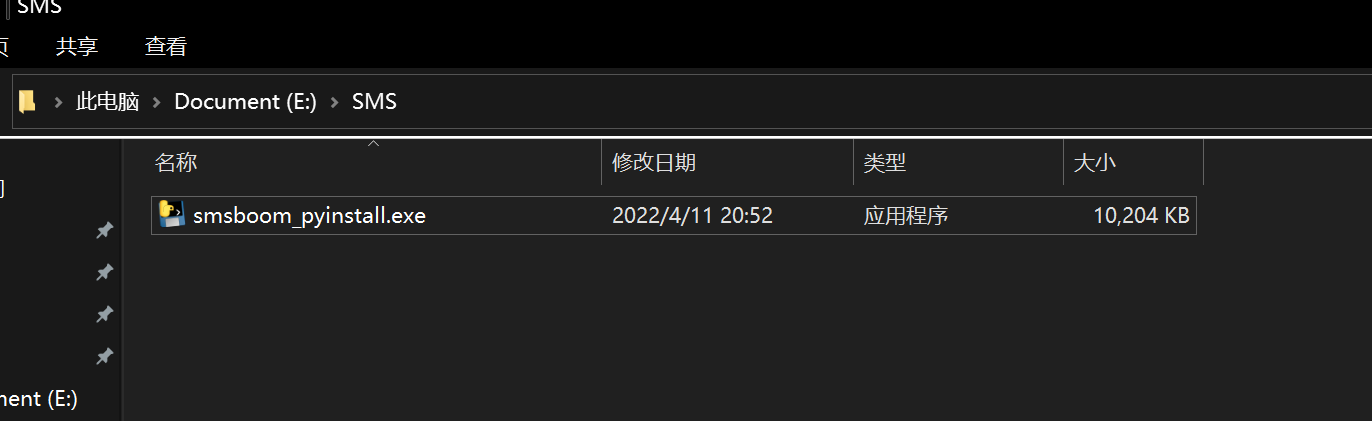
1. 在任意盘(**除C盘外**)中新建一个文件夹.将程序移动到其中. e.g.
|
||
|
||
|
||
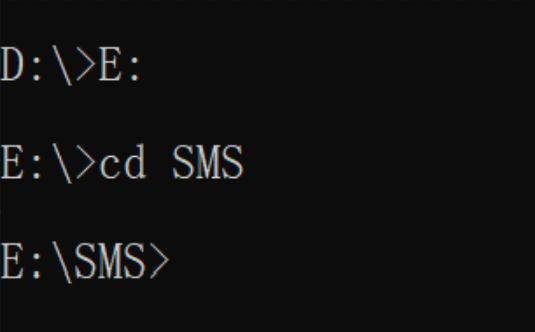
2. `Win`+`R` 打开cmd.输入存放的盘符.例如: `E:` 然后cd到文件夹,例如 `cd SMS`
|
||
|
||
|
||
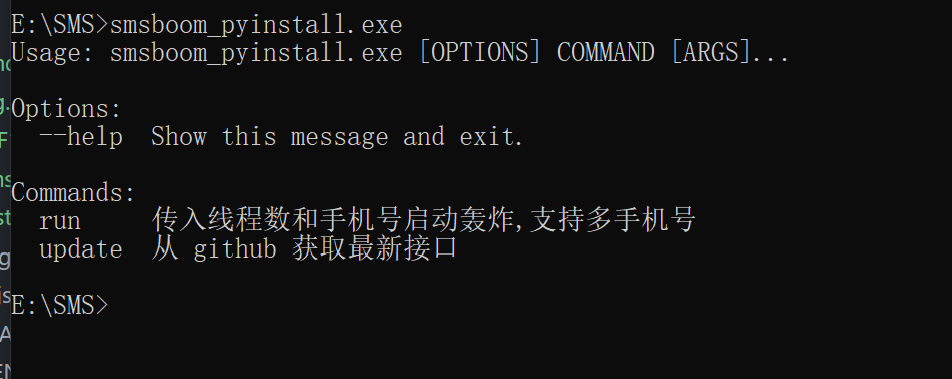
3. 确认 cmd 路径是 EXE 所在路径后,cmd 输入:`smsboom_pyinstall.exe`,若出现命令提示,则说明脚本已正常运行.
|
||
|
||
|
||
4. 使用前必须更新一遍最新接口
|
||
|
||
```shell
|
||
smsboom_pyinstall.exe update
|
||
```
|
||
|
||
> 若更新接口出现错误 `ssl_`, 请参见 [issue](https://github.com/OpenEthan/SMSBoom/issues/2) **关闭代理软件**再 update.
|
||
|
||
5. 传递命令示例
|
||
|
||
启动64个线程,轰//炸一个人的手机号(198xxxxxxxx),只轰//炸一波。
|
||
|
||
```shell
|
||
smsboom_pyinstall.exe run -t 64 -p 198xxxxxxxxx
|
||
```
|
||
|
||
启动64个线程,轰//炸一个人的手机号(19xxxxxxx),启动循环轰//炸, 轮番轰//炸60次
|
||
|
||
```shell
|
||
smsboom_pyinstall.exe run -t 64 -p 198xxxxxxxxx -f 60
|
||
```
|
||
|
||
启动64个线程,轰//炸一个人的手机号(19xxxxxxx),启动循环轰//炸, 轮番轰//炸60次, 每次间隔30秒
|
||
|
||
```shell
|
||
smsboom_pyinstall.exe run -t 64 -p 198xxxxxxxxx -f 60 -i 30
|
||
```
|
||
|
||
启动64个线程,轰//炸一个人的手机号(19xxxxxxx),启动循环轰//炸, 轮番轰//炸60次, 每次间隔30秒, 开启代理列表进行轰炸
|
||
|
||
```shell
|
||
smsboom_pyinstall.exe run -t 64 -p 198xxxxxxxxx -f 60 -i 30 -e
|
||
```
|
||
|
||
启动64个线程,轰//炸多个人的手机号(138xxx,139xxxx),启动循环轰//炸, 轮番轰炸60次, 每次间隔30秒, 开启代理列表进行轰炸
|
||
|
||
```shell
|
||
smsboom_pyinstall.exe run -t 64 -p 138xxxxxxxx -p 139xxxxxxxx -f 60 -i 30 -e
|
||
```
|
||
|
||
### Development
|
||
|
||
1. Download 下载项目
|
||
|
||
```shell
|
||
git clone https://github.com/AdminWhaleFall/SMSBoom.git/
|
||
```
|
||
|
||
2. 配置虚拟环境 Deploy Virtual Envirement
|
||
|
||
**前提条件:** 请确保自己的电脑有 `python3.x` 的环境,推荐使用 `3.8` 及以上!
|
||
|
||
#### 使用 pipenv
|
||
|
||
1. 安装 pipenv 包管理工具.
|
||
|
||
```shell
|
||
pip install pipenv
|
||
```
|
||
|
||
2. 为项目构建虚拟环境.
|
||
|
||
```shell
|
||
pipenv install # 仅使用轰//炸功能
|
||
pipenv install --dev # 使用 webui 调试接口功能.
|
||
```
|
||
|
||
3. 尝试运行 smsboom.py
|
||
|
||
```shell
|
||
pipenv shell # 激活虚拟环境
|
||
python smsboom.py # linux
|
||
```
|
||
|
||
若无报错,输出帮助信息,则说明环境已经正确安装。若报错请使用方案二
|
||
|
||
#### 不使用虚拟环境
|
||
|
||
1. 安装所需要的库
|
||
|
||
```shell
|
||
pip install -r requirements.txt # 仅使用轰//炸
|
||
pip install -r requirements-dev.txt # 使用 webui
|
||
```
|
||
|
||
2. 尝试运行 smsboom.py
|
||
|
||
```shell
|
||
python smsboom.py
|
||
```
|
||
|
||
若无报错,输出帮助信息,则说明环境已经正确安装。
|
||
|
||
#### 使用 Docker 运行
|
||
|
||
##### 方式一: 一键运行
|
||
|
||
```shell
|
||
docker run --rm lanqsh/smsboom run -t 1 -p {PHONE} -i 1
|
||
```
|
||
|
||
##### 方式二: 自建镜像
|
||
|
||
**前提条件:** 请确保当前环境已安装 [Docker](https://docs.docker.com/get-docker/).
|
||
|
||
1. 构建镜像
|
||
|
||
```shell
|
||
docker build -t whalefell/smsboom .
|
||
```
|
||
|
||
2. 尝试运行
|
||
|
||
```shell
|
||
docker run --rm whalefell/smsboom:latest --help
|
||
|
||
Usage: smsboom.py [OPTIONS] COMMAND [ARGS]...
|
||
|
||
Options:
|
||
--help Show this message and exit.
|
||
|
||
Commands:
|
||
asyncrun 以最快的方式请求接口(真异步百万并发)
|
||
onerun 单线程(测试使用)
|
||
run 传入线程数和手机号启动轰炸,支持多手机号
|
||
update 从 github 获取最新接口
|
||
```
|
||
|
||
#### 运行
|
||
|
||
若使用虚拟环境,请先激活. `pipenv shell`
|
||
|
||
```shell
|
||
# 输出帮助信息
|
||
python smsboom.py --help
|
||
|
||
Usage: smsboom.py [OPTIONS] COMMAND [ARGS]...
|
||
Options:
|
||
--help Show this message and exit.
|
||
Commands:
|
||
run 传入线程数和手机号启动轰//炸,支持多手机号
|
||
update 从 github 获取最新接口
|
||
```
|
||
|
||
- 启动轰//炸
|
||
|
||
帮助信息:
|
||
|
||
```shell
|
||
python smsboom.py run --help
|
||
|
||
Usage: smsboom.py run [OPTIONS]
|
||
|
||
传入线程数和手机号启动轰//炸,支持多手机号
|
||
|
||
Options:
|
||
-t, --thread INTEGER 线程数(默认64)
|
||
-p, --phone TEXT 手机号,可传入多个再使用-p传递 [required]
|
||
-f, --frequency INTEGER 执行次数(默认1次)
|
||
-i, --interval INTEGER 间隔时间(默认60s)
|
||
-e, --enable_proxy BOOLEAN 开启代理(默认关闭)
|
||
--help Show this message and exit.
|
||
```
|
||
|
||
### 使用代理
|
||
|
||
本项目不能通过API自动获取代理, 你可以从下面的免费代理网站中手动获取代理, 或是选择使用自己的代理, 或是不使用代理.
|
||
|
||
> [https://proxyscrape.com/free-proxy-list](https://proxyscrape.com/free-proxy-list)
|
||
|
||
> [https://openproxy.space/list](https://openproxy.space/list)
|
||
|
||
将代理添加到 `http_proxy.txt` `socks4_proxy.txt` `socks5_proxy.txt` 三个文件中, 命令参数添加 `-e` 执行即可.
|
||
|
||
-->
|
||
|
||
## Donation / Sponsor
|
||
|
||
Donation is not available at the moment.
|
||
暂时不开放赞助
|
||
|
||
## Star ♥ Trend
|
||
|
||
<img src="https://starchart.cc/OpenEthan/smsboom.svg">
|
||
|
||
## ✨Discussion
|
||
|
||
欢迎加入讨论对项目提出问题和建议!!!mua!
|
||
|
||
|