
Transparent Proxy with cgroup v2
Introduction
cgproxy will transparent proxy anything running in specific cgroup. It resembles with proxychains and tsocks in default setting.
It aslo supports global transparent proxy and gateway proxy. See Global transparent proxy and Gateway proxy.
Prerequest
-
cgroup2
Both cgroup and cgroup2 are enabled in linux by default. So you don't have to do anything about this.
systemd-cglsto see the cgroup hierarchical tree.- Why cgroup v2? Because simple, elegant and intuitive.
-
TPROXY
A process listening on port (e.g. 12345) to accept iptables TPROXY, for example v2ray's dokodemo-door in tproxy mode.
How to install
mkdir build && cd build && cmake .. && make && make install
-
It is alreay in archlinux AUR.
-
DEB and RPM are packaged in release page.
Default usage
-
First enable and start service
sudo systemctl enable --now cgproxy.service -
Then prefix with cgproxy with your command, just like proxychains
cgproxy [--debug] <CMD> -
For example, test proxy
cgproxy curl -vI https://www.google.com -
To completely stop
sudo systemctl disable --now cgproxy.service
Configuration
Config file: /etc/cgproxy/config.json
{
    "cgroup_noproxy": ["/system.slice/v2ray.service"],
    "cgroup_proxy": [],
    "enable_dns": true,
    "enable_gateway": false,
    "enable_ipv4": true,
    "enable_ipv6": true,
    "enable_tcp": true,
    "enable_udp": true,
    "port": 12345
}
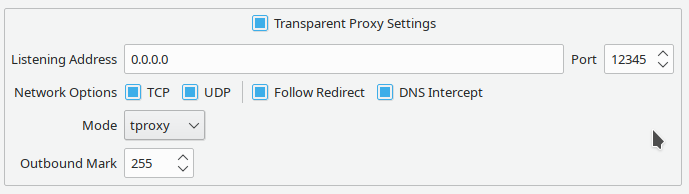
- port tproxy listenning port
- cgroup_noproxy cgroup array that no need to proxy,
/noproxy.sliceis preserved - cgroup_proxy cgroup array that need to proxy,
/proxy.sliceis preserved - enable_gateway enable gateway proxy for local devices
- enable_dns enable dns to go to proxy
- enable_tcp
- enable_udp
- enable_ipv4
- enable_ipv6
Note: cgroup in configuration need to be exist, otherwise ignored
If you changed config, remember to restart service
sudo systemctl restart cgproxy.service
Global transparent proxy
-
Set
"cgroup_proxy":["/"]in configuration, this will proxy all connection -
Allow your proxy program (v2ray) direct to internet to avoid loop. Two ways:
-
active way, run command
example:
cgnoproxy sudo v2ray -config config_fileexample:
cgnoproxy qv2ray -
passive way, set it's cgroup in configuration, very useful for service
example:
"cgroup_noproxy":["/system.slice/v2ray.service"]
-
-
Finally, restart cgproxy service, that's all
Gateway proxy
- Set
"enable_gateway":truein configuration - And allow your proxy software (v2ray) direct to internet if necessary, described above
- Other device set this host as gateway, and set public dns if need
Other useful tools provided in this project
-
cgnoproxyrun program wihout proxy, very useful in global transparent proxycgnoproxy [--debug] <CMD> -
cgattachattach specific process pid to specific cgroup which will create if not exist , cgroup can be only one level down exist cgroup, otherwise created fail.You need to set
set(build_tools ON)in CmakeLists.txt to build this.cgattch <pid> <cgroup> # example cgattch 9999 /proxy.slice
NOTES
-
v2ray TPROXY need root or special permission, use service or
sudo setcap "cap_net_admin,cap_net_bind_service=ep" /usr/lib/v2ray/v2ray -
Why not outbound mark solution, because in v2ray when
"localhost"is used, out-going DNS traffic is not controlled by V2Ray, so no mark at all, that's pity.
TIPS
systemd-cglsto see the cgroup hierarchical tree.- Check cgroup2 support
findmnt -t cgroup2 - Offer you v2ray service and full config exmaple in v2ray_config
- Offer you qv2ray config example
Licences
cgproxy is licenced under 