mirror of
https://github.com/RobbieHan/sandboxMP.git
synced 2026-02-04 03:13:15 +08:00
Compare commits
16 Commits
| Author | SHA1 | Date | |
|---|---|---|---|

|
9216755a5b | ||
|
|
892ec0b2de | ||
|
|
05b1cc6665 | ||
|
|
8c00fdd315 | ||
|
|
3182032540 | ||
|
|
2646254e52 | ||
|
|
e3490b3af7 | ||
|
|
6b413bc114 | ||
|
|
bca383fbb4 | ||
|
|
e6272ccaab | ||
|
|
cbe0c54472 | ||
|
|
cd879f38d7 | ||
|
|
6dfb9197e6 | ||
|
|
9bffe64477 | ||
|
|
a328e88122 | ||
|
|
2511a3c066 |
992
.idea/workspace.xml
generated
Normal file
992
.idea/workspace.xml
generated
Normal file
@@ -0,0 +1,992 @@
|
||||
<?xml version="1.0" encoding="UTF-8"?>
|
||||
<project version="4">
|
||||
<component name="ChangeListManager">
|
||||
<list default="true" id="80da5b45-7eca-459a-bbe3-5443bc141768" name="Default" comment="">
|
||||
<<<<<<< HEAD
|
||||
<change beforePath="$PROJECT_DIR$/.idea/workspace.xml" afterPath="$PROJECT_DIR$/.idea/workspace.xml" />
|
||||
<<<<<<< HEAD
|
||||
<<<<<<< HEAD
|
||||
=======
|
||||
<<<<<<< HEAD
|
||||
<change beforePath="$PROJECT_DIR$/.idea/workspace.xml" afterPath="$PROJECT_DIR$/.idea/workspace.xml" />
|
||||
=======
|
||||
<change beforePath="$PROJECT_DIR$/apps/system/tests.py" afterPath="$PROJECT_DIR$/apps/system/tests.py" />
|
||||
>>>>>>> a328e88122d80e72999261759f2594796f8da35b
|
||||
=======
|
||||
<change beforePath="$PROJECT_DIR$/apps/system/forms.py" afterPath="$PROJECT_DIR$/apps/system/forms.py" />
|
||||
>>>>>>> 1-rbac
|
||||
<change beforePath="$PROJECT_DIR$/apps/system/urls.py" afterPath="$PROJECT_DIR$/apps/system/urls.py" />
|
||||
<change beforePath="$PROJECT_DIR$/db.sqlite3" afterPath="$PROJECT_DIR$/db.sqlite3" />
|
||||
<<<<<<< HEAD
|
||||
<<<<<<< HEAD
|
||||
<change beforePath="$PROJECT_DIR$/templates/system/structure/structure.html" afterPath="$PROJECT_DIR$/templates/system/structure/structure.html" />
|
||||
<<<<<<< HEAD
|
||||
=======
|
||||
<change beforePath="$PROJECT_DIR$/templates/system/structure/structure_create.html" afterPath="$PROJECT_DIR$/templates/system/structure/structure_create.html" />
|
||||
>>>>>>> 1-rbac
|
||||
>>>>>>> a328e88122d80e72999261759f2594796f8da35b
|
||||
=======
|
||||
<change beforePath="$PROJECT_DIR$/templates/base-static.html" afterPath="$PROJECT_DIR$/templates/base-static.html" />
|
||||
>>>>>>> 1-rbac
|
||||
=======
|
||||
>>>>>>> 1-rbac
|
||||
=======
|
||||
<change beforePath="$PROJECT_DIR$/db.sqlite3" afterPath="$PROJECT_DIR$/db.sqlite3" />
|
||||
<change beforePath="$PROJECT_DIR$/sandboxMP/settings.py" afterPath="$PROJECT_DIR$/sandboxMP/settings.py" />
|
||||
>>>>>>> 1-rbac
|
||||
</list>
|
||||
<option name="EXCLUDED_CONVERTED_TO_IGNORED" value="true" />
|
||||
<option name="TRACKING_ENABLED" value="true" />
|
||||
<option name="SHOW_DIALOG" value="false" />
|
||||
<option name="HIGHLIGHT_CONFLICTS" value="true" />
|
||||
<option name="HIGHLIGHT_NON_ACTIVE_CHANGELIST" value="false" />
|
||||
<option name="LAST_RESOLUTION" value="IGNORE" />
|
||||
</component>
|
||||
<component name="DjangoConsoleOptions" custom-start-script="import sys; print('Python %s on %s' % (sys.version, sys.platform)) import django; print('Django %s' % django.get_version()) sys.path.extend([WORKING_DIR_AND_PYTHON_PATHS]) if 'setup' in dir(django): django.setup() import django_manage_shell; django_manage_shell.run(PROJECT_ROOT)">
|
||||
<option name="myCustomStartScript" value="import sys; print('Python %s on %s' % (sys.version, sys.platform)) import django; print('Django %s' % django.get_version()) sys.path.extend([WORKING_DIR_AND_PYTHON_PATHS]) if 'setup' in dir(django): django.setup() import django_manage_shell; django_manage_shell.run(PROJECT_ROOT)" />
|
||||
</component>
|
||||
<component name="FileEditorManager">
|
||||
<leaf SIDE_TABS_SIZE_LIMIT_KEY="300">
|
||||
<file leaf-file-name="settings.py" pinned="false" current-in-tab="true">
|
||||
<entry file="file://$PROJECT_DIR$/sandboxMP/settings.py">
|
||||
<provider selected="true" editor-type-id="text-editor">
|
||||
<<<<<<< HEAD
|
||||
<<<<<<< HEAD
|
||||
<<<<<<< HEAD
|
||||
<<<<<<< HEAD
|
||||
<state relative-caret-position="1122">
|
||||
<caret line="77" column="0" lean-forward="false" selection-start-line="77" selection-start-column="0" selection-end-line="88" selection-end-column="77" />
|
||||
=======
|
||||
<state relative-caret-position="592">
|
||||
<<<<<<< HEAD
|
||||
<caret line="42" column="77" lean-forward="false" selection-start-line="42" selection-start-column="77" selection-end-line="42" selection-end-column="77" />
|
||||
=======
|
||||
<caret line="60" column="77" lean-forward="true" selection-start-line="60" selection-start-column="77" selection-end-line="60" selection-end-column="77" />
|
||||
>>>>>>> 1-rbac
|
||||
>>>>>>> a328e88122d80e72999261759f2594796f8da35b
|
||||
=======
|
||||
<state relative-caret-position="425">
|
||||
<caret line="25" column="0" lean-forward="false" selection-start-line="25" selection-start-column="0" selection-end-line="25" selection-end-column="0" />
|
||||
>>>>>>> 1-rbac
|
||||
=======
|
||||
<state relative-caret-position="408">
|
||||
<caret line="27" column="0" lean-forward="false" selection-start-line="27" selection-start-column="0" selection-end-line="27" selection-end-column="0" />
|
||||
>>>>>>> 1-rbac
|
||||
=======
|
||||
<state relative-caret-position="597">
|
||||
<caret line="151" column="34" lean-forward="true" selection-start-line="151" selection-start-column="34" selection-end-line="151" selection-end-column="34" />
|
||||
>>>>>>> 1-rbac
|
||||
<folding>
|
||||
<element signature="e#310#319#0" expanded="true" />
|
||||
</folding>
|
||||
</state>
|
||||
</provider>
|
||||
</entry>
|
||||
</file>
|
||||
<<<<<<< HEAD
|
||||
<file leaf-file-name="views_user.py" pinned="false" current-in-tab="false">
|
||||
<entry file="file://$PROJECT_DIR$/apps/system/views_user.py">
|
||||
<provider selected="true" editor-type-id="text-editor">
|
||||
<<<<<<< HEAD
|
||||
<<<<<<< HEAD
|
||||
<<<<<<< HEAD
|
||||
<state relative-caret-position="408">
|
||||
<caret line="25" column="0" lean-forward="false" selection-start-line="25" selection-start-column="0" selection-end-line="25" selection-end-column="0" />
|
||||
=======
|
||||
<<<<<<< HEAD
|
||||
<state relative-caret-position="1238">
|
||||
<caret line="127" column="30" lean-forward="true" selection-start-line="127" selection-start-column="30" selection-end-line="127" selection-end-column="30" />
|
||||
=======
|
||||
<state relative-caret-position="1833">
|
||||
<caret line="217" column="15" lean-forward="true" selection-start-line="217" selection-start-column="15" selection-end-line="217" selection-end-column="15" />
|
||||
>>>>>>> 1-rbac
|
||||
>>>>>>> a328e88122d80e72999261759f2594796f8da35b
|
||||
<folding />
|
||||
=======
|
||||
<state relative-caret-position="298">
|
||||
<caret line="76" column="0" lean-forward="false" selection-start-line="76" selection-start-column="0" selection-end-line="76" selection-end-column="0" />
|
||||
=======
|
||||
<state relative-caret-position="1054">
|
||||
<caret line="62" column="53" lean-forward="false" selection-start-line="62" selection-start-column="53" selection-end-line="62" selection-end-column="53" />
|
||||
>>>>>>> 1-rbac
|
||||
<folding>
|
||||
<element signature="e#78#87#0" expanded="true" />
|
||||
</folding>
|
||||
>>>>>>> 1-rbac
|
||||
</state>
|
||||
</provider>
|
||||
</entry>
|
||||
</file>
|
||||
<file leaf-file-name="views_menu.py" pinned="false" current-in-tab="false">
|
||||
<entry file="file://$PROJECT_DIR$/apps/system/views_menu.py">
|
||||
<provider selected="true" editor-type-id="text-editor">
|
||||
<<<<<<< HEAD
|
||||
<<<<<<< HEAD
|
||||
<<<<<<< HEAD
|
||||
<state relative-caret-position="221">
|
||||
<caret line="16" column="0" lean-forward="false" selection-start-line="16" selection-start-column="0" selection-end-line="16" selection-end-column="0" />
|
||||
<folding />
|
||||
=======
|
||||
<state relative-caret-position="629">
|
||||
<caret line="37" column="5" lean-forward="false" selection-start-line="37" selection-start-column="5" selection-end-line="37" selection-end-column="5" />
|
||||
=======
|
||||
<state relative-caret-position="187">
|
||||
<caret line="11" column="0" lean-forward="false" selection-start-line="11" selection-start-column="0" selection-end-line="11" selection-end-column="53" />
|
||||
>>>>>>> 1-rbac
|
||||
<folding>
|
||||
<element signature="e#77#121#0" expanded="true" />
|
||||
</folding>
|
||||
>>>>>>> 1-rbac
|
||||
</state>
|
||||
</provider>
|
||||
</entry>
|
||||
</file>
|
||||
<file leaf-file-name="custom.py" pinned="false" current-in-tab="false">
|
||||
<entry file="file://$PROJECT_DIR$/apps/custom.py">
|
||||
<provider selected="true" editor-type-id="text-editor">
|
||||
<state relative-caret-position="357">
|
||||
<caret line="21" column="0" lean-forward="false" selection-start-line="21" selection-start-column="0" selection-end-line="21" selection-end-column="0" />
|
||||
<folding>
|
||||
<element signature="e#73#84#0" expanded="true" />
|
||||
</folding>
|
||||
</state>
|
||||
</provider>
|
||||
</entry>
|
||||
</file>
|
||||
<file leaf-file-name="menu_form.html" pinned="false" current-in-tab="true">
|
||||
<entry file="file://$PROJECT_DIR$/templates/system/menu_form.html">
|
||||
<provider selected="true" editor-type-id="text-editor">
|
||||
<<<<<<< HEAD
|
||||
<<<<<<< HEAD
|
||||
<state relative-caret-position="4046">
|
||||
<caret line="238" column="22" lean-forward="false" selection-start-line="238" selection-start-column="22" selection-end-line="238" selection-end-column="22" />
|
||||
<folding />
|
||||
=======
|
||||
<<<<<<< HEAD
|
||||
<state relative-caret-position="238">
|
||||
<caret line="14" column="0" lean-forward="false" selection-start-line="14" selection-start-column="0" selection-end-line="14" selection-end-column="0" />
|
||||
=======
|
||||
<state relative-caret-position="255">
|
||||
<caret line="15" column="0" lean-forward="true" selection-start-line="15" selection-start-column="0" selection-end-line="15" selection-end-column="0" />
|
||||
>>>>>>> 1-rbac
|
||||
<folding>
|
||||
<element signature="e#0#37#0" expanded="true" />
|
||||
</folding>
|
||||
>>>>>>> a328e88122d80e72999261759f2594796f8da35b
|
||||
=======
|
||||
<state relative-caret-position="83">
|
||||
<caret line="96" column="0" lean-forward="false" selection-start-line="96" selection-start-column="0" selection-end-line="96" selection-end-column="0" />
|
||||
<folding>
|
||||
<element signature="e#73#82#0" expanded="true" />
|
||||
</folding>
|
||||
>>>>>>> 1-rbac
|
||||
=======
|
||||
<state relative-caret-position="255">
|
||||
<caret line="66" column="49" lean-forward="true" selection-start-line="66" selection-start-column="49" selection-end-line="66" selection-end-column="49" />
|
||||
<folding />
|
||||
>>>>>>> 1-rbac
|
||||
</state>
|
||||
</provider>
|
||||
</entry>
|
||||
</file>
|
||||
=======
|
||||
>>>>>>> 1-rbac
|
||||
</leaf>
|
||||
</component>
|
||||
<component name="FileTemplateManagerImpl">
|
||||
<option name="RECENT_TEMPLATES">
|
||||
<list>
|
||||
<option value="HTML File" />
|
||||
<option value="Python Script" />
|
||||
</list>
|
||||
</option>
|
||||
</component>
|
||||
<component name="FindInProjectRecents">
|
||||
<findStrings>
|
||||
<find>reverse</find>
|
||||
<find>OA</find>
|
||||
</findStrings>
|
||||
</component>
|
||||
<component name="Git.Settings">
|
||||
<option name="RECENT_GIT_ROOT_PATH" value="$PROJECT_DIR$" />
|
||||
</component>
|
||||
<component name="IdeDocumentHistory">
|
||||
<option name="CHANGED_PATHS">
|
||||
<list>
|
||||
<option value="$PROJECT_DIR$/apps/system/mixin.py" />
|
||||
<option value="$PROJECT_DIR$/templates/system/system.html" />
|
||||
<option value="$PROJECT_DIR$/sandboxMP/urls.py" />
|
||||
<option value="$PROJECT_DIR$/apps/system/tests.py" />
|
||||
<option value="$PROJECT_DIR$/templates/system/structure/structure_create.html" />
|
||||
<option value="$PROJECT_DIR$/templates/system/structure/strueture_users.html" />
|
||||
<option value="$PROJECT_DIR$/templates/system/structure/strueture_user.html" />
|
||||
<option value="$PROJECT_DIR$/templates/system/structure/structure_user.html" />
|
||||
<option value="$PROJECT_DIR$/templates/system/users/user_create.html" />
|
||||
<option value="$PROJECT_DIR$/templates/system/users/user_detail.html" />
|
||||
<option value="$PROJECT_DIR$/templates/base-static.html" />
|
||||
<option value="$PROJECT_DIR$/templates/system/users/passwd_change.html" />
|
||||
<option value="$PROJECT_DIR$/apps/system/forms.py" />
|
||||
<option value="$PROJECT_DIR$/apps/system/views.menu.py" />
|
||||
<option value="$PROJECT_DIR$/apps/system/apps.py" />
|
||||
<option value="$PROJECT_DIR$/templates/system/menu_list.html" />
|
||||
<option value="$PROJECT_DIR$/templates/system/role_create.html" />
|
||||
<option value="$PROJECT_DIR$/templates/system/role_update.html" />
|
||||
<option value="$PROJECT_DIR$/templates/system/role_role2user.html" />
|
||||
<option value="$PROJECT_DIR$/templates/system/role_role2menu.html" />
|
||||
<option value="$PROJECT_DIR$/apps/system/urls.py" />
|
||||
<option value="$PROJECT_DIR$/templates/system/menu_form.html" />
|
||||
<option value="$PROJECT_DIR$/templates/system/menu_update.html" />
|
||||
<option value="$PROJECT_DIR$/apps/system/milddleware.py" />
|
||||
<option value="$PROJECT_DIR$/apps/milddleware.py" />
|
||||
<option value="$PROJECT_DIR$/templates/head-footer.html" />
|
||||
<option value="$PROJECT_DIR$/templates/system/structure/structure.html" />
|
||||
<option value="$PROJECT_DIR$/templates/system/users/user.html" />
|
||||
<option value="$PROJECT_DIR$/templates/system/role.html" />
|
||||
<option value="$PROJECT_DIR$/apps/system/middleware.py" />
|
||||
<option value="$PROJECT_DIR$/apps/system/models.py" />
|
||||
<option value="$PROJECT_DIR$/apps/custom.py" />
|
||||
<option value="$PROJECT_DIR$/apps/system/views.py" />
|
||||
<option value="$PROJECT_DIR$/apps/system/views_menu.py" />
|
||||
<option value="$PROJECT_DIR$/apps/system/views_role.py" />
|
||||
<option value="$PROJECT_DIR$/apps/system/views_structure.py" />
|
||||
<option value="$PROJECT_DIR$/apps/system/views_user.py" />
|
||||
<option value="$PROJECT_DIR$/templates/base-left.html" />
|
||||
<option value="$PROJECT_DIR$/templates/system/index.html" />
|
||||
<option value="$PROJECT_DIR$/templates/system/system_index1.html" />
|
||||
<option value="$PROJECT_DIR$/templates/system/system_index.html" />
|
||||
<option value="$PROJECT_DIR$/requirements/dev" />
|
||||
<option value="$PROJECT_DIR$/requirements/pro" />
|
||||
<option value="$PROJECT_DIR$/sandboxMP/settings.py" />
|
||||
</list>
|
||||
</option>
|
||||
</component>
|
||||
<component name="JsBuildToolGruntFileManager" detection-done="true" sorting="DEFINITION_ORDER" />
|
||||
<component name="JsBuildToolPackageJson" detection-done="true" sorting="DEFINITION_ORDER" />
|
||||
<component name="JsGulpfileManager">
|
||||
<detection-done>true</detection-done>
|
||||
<sorting>DEFINITION_ORDER</sorting>
|
||||
</component>
|
||||
<<<<<<< HEAD
|
||||
<component name="ProjectFrameBounds" extendedState="6">
|
||||
<<<<<<< HEAD
|
||||
<option name="x" value="-8" />
|
||||
=======
|
||||
=======
|
||||
<component name="ProjectFrameBounds" extendedState="7">
|
||||
<<<<<<< HEAD
|
||||
>>>>>>> 1-rbac
|
||||
<option name="x" value="-1448" />
|
||||
>>>>>>> 1-rbac
|
||||
=======
|
||||
<option name="x" value="-8" />
|
||||
>>>>>>> 1-rbac
|
||||
<option name="y" value="-8" />
|
||||
<option name="width" value="1936" />
|
||||
<option name="height" value="1056" />
|
||||
</component>
|
||||
<component name="ProjectInspectionProfilesVisibleTreeState">
|
||||
<entry key="Project Default">
|
||||
<profile-state>
|
||||
<expanded-state>
|
||||
<State>
|
||||
<id />
|
||||
</State>
|
||||
</expanded-state>
|
||||
<selected-state>
|
||||
<State>
|
||||
<id>AngularJS</id>
|
||||
</State>
|
||||
</selected-state>
|
||||
</profile-state>
|
||||
</entry>
|
||||
</component>
|
||||
<component name="ProjectLevelVcsManager" settingsEditedManually="true" />
|
||||
<component name="ProjectView">
|
||||
<navigator currentView="ProjectPane" proportions="" version="1">
|
||||
<flattenPackages />
|
||||
<showMembers />
|
||||
<showModules />
|
||||
<showLibraryContents />
|
||||
<hideEmptyPackages />
|
||||
<abbreviatePackageNames />
|
||||
<autoscrollToSource />
|
||||
<autoscrollFromSource />
|
||||
<sortByType />
|
||||
<manualOrder />
|
||||
<foldersAlwaysOnTop value="true" />
|
||||
</navigator>
|
||||
<panes>
|
||||
<pane id="Scratches" />
|
||||
<pane id="ProjectPane">
|
||||
<subPane>
|
||||
<expand>
|
||||
<path>
|
||||
<item name="sandboxMP" type="b2602c69:ProjectViewProjectNode" />
|
||||
<item name="sandboxMP" type="462c0819:PsiDirectoryNode" />
|
||||
</path>
|
||||
<path>
|
||||
<item name="sandboxMP" type="b2602c69:ProjectViewProjectNode" />
|
||||
<item name="sandboxMP" type="462c0819:PsiDirectoryNode" />
|
||||
<item name="apps" type="462c0819:PsiDirectoryNode" />
|
||||
</path>
|
||||
</expand>
|
||||
<select />
|
||||
</subPane>
|
||||
</pane>
|
||||
<pane id="Scope" />
|
||||
</panes>
|
||||
</component>
|
||||
<component name="PropertiesComponent">
|
||||
<property name="nodejs_interpreter_path.stuck_in_default_project" value="undefined stuck path" />
|
||||
<property name="settings.editor.selected.configurable" value="com.jetbrains.python.configuration.PyActiveSdkModuleConfigurable" />
|
||||
<property name="last_opened_file_path" value="D:/PycharmProject/sandboxOA" />
|
||||
<property name="WebServerToolWindowFactoryState" value="false" />
|
||||
<property name="DefaultHtmlFileTemplate" value="HTML File" />
|
||||
</component>
|
||||
<component name="PyConsoleOptionsProvider">
|
||||
<option name="myPythonConsoleState">
|
||||
<console-settings is-module-sdk="true">
|
||||
<option name="myUseModuleSdk" value="true" />
|
||||
</console-settings>
|
||||
</option>
|
||||
</component>
|
||||
<component name="RecentsManager">
|
||||
<key name="CopyFile.RECENT_KEYS">
|
||||
<recent name="D:\ProjectFile\sandboxMP\templates" />
|
||||
<recent name="D:\ProjectFile\sandboxMP\templates\system\users" />
|
||||
<recent name="D:\ProjectFile\sandboxMP\templates\system" />
|
||||
<recent name="D:\ProjectFile\sandboxMP\templates\system\structure" />
|
||||
<recent name="D:\ProjectFile\sandboxMP\apps\system" />
|
||||
</key>
|
||||
<key name="MoveFile.RECENT_KEYS">
|
||||
<recent name="D:\ProjectFile\sandboxMP\templates\system" />
|
||||
<recent name="D:\ProjectFile\sandboxMP\apps" />
|
||||
</key>
|
||||
</component>
|
||||
<component name="RunDashboard">
|
||||
<option name="ruleStates">
|
||||
<list>
|
||||
<RuleState>
|
||||
<option name="name" value="ConfigurationTypeDashboardGroupingRule" />
|
||||
</RuleState>
|
||||
<RuleState>
|
||||
<option name="name" value="StatusDashboardGroupingRule" />
|
||||
</RuleState>
|
||||
</list>
|
||||
</option>
|
||||
</component>
|
||||
<component name="RunManager">
|
||||
<configuration name="sandboxMP" type="Python.DjangoServer" factoryName="Django server">
|
||||
<option name="INTERPRETER_OPTIONS" value="" />
|
||||
<option name="PARENT_ENVS" value="true" />
|
||||
<envs>
|
||||
<env name="PYTHONUNBUFFERED" value="1" />
|
||||
<env name="DJANGO_SETTINGS_MODULE" value="sandboxMP.settings" />
|
||||
</envs>
|
||||
<option name="SDK_HOME" value="" />
|
||||
<option name="WORKING_DIRECTORY" value="" />
|
||||
<option name="IS_MODULE_SDK" value="false" />
|
||||
<option name="ADD_CONTENT_ROOTS" value="true" />
|
||||
<option name="ADD_SOURCE_ROOTS" value="true" />
|
||||
<module name="sandboxMP" />
|
||||
<option name="launchJavascriptDebuger" value="false" />
|
||||
<option name="port" value="8000" />
|
||||
<option name="host" value="" />
|
||||
<option name="additionalOptions" value="" />
|
||||
<option name="browserUrl" value="" />
|
||||
<option name="runTestServer" value="false" />
|
||||
<option name="runNoReload" value="false" />
|
||||
<option name="useCustomRunCommand" value="false" />
|
||||
<option name="customRunCommand" value="" />
|
||||
</configuration>
|
||||
</component>
|
||||
<component name="ShelveChangesManager" show_recycled="false">
|
||||
<option name="remove_strategy" value="false" />
|
||||
</component>
|
||||
<component name="SvnConfiguration">
|
||||
<configuration />
|
||||
</component>
|
||||
<component name="TaskManager">
|
||||
<task active="true" id="Default" summary="Default task">
|
||||
<changelist id="80da5b45-7eca-459a-bbe3-5443bc141768" name="Default" comment="" />
|
||||
<created>1539589405377</created>
|
||||
<option name="number" value="Default" />
|
||||
<option name="presentableId" value="Default" />
|
||||
<updated>1539589405377</updated>
|
||||
</task>
|
||||
<servers />
|
||||
</component>
|
||||
<component name="TodoView">
|
||||
<todo-panel id="selected-file">
|
||||
<is-autoscroll-to-source value="true" />
|
||||
</todo-panel>
|
||||
<todo-panel id="all">
|
||||
<are-packages-shown value="true" />
|
||||
<is-autoscroll-to-source value="true" />
|
||||
</todo-panel>
|
||||
</component>
|
||||
<component name="ToolWindowManager">
|
||||
<<<<<<< HEAD
|
||||
<<<<<<< HEAD
|
||||
<<<<<<< HEAD
|
||||
<frame x="-8" y="-8" width="1936" height="1056" extended-state="6" />
|
||||
=======
|
||||
<frame x="-1448" y="-8" width="1456" height="876" extended-state="6" />
|
||||
>>>>>>> 1-rbac
|
||||
=======
|
||||
<frame x="-1448" y="-8" width="1456" height="876" extended-state="7" />
|
||||
>>>>>>> 1-rbac
|
||||
=======
|
||||
<frame x="-8" y="-8" width="1936" height="1056" extended-state="7" />
|
||||
>>>>>>> 1-rbac
|
||||
<editor active="true" />
|
||||
<layout>
|
||||
<window_info id="TODO" active="false" anchor="bottom" auto_hide="false" internal_type="DOCKED" type="DOCKED" visible="false" show_stripe_button="true" weight="0.3297062" sideWeight="0.5" order="6" side_tool="false" content_ui="tabs" />
|
||||
<window_info id="Event Log" active="false" anchor="bottom" auto_hide="false" internal_type="DOCKED" type="DOCKED" visible="false" show_stripe_button="true" weight="0.24156693" sideWeight="0.5042644" order="7" side_tool="true" content_ui="tabs" />
|
||||
<window_info id="Version Control" active="false" anchor="bottom" auto_hide="false" internal_type="DOCKED" type="DOCKED" visible="false" show_stripe_button="true" weight="0.3297062" sideWeight="0.5" order="7" side_tool="false" content_ui="tabs" />
|
||||
<window_info id="Python Console" active="false" anchor="bottom" auto_hide="false" internal_type="DOCKED" type="DOCKED" visible="false" show_stripe_button="true" weight="0.3297062" sideWeight="0.5" order="7" side_tool="false" content_ui="tabs" />
|
||||
<window_info id="Run" active="false" anchor="bottom" auto_hide="false" internal_type="DOCKED" type="DOCKED" visible="true" show_stripe_button="true" weight="0.18498367" sideWeight="0.49573562" order="2" side_tool="false" content_ui="tabs" />
|
||||
<window_info id="Mongo Explorer" active="false" anchor="right" auto_hide="false" internal_type="DOCKED" type="DOCKED" visible="false" show_stripe_button="true" weight="0.33" sideWeight="0.5" order="3" side_tool="false" content_ui="tabs" />
|
||||
<window_info id="Terminal" active="false" anchor="bottom" auto_hide="false" internal_type="DOCKED" type="DOCKED" visible="false" show_stripe_button="true" weight="0.3297062" sideWeight="0.5" order="7" side_tool="false" content_ui="tabs" />
|
||||
<window_info id="Project" active="false" anchor="left" auto_hide="false" internal_type="DOCKED" type="DOCKED" visible="true" show_stripe_button="true" weight="0.26972282" sideWeight="0.5" order="0" side_tool="false" content_ui="combo" />
|
||||
<window_info id="Docker" active="false" anchor="bottom" auto_hide="false" internal_type="DOCKED" type="DOCKED" visible="false" show_stripe_button="false" weight="0.33" sideWeight="0.5" order="7" side_tool="false" content_ui="tabs" />
|
||||
<window_info id="Database" active="false" anchor="right" auto_hide="false" internal_type="DOCKED" type="DOCKED" visible="false" show_stripe_button="true" weight="0.33" sideWeight="0.5" order="3" side_tool="false" content_ui="tabs" />
|
||||
<window_info id="SciView" active="false" anchor="right" auto_hide="false" internal_type="DOCKED" type="DOCKED" visible="false" show_stripe_button="true" weight="0.33" sideWeight="0.5" order="3" side_tool="false" content_ui="tabs" />
|
||||
<window_info id="Structure" active="false" anchor="left" auto_hide="false" internal_type="DOCKED" type="DOCKED" visible="false" show_stripe_button="true" weight="0.18656716" sideWeight="0.5" order="1" side_tool="false" content_ui="tabs" />
|
||||
<window_info id="Favorites" active="false" anchor="left" auto_hide="false" internal_type="DOCKED" type="DOCKED" visible="false" show_stripe_button="true" weight="0.33" sideWeight="0.5" order="2" side_tool="true" content_ui="tabs" />
|
||||
<window_info id="Debug" active="false" anchor="bottom" auto_hide="false" internal_type="DOCKED" type="DOCKED" visible="false" show_stripe_button="true" weight="0.28281462" sideWeight="0.5" order="3" side_tool="false" content_ui="tabs" />
|
||||
<window_info id="Cvs" active="false" anchor="bottom" auto_hide="false" internal_type="DOCKED" type="DOCKED" visible="false" show_stripe_button="true" weight="0.25" sideWeight="0.5" order="4" side_tool="false" content_ui="tabs" />
|
||||
<window_info id="Message" active="false" anchor="bottom" auto_hide="false" internal_type="DOCKED" type="DOCKED" visible="false" show_stripe_button="true" weight="0.33" sideWeight="0.5" order="0" side_tool="false" content_ui="tabs" />
|
||||
<window_info id="Commander" active="false" anchor="right" auto_hide="false" internal_type="DOCKED" type="DOCKED" visible="false" show_stripe_button="true" weight="0.4" sideWeight="0.5" order="0" side_tool="false" content_ui="tabs" />
|
||||
<window_info id="Inspection" active="false" anchor="bottom" auto_hide="false" internal_type="DOCKED" type="DOCKED" visible="false" show_stripe_button="true" weight="0.4" sideWeight="0.5" order="5" side_tool="false" content_ui="tabs" />
|
||||
<window_info id="manage.py@sandboxMP" active="false" anchor="bottom" auto_hide="false" internal_type="DOCKED" type="DOCKED" visible="false" show_stripe_button="true" weight="0.34912044" sideWeight="0.5" order="8" side_tool="false" content_ui="tabs" />
|
||||
<window_info id="Hierarchy" active="false" anchor="right" auto_hide="false" internal_type="DOCKED" type="DOCKED" visible="false" show_stripe_button="true" weight="0.25" sideWeight="0.5" order="2" side_tool="false" content_ui="combo" />
|
||||
<window_info id="Find" active="false" anchor="bottom" auto_hide="false" internal_type="DOCKED" type="DOCKED" visible="false" show_stripe_button="true" weight="0.33" sideWeight="0.5" order="1" side_tool="false" content_ui="tabs" />
|
||||
<window_info id="Ant Build" active="false" anchor="right" auto_hide="false" internal_type="DOCKED" type="DOCKED" visible="false" show_stripe_button="true" weight="0.25" sideWeight="0.5" order="1" side_tool="false" content_ui="tabs" />
|
||||
</layout>
|
||||
</component>
|
||||
<component name="TypeScriptGeneratedFilesManager">
|
||||
<option name="version" value="1" />
|
||||
</component>
|
||||
<component name="VcsContentAnnotationSettings">
|
||||
<option name="myLimit" value="2678400000" />
|
||||
</component>
|
||||
<component name="XDebuggerManager">
|
||||
<breakpoint-manager>
|
||||
<default-breakpoints>
|
||||
<breakpoint type="python-exception">
|
||||
<properties notifyOnTerminate="true" exception="BaseException">
|
||||
<option name="notifyOnTerminate" value="true" />
|
||||
</properties>
|
||||
</breakpoint>
|
||||
</default-breakpoints>
|
||||
<option name="time" value="38" />
|
||||
</breakpoint-manager>
|
||||
<watches-manager />
|
||||
</component>
|
||||
<component name="editorHistoryManager">
|
||||
<entry file="file://$USER_HOME$/Envs/sandboxMP/Lib/site-packages/django/contrib/auth/decorators.py">
|
||||
<provider selected="true" editor-type-id="text-editor">
|
||||
<state relative-caret-position="-459">
|
||||
<caret line="9" column="57" lean-forward="false" selection-start-line="9" selection-start-column="57" selection-end-line="9" selection-end-column="57" />
|
||||
</state>
|
||||
</provider>
|
||||
</entry>
|
||||
<entry file="file://$PROJECT_DIR$/sandboxMP/urls.py">
|
||||
<provider selected="true" editor-type-id="text-editor">
|
||||
<state relative-caret-position="493">
|
||||
<caret line="29" column="63" lean-forward="true" selection-start-line="29" selection-start-column="63" selection-end-line="30" selection-end-column="0" />
|
||||
</state>
|
||||
</provider>
|
||||
</entry>
|
||||
<entry file="file://$USER_HOME$/Envs/sandboxMP/Lib/site-packages/django/db/models/base.py">
|
||||
<provider selected="true" editor-type-id="text-editor">
|
||||
<state relative-caret-position="238">
|
||||
<caret line="100" column="8" lean-forward="false" selection-start-line="100" selection-start-column="8" selection-end-line="100" selection-end-column="8" />
|
||||
</state>
|
||||
</provider>
|
||||
</entry>
|
||||
<entry file="file://$USER_HOME$/Envs/sandboxMP/Lib/site-packages/django/utils/encoding.py">
|
||||
<provider selected="true" editor-type-id="text-editor">
|
||||
<state relative-caret-position="-1649">
|
||||
<caret line="121" column="4" lean-forward="false" selection-start-line="121" selection-start-column="4" selection-end-line="121" selection-end-column="4" />
|
||||
</state>
|
||||
</provider>
|
||||
</entry>
|
||||
<entry file="file://$USER_HOME$/Envs/sandboxMP/Lib/site-packages/django/contrib/flatpages/models.py">
|
||||
<provider selected="true" editor-type-id="text-editor">
|
||||
<state relative-caret-position="595">
|
||||
<caret line="39" column="22" lean-forward="false" selection-start-line="39" selection-start-column="22" selection-end-line="39" selection-end-column="22" />
|
||||
</state>
|
||||
</provider>
|
||||
</entry>
|
||||
<entry file="file://$USER_HOME$/Envs/sandboxMP/Lib/site-packages/django/db/models/__init__.py">
|
||||
<provider selected="true" editor-type-id="text-editor">
|
||||
<state relative-caret-position="-204">
|
||||
<caret line="0" column="0" lean-forward="false" selection-start-line="0" selection-start-column="0" selection-end-line="0" selection-end-column="0" />
|
||||
</state>
|
||||
</provider>
|
||||
</entry>
|
||||
<entry file="file://$USER_HOME$/Envs/sandboxMP/Lib/site-packages/django/forms/models.py">
|
||||
<provider selected="true" editor-type-id="text-editor">
|
||||
<state relative-caret-position="230">
|
||||
<caret line="472" column="4" lean-forward="false" selection-start-line="472" selection-start-column="4" selection-end-line="472" selection-end-column="4" />
|
||||
</state>
|
||||
</provider>
|
||||
</entry>
|
||||
<entry file="file://$PROJECT_DIR$/templates/system/users/login.html">
|
||||
<provider selected="true" editor-type-id="text-editor">
|
||||
<state relative-caret-position="170">
|
||||
<caret line="10" column="57" lean-forward="true" selection-start-line="10" selection-start-column="57" selection-end-line="10" selection-end-column="57" />
|
||||
</state>
|
||||
</provider>
|
||||
</entry>
|
||||
<entry file="file://$USER_HOME$/Envs/sandboxMP/Lib/site-packages/django/views/generic/__init__.py">
|
||||
<provider selected="true" editor-type-id="text-editor">
|
||||
<state relative-caret-position="187">
|
||||
<caret line="11" column="11" lean-forward="false" selection-start-line="11" selection-start-column="11" selection-end-line="11" selection-end-column="11" />
|
||||
</state>
|
||||
</provider>
|
||||
</entry>
|
||||
<entry file="file://$PROJECT_DIR$/apps/system/forms.py">
|
||||
<provider selected="true" editor-type-id="text-editor">
|
||||
<state relative-caret-position="432">
|
||||
<caret line="127" column="0" lean-forward="false" selection-start-line="127" selection-start-column="0" selection-end-line="127" selection-end-column="0" />
|
||||
</state>
|
||||
</provider>
|
||||
</entry>
|
||||
<entry file="file://$PROJECT_DIR$/apps/system/apps.py">
|
||||
<provider selected="true" editor-type-id="text-editor">
|
||||
<state relative-caret-position="85">
|
||||
<caret line="5" column="0" lean-forward="true" selection-start-line="5" selection-start-column="0" selection-end-line="5" selection-end-column="0" />
|
||||
</state>
|
||||
</provider>
|
||||
</entry>
|
||||
<entry file="file://$USER_HOME$/Envs/sandboxMP/Lib/site-packages/django/views/generic/base.py">
|
||||
<provider selected="true" editor-type-id="text-editor">
|
||||
<state relative-caret-position="197">
|
||||
<caret line="130" column="33" lean-forward="true" selection-start-line="130" selection-start-column="4" selection-end-line="130" selection-end-column="33" />
|
||||
</state>
|
||||
</provider>
|
||||
</entry>
|
||||
<entry file="file://$USER_HOME$/Envs/sandboxMP/Lib/site-packages/django/shortcuts.py">
|
||||
<provider selected="true" editor-type-id="text-editor">
|
||||
<state relative-caret-position="342">
|
||||
<caret line="56" column="50" lean-forward="true" selection-start-line="56" selection-start-column="21" selection-end-line="56" selection-end-column="50" />
|
||||
</state>
|
||||
</provider>
|
||||
</entry>
|
||||
<entry file="file://$USER_HOME$/Envs/sandboxMP/Lib/site-packages/django/http/response.py">
|
||||
<provider selected="true" editor-type-id="text-editor">
|
||||
<state relative-caret-position="-1063">
|
||||
<caret line="475" column="6" lean-forward="false" selection-start-line="475" selection-start-column="6" selection-end-line="475" selection-end-column="6" />
|
||||
</state>
|
||||
</provider>
|
||||
</entry>
|
||||
<entry file="file://$PROJECT_DIR$/templates/system/role_update.html">
|
||||
<provider selected="true" editor-type-id="text-editor">
|
||||
<state relative-caret-position="657">
|
||||
<caret line="80" column="14" lean-forward="false" selection-start-line="80" selection-start-column="14" selection-end-line="80" selection-end-column="14" />
|
||||
</state>
|
||||
</provider>
|
||||
</entry>
|
||||
<<<<<<< HEAD
|
||||
<<<<<<< HEAD
|
||||
<entry file="file://$PROJECT_DIR$/apps/system/views_user.py">
|
||||
<provider selected="true" editor-type-id="text-editor">
|
||||
<<<<<<< HEAD
|
||||
<state relative-caret-position="272">
|
||||
<caret line="16" column="43" lean-forward="false" selection-start-line="16" selection-start-column="43" selection-end-line="16" selection-end-column="43" />
|
||||
=======
|
||||
<state relative-caret-position="652">
|
||||
<caret line="49" column="23" lean-forward="true" selection-start-line="49" selection-start-column="23" selection-end-line="49" selection-end-column="23" />
|
||||
<<<<<<< HEAD
|
||||
=======
|
||||
>>>>>>> 1-rbac
|
||||
<folding>
|
||||
<element signature="e#78#113#0" expanded="false" />
|
||||
</folding>
|
||||
>>>>>>> a328e88122d80e72999261759f2594796f8da35b
|
||||
</state>
|
||||
</provider>
|
||||
</entry>
|
||||
=======
|
||||
>>>>>>> 1-rbac
|
||||
<entry file="file://$PROJECT_DIR$/apps/system/tests.py">
|
||||
=======
|
||||
<entry file="file://$PROJECT_DIR$/templates/system/role_form.html">
|
||||
>>>>>>> 1-rbac
|
||||
<provider selected="true" editor-type-id="text-editor">
|
||||
<state relative-caret-position="504">
|
||||
<caret line="70" column="11" lean-forward="true" selection-start-line="70" selection-start-column="11" selection-end-line="70" selection-end-column="11" />
|
||||
</state>
|
||||
</provider>
|
||||
</entry>
|
||||
<entry file="file://$USER_HOME$/Envs/sandboxMP/Lib/site-packages/django/views/generic/detail.py">
|
||||
<provider selected="true" editor-type-id="text-editor">
|
||||
<state relative-caret-position="272">
|
||||
<caret line="20" column="0" lean-forward="false" selection-start-line="20" selection-start-column="0" selection-end-line="25" selection-end-column="11" />
|
||||
</state>
|
||||
</provider>
|
||||
</entry>
|
||||
<entry file="file://$USER_HOME$/Envs/sandboxMP/Lib/site-packages/django/views/generic/edit.py">
|
||||
<provider selected="true" editor-type-id="text-editor">
|
||||
<state relative-caret-position="289">
|
||||
<caret line="69" column="39" lean-forward="true" selection-start-line="69" selection-start-column="39" selection-end-line="69" selection-end-column="39" />
|
||||
</state>
|
||||
</provider>
|
||||
</entry>
|
||||
<entry file="file://$PROJECT_DIR$/templates/system/role_role2user.html">
|
||||
<provider selected="true" editor-type-id="text-editor">
|
||||
<<<<<<< HEAD
|
||||
<<<<<<< HEAD
|
||||
<<<<<<< HEAD
|
||||
<state relative-caret-position="527">
|
||||
<caret line="37" column="5" lean-forward="true" selection-start-line="37" selection-start-column="5" selection-end-line="37" selection-end-column="5" />
|
||||
=======
|
||||
<state relative-caret-position="-15">
|
||||
<caret line="29" column="95" lean-forward="true" selection-start-line="29" selection-start-column="95" selection-end-line="29" selection-end-column="95" />
|
||||
>>>>>>> 1-rbac
|
||||
=======
|
||||
<state relative-caret-position="563">
|
||||
<caret line="98" column="20" lean-forward="false" selection-start-line="98" selection-start-column="20" selection-end-line="98" selection-end-column="20" />
|
||||
>>>>>>> 1-rbac
|
||||
</state>
|
||||
</provider>
|
||||
</entry>
|
||||
<entry file="file://$PROJECT_DIR$/templates/system/role_role2menu.html">
|
||||
<provider selected="true" editor-type-id="text-editor">
|
||||
<<<<<<< HEAD
|
||||
<<<<<<< HEAD
|
||||
<state relative-caret-position="221">
|
||||
<caret line="16" column="0" lean-forward="false" selection-start-line="16" selection-start-column="0" selection-end-line="16" selection-end-column="0" />
|
||||
=======
|
||||
<state relative-caret-position="51">
|
||||
<<<<<<< HEAD
|
||||
<caret line="3" column="0" lean-forward="true" selection-start-line="3" selection-start-column="0" selection-end-line="3" selection-end-column="0" />
|
||||
=======
|
||||
<caret line="10" column="6" lean-forward="false" selection-start-line="10" selection-start-column="6" selection-end-line="10" selection-end-column="6" />
|
||||
>>>>>>> a328e88122d80e72999261759f2594796f8da35b
|
||||
=======
|
||||
<state relative-caret-position="836">
|
||||
<caret line="238" column="22" lean-forward="false" selection-start-line="238" selection-start-column="22" selection-end-line="238" selection-end-column="22" />
|
||||
</state>
|
||||
</provider>
|
||||
</entry>
|
||||
<<<<<<< HEAD
|
||||
<entry file="file://$PROJECT_DIR$/apps/system/models.py">
|
||||
<provider selected="true" editor-type-id="text-editor">
|
||||
<state relative-caret-position="408">
|
||||
<caret line="25" column="0" lean-forward="false" selection-start-line="25" selection-start-column="0" selection-end-line="25" selection-end-column="0" />
|
||||
>>>>>>> 1-rbac
|
||||
<folding />
|
||||
>>>>>>> 1-rbac
|
||||
</state>
|
||||
</provider>
|
||||
</entry>
|
||||
=======
|
||||
>>>>>>> 1-rbac
|
||||
<entry file="file://$PROJECT_DIR$/static/plugins/datatables/dataTables.const-1.js">
|
||||
=======
|
||||
<state relative-caret-position="2097">
|
||||
<caret line="177" column="13" lean-forward="true" selection-start-line="177" selection-start-column="13" selection-end-line="177" selection-end-column="13" />
|
||||
</state>
|
||||
</provider>
|
||||
</entry>
|
||||
<entry file="file://$PROJECT_DIR$/templates/system/menu_update.html">
|
||||
>>>>>>> 1-rbac
|
||||
<provider selected="true" editor-type-id="text-editor">
|
||||
<state relative-caret-position="153">
|
||||
<caret line="48" column="11" lean-forward="false" selection-start-line="48" selection-start-column="11" selection-end-line="48" selection-end-column="11" />
|
||||
</state>
|
||||
</provider>
|
||||
</entry>
|
||||
<entry file="file://$PROJECT_DIR$/apps/system/urls.py">
|
||||
<provider selected="true" editor-type-id="text-editor">
|
||||
<<<<<<< HEAD
|
||||
<<<<<<< HEAD
|
||||
<<<<<<< HEAD
|
||||
<state relative-caret-position="1122">
|
||||
<caret line="77" column="0" lean-forward="false" selection-start-line="77" selection-start-column="0" selection-end-line="88" selection-end-column="77" />
|
||||
=======
|
||||
<state relative-caret-position="592">
|
||||
<<<<<<< HEAD
|
||||
<caret line="42" column="77" lean-forward="false" selection-start-line="42" selection-start-column="77" selection-end-line="42" selection-end-column="77" />
|
||||
=======
|
||||
<caret line="60" column="77" lean-forward="true" selection-start-line="60" selection-start-column="77" selection-end-line="60" selection-end-column="77" />
|
||||
>>>>>>> 1-rbac
|
||||
>>>>>>> a328e88122d80e72999261759f2594796f8da35b
|
||||
<folding>
|
||||
<element signature="e#83#94#0" expanded="true" />
|
||||
</folding>
|
||||
=======
|
||||
<state relative-caret-position="541">
|
||||
<caret line="88" column="77" lean-forward="true" selection-start-line="88" selection-start-column="77" selection-end-line="88" selection-end-column="77" />
|
||||
>>>>>>> 1-rbac
|
||||
=======
|
||||
<state relative-caret-position="510">
|
||||
<caret line="30" column="92" lean-forward="true" selection-start-line="30" selection-start-column="92" selection-end-line="30" selection-end-column="92" />
|
||||
>>>>>>> 1-rbac
|
||||
</state>
|
||||
</provider>
|
||||
</entry>
|
||||
<entry file="file://$USER_HOME$/Envs/sandboxMP/Lib/site-packages/django/core/servers/basehttp.py">
|
||||
<provider selected="true" editor-type-id="text-editor">
|
||||
<state relative-caret-position="401">
|
||||
<caret line="58" column="0" lean-forward="true" selection-start-line="58" selection-start-column="0" selection-end-line="58" selection-end-column="0" />
|
||||
</state>
|
||||
</provider>
|
||||
</entry>
|
||||
<entry file="file://$PROJECT_DIR$/sandboxMP/wsgi.py">
|
||||
<provider selected="true" editor-type-id="text-editor">
|
||||
<state relative-caret-position="187">
|
||||
<caret line="11" column="49" lean-forward="true" selection-start-line="11" selection-start-column="49" selection-end-line="11" selection-end-column="49" />
|
||||
</state>
|
||||
</provider>
|
||||
</entry>
|
||||
<entry file="file://$PROJECT_DIR$/apps/milddleware.py" />
|
||||
<entry file="file://$PROJECT_DIR$/apps/system/mixin.py">
|
||||
<provider selected="true" editor-type-id="text-editor">
|
||||
<state relative-caret-position="187">
|
||||
<caret line="11" column="35" lean-forward="true" selection-start-line="11" selection-start-column="35" selection-end-line="11" selection-end-column="35" />
|
||||
</state>
|
||||
</provider>
|
||||
</entry>
|
||||
<entry file="file://$USER_HOME$/Envs/sandboxMP/Lib/site-packages/django/utils/module_loading.py">
|
||||
<provider selected="true" editor-type-id="text-editor">
|
||||
<<<<<<< HEAD
|
||||
<<<<<<< HEAD
|
||||
<<<<<<< HEAD
|
||||
<state relative-caret-position="4046">
|
||||
<caret line="238" column="22" lean-forward="false" selection-start-line="238" selection-start-column="22" selection-end-line="238" selection-end-column="22" />
|
||||
=======
|
||||
<state relative-caret-position="238">
|
||||
<caret line="14" column="73" lean-forward="true" selection-start-line="14" selection-start-column="73" selection-end-line="14" selection-end-column="73" />
|
||||
>>>>>>> 1-rbac
|
||||
<folding />
|
||||
=======
|
||||
<<<<<<< HEAD
|
||||
<state relative-caret-position="238">
|
||||
<caret line="14" column="0" lean-forward="false" selection-start-line="14" selection-start-column="0" selection-end-line="14" selection-end-column="0" />
|
||||
=======
|
||||
<state relative-caret-position="255">
|
||||
<caret line="15" column="0" lean-forward="true" selection-start-line="15" selection-start-column="0" selection-end-line="15" selection-end-column="0" />
|
||||
>>>>>>> 1-rbac
|
||||
<folding>
|
||||
<element signature="e#0#37#0" expanded="true" />
|
||||
</folding>
|
||||
>>>>>>> a328e88122d80e72999261759f2594796f8da35b
|
||||
=======
|
||||
<state relative-caret-position="221">
|
||||
<caret line="16" column="0" lean-forward="false" selection-start-line="16" selection-start-column="0" selection-end-line="16" selection-end-column="0" />
|
||||
>>>>>>> 1-rbac
|
||||
</state>
|
||||
</provider>
|
||||
</entry>
|
||||
<entry file="file://$USER_HOME$/Envs/sandboxMP/Lib/importlib/__init__.py">
|
||||
<provider selected="true" editor-type-id="text-editor">
|
||||
<state relative-caret-position="231">
|
||||
<caret line="125" column="0" lean-forward="false" selection-start-line="125" selection-start-column="0" selection-end-line="125" selection-end-column="0" />
|
||||
</state>
|
||||
</provider>
|
||||
</entry>
|
||||
<entry file="file://$USER_HOME$/Envs/sandboxMP/Lib/site-packages/django/core/handlers/exception.py">
|
||||
<provider selected="true" editor-type-id="text-editor">
|
||||
<state relative-caret-position="340">
|
||||
<caret line="34" column="0" lean-forward="false" selection-start-line="34" selection-start-column="0" selection-end-line="34" selection-end-column="0" />
|
||||
</state>
|
||||
</provider>
|
||||
</entry>
|
||||
<entry file="file://$USER_HOME$/Envs/sandboxMP/Lib/site-packages/django/utils/deprecation.py">
|
||||
<provider selected="true" editor-type-id="text-editor">
|
||||
<state relative-caret-position="497">
|
||||
<caret line="89" column="0" lean-forward="false" selection-start-line="89" selection-start-column="0" selection-end-line="89" selection-end-column="0" />
|
||||
</state>
|
||||
</provider>
|
||||
</entry>
|
||||
<entry file="file://$PROJECT_DIR$/templates/system/menu_form.html">
|
||||
<provider selected="true" editor-type-id="text-editor">
|
||||
<state relative-caret-position="310">
|
||||
<caret line="51" column="26" lean-forward="false" selection-start-line="51" selection-start-column="26" selection-end-line="51" selection-end-column="26" />
|
||||
</state>
|
||||
</provider>
|
||||
</entry>
|
||||
<entry file="file://$PROJECT_DIR$/templates/system/menu_list.html">
|
||||
<provider selected="true" editor-type-id="text-editor">
|
||||
<state relative-caret-position="204">
|
||||
<caret line="60" column="0" lean-forward="false" selection-start-line="60" selection-start-column="0" selection-end-line="66" selection-end-column="13" />
|
||||
</state>
|
||||
</provider>
|
||||
</entry>
|
||||
<entry file="file://$PROJECT_DIR$/templates/system/role.html">
|
||||
<provider selected="true" editor-type-id="text-editor">
|
||||
<state relative-caret-position="540">
|
||||
<caret line="71" column="19" lean-forward="false" selection-start-line="71" selection-start-column="19" selection-end-line="71" selection-end-column="19" />
|
||||
</state>
|
||||
</provider>
|
||||
</entry>
|
||||
<entry file="file://$PROJECT_DIR$/templates/system/structure/structure.html">
|
||||
<provider selected="true" editor-type-id="text-editor">
|
||||
<state relative-caret-position="310">
|
||||
<caret line="59" column="0" lean-forward="false" selection-start-line="59" selection-start-column="0" selection-end-line="65" selection-end-column="9" />
|
||||
</state>
|
||||
</provider>
|
||||
</entry>
|
||||
<entry file="file://$PROJECT_DIR$/templates/head-footer.html">
|
||||
<provider selected="true" editor-type-id="text-editor">
|
||||
<state relative-caret-position="306">
|
||||
<caret line="18" column="85" lean-forward="false" selection-start-line="18" selection-start-column="85" selection-end-line="18" selection-end-column="85" />
|
||||
</state>
|
||||
</provider>
|
||||
</entry>
|
||||
<entry file="file://$PROJECT_DIR$/apps/custom.py">
|
||||
<provider selected="true" editor-type-id="text-editor">
|
||||
<state relative-caret-position="340">
|
||||
<caret line="20" column="49" lean-forward="true" selection-start-line="20" selection-start-column="49" selection-end-line="20" selection-end-column="49" />
|
||||
</state>
|
||||
</provider>
|
||||
</entry>
|
||||
<entry file="file://$PROJECT_DIR$/apps/system/views.py">
|
||||
<provider selected="true" editor-type-id="text-editor">
|
||||
<state relative-caret-position="170">
|
||||
<caret line="10" column="0" lean-forward="true" selection-start-line="10" selection-start-column="0" selection-end-line="10" selection-end-column="0" />
|
||||
</state>
|
||||
</provider>
|
||||
</entry>
|
||||
<entry file="file://$PROJECT_DIR$/apps/system/views_menu.py">
|
||||
<provider selected="true" editor-type-id="text-editor">
|
||||
<state relative-caret-position="204">
|
||||
<caret line="18" column="36" lean-forward="true" selection-start-line="18" selection-start-column="36" selection-end-line="18" selection-end-column="36" />
|
||||
</state>
|
||||
</provider>
|
||||
</entry>
|
||||
<entry file="file://$PROJECT_DIR$/apps/system/views_role.py">
|
||||
<provider selected="true" editor-type-id="text-editor">
|
||||
<state relative-caret-position="187">
|
||||
<caret line="19" column="52" lean-forward="false" selection-start-line="19" selection-start-column="52" selection-end-line="19" selection-end-column="52" />
|
||||
</state>
|
||||
</provider>
|
||||
</entry>
|
||||
<entry file="file://$PROJECT_DIR$/apps/system/views_structure.py">
|
||||
<provider selected="true" editor-type-id="text-editor">
|
||||
<state relative-caret-position="254">
|
||||
<caret line="21" column="58" lean-forward="false" selection-start-line="21" selection-start-column="58" selection-end-line="21" selection-end-column="58" />
|
||||
</state>
|
||||
</provider>
|
||||
</entry>
|
||||
<entry file="file://$PROJECT_DIR$/apps/system/models.py">
|
||||
<provider selected="true" editor-type-id="text-editor">
|
||||
<state relative-caret-position="255">
|
||||
<caret line="22" column="0" lean-forward="false" selection-start-line="22" selection-start-column="0" selection-end-line="22" selection-end-column="0" />
|
||||
</state>
|
||||
</provider>
|
||||
</entry>
|
||||
<entry file="file://$PROJECT_DIR$/templates/base-left.html">
|
||||
<provider selected="true" editor-type-id="text-editor">
|
||||
<state relative-caret-position="255">
|
||||
<caret line="66" column="21" lean-forward="false" selection-start-line="66" selection-start-column="21" selection-end-line="66" selection-end-column="21" />
|
||||
</state>
|
||||
</provider>
|
||||
</entry>
|
||||
<entry file="file://$PROJECT_DIR$/apps/system/middleware.py">
|
||||
<provider selected="true" editor-type-id="text-editor">
|
||||
<state relative-caret-position="470">
|
||||
<caret line="96" column="45" lean-forward="false" selection-start-line="96" selection-start-column="45" selection-end-line="96" selection-end-column="45" />
|
||||
</state>
|
||||
</provider>
|
||||
</entry>
|
||||
<entry file="file://$PROJECT_DIR$/apps/system/views_user.py">
|
||||
<provider selected="true" editor-type-id="text-editor">
|
||||
<state relative-caret-position="440">
|
||||
<caret line="83" column="7" lean-forward="true" selection-start-line="83" selection-start-column="7" selection-end-line="83" selection-end-column="7" />
|
||||
</state>
|
||||
</provider>
|
||||
</entry>
|
||||
<entry file="file://$PROJECT_DIR$/templates/system/users/user.html">
|
||||
<provider selected="true" editor-type-id="text-editor">
|
||||
<state relative-caret-position="238">
|
||||
<caret line="14" column="50" lean-forward="true" selection-start-line="14" selection-start-column="50" selection-end-line="14" selection-end-column="50" />
|
||||
</state>
|
||||
</provider>
|
||||
</entry>
|
||||
<entry file="file://$PROJECT_DIR$/templates/system/system_index1.html" />
|
||||
<entry file="file://$PROJECT_DIR$/templates/invoice.html" />
|
||||
<entry file="file://$PROJECT_DIR$/requirements/pro">
|
||||
<provider selected="true" editor-type-id="text-editor">
|
||||
<state relative-caret-position="17">
|
||||
<caret line="1" column="13" lean-forward="true" selection-start-line="1" selection-start-column="13" selection-end-line="1" selection-end-column="13" />
|
||||
</state>
|
||||
</provider>
|
||||
</entry>
|
||||
<entry file="file://$PROJECT_DIR$/requirements/dev">
|
||||
<provider selected="true" editor-type-id="text-editor">
|
||||
<state relative-caret-position="17">
|
||||
<caret line="1" column="13" lean-forward="false" selection-start-line="1" selection-start-column="13" selection-end-line="1" selection-end-column="13" />
|
||||
</state>
|
||||
</provider>
|
||||
</entry>
|
||||
<entry file="file://$PROJECT_DIR$/templates/system/system_index.html">
|
||||
<provider selected="true" editor-type-id="text-editor">
|
||||
<state relative-caret-position="33">
|
||||
<caret line="2" column="0" lean-forward="true" selection-start-line="2" selection-start-column="0" selection-end-line="2" selection-end-column="0" />
|
||||
</state>
|
||||
</provider>
|
||||
</entry>
|
||||
<entry file="file://$PROJECT_DIR$/sandboxMP/settings.py">
|
||||
<provider selected="true" editor-type-id="text-editor">
|
||||
<state relative-caret-position="597">
|
||||
<caret line="151" column="34" lean-forward="true" selection-start-line="151" selection-start-column="34" selection-end-line="151" selection-end-column="34" />
|
||||
<folding>
|
||||
<element signature="e#310#319#0" expanded="true" />
|
||||
</folding>
|
||||
</state>
|
||||
</provider>
|
||||
</entry>
|
||||
<<<<<<< HEAD
|
||||
<entry file="file://$PROJECT_DIR$/templates/system/menu_form.html">
|
||||
<provider selected="true" editor-type-id="text-editor">
|
||||
<<<<<<< HEAD
|
||||
<<<<<<< HEAD
|
||||
<<<<<<< HEAD
|
||||
<state relative-caret-position="258">
|
||||
<caret line="72" column="0" lean-forward="false" selection-start-line="72" selection-start-column="0" selection-end-line="72" selection-end-column="0" />
|
||||
=======
|
||||
<<<<<<< HEAD
|
||||
<state relative-caret-position="1238">
|
||||
<caret line="127" column="30" lean-forward="true" selection-start-line="127" selection-start-column="30" selection-end-line="127" selection-end-column="30" />
|
||||
=======
|
||||
<state relative-caret-position="1833">
|
||||
<caret line="217" column="15" lean-forward="true" selection-start-line="217" selection-start-column="15" selection-end-line="217" selection-end-column="15" />
|
||||
>>>>>>> 1-rbac
|
||||
>>>>>>> a328e88122d80e72999261759f2594796f8da35b
|
||||
=======
|
||||
<state relative-caret-position="-4537">
|
||||
<caret line="103" column="25" lean-forward="true" selection-start-line="103" selection-start-column="25" selection-end-line="103" selection-end-column="25" />
|
||||
>>>>>>> 1-rbac
|
||||
=======
|
||||
<state relative-caret-position="255">
|
||||
<caret line="66" column="49" lean-forward="true" selection-start-line="66" selection-start-column="49" selection-end-line="66" selection-end-column="49" />
|
||||
>>>>>>> 1-rbac
|
||||
<folding />
|
||||
</state>
|
||||
</provider>
|
||||
</entry>
|
||||
=======
|
||||
>>>>>>> 1-rbac
|
||||
</component>
|
||||
<component name="masterDetails">
|
||||
<states>
|
||||
<state key="ScopeChooserConfigurable.UI">
|
||||
<settings>
|
||||
<splitter-proportions>
|
||||
<option name="proportions">
|
||||
<list>
|
||||
<option value="0.2" />
|
||||
</list>
|
||||
</option>
|
||||
</splitter-proportions>
|
||||
</settings>
|
||||
</state>
|
||||
</states>
|
||||
</component>
|
||||
</project>
|
||||
777
README.md
Normal file
777
README.md
Normal file
@@ -0,0 +1,777 @@
|
||||
> 项目说明:本项目是根据客户需求开发的一套自动化运维项目,在征得客户同意的情况下,将部分功能开源。本项目配套有完整开发文档,详细记录了项目整个实现过程,可作为学习Django的参考文档。文档以项目为主线,逐步介绍了Django基本类视图、通用类视图和自定义类视图,涵盖了Django核心组件和扩展模块的使用,包括:logging 、signals、simple-history等,同时扩展了celery和channel来实现分布式任务队列和websocket功能等,利用ansible进行集中管理和自动化任务执行。
|
||||
|
||||
# 1 运行环境配置
|
||||
|
||||
## 1.1 项目运行环境
|
||||
|
||||
- 系统版本: Centos7(CentOS Linux release 7.6.1810)
|
||||
- Python版本:Python 3.6.6 (default, Jan 30 2019, 21:53:32)
|
||||
- Django版本:django 2.1.5
|
||||
- 数据库: mysql5.7/mongo3.4/redis3.2
|
||||
- 进程管理工具:supervisorctl 3.1.4
|
||||
- 扫描工具:Nmap version 6.40
|
||||
- 其他依赖:sandboxMP/requirements/pro.txt
|
||||
|
||||
## 1.2 Python虚拟环境配置
|
||||
|
||||
准备一台centos7的系统作为项目运行的服务器系统,完成基本网络设置、防火墙设置和系统基本优化设置。(以下内容都是在Centos7系统命令行中进行操作)
|
||||
|
||||
|
||||
1、基础配置:使用ssh远程工具(我用的是secureCRT)连接准备好的Centos7系统,完成以下设置:
|
||||
|
||||
```
|
||||
# 1.修改系统登陆后的提示信息。
|
||||
# 将motd内容改为:sandboxMP 172.16.3.200 (地址设置成你登陆的系统地址,上下各空一行);
|
||||
# 这样在登陆系统是的时候就可以看到上面的提示信息,防止登错系统。
|
||||
[root@template ~]$ vim /etc/motd
|
||||
|
||||
sandboxMP 192.168.31.200
|
||||
|
||||
# 2.修改主机名,exit退出系统,按回车重新连接系统,就可以看到新的提示信息和主机名
|
||||
[root@template ~]$ hostnamectl set-hostname sandboxmp
|
||||
[root@template ~]$ exit
|
||||
```
|
||||
|
||||
2、安装python3.6:系统中默认带有python2.7,项目中使用的是python3.6.6
|
||||
|
||||
|
||||
```
|
||||
# 1.可以去官网下载python3.6.6(Source release Gzip),也可以在linux下使用wget下载
|
||||
[root@sandboxmp ~]$ yum -y install wget
|
||||
[root@sandboxmp ~]$ wget https://www.python.org/ftp/python/3.6.6/Python-3.6.6.tgz
|
||||
|
||||
# 2.安装pip和环境依赖包
|
||||
[root@sandboxmp ~]$ yum -y install epel-release
|
||||
[root@sandboxmp ~]$ yum -y install python-pip
|
||||
[root@sandboxmp ~]$ pip install --upgrade pip
|
||||
[root@sandboxmp ~]$ yum install -y zlib zlib-devel --setopt=protected_multilib=false
|
||||
[root@sandboxmp ~]$ yum install -y bzip2 bzip2-devel openssl openssl-devel ncurses ncurses-devel sqlite sqlite-devel readline readline-devel gcc make python-devel
|
||||
|
||||
# 3.安装python3.6(编译安装完成执行 echo $? 返回0安装成功,否则安装出错)
|
||||
[root@sandboxmp ~]$ tar -zvxf Python-3.6.6.tgz
|
||||
[root@sandboxmp ~]$ cd Python-3.6.6
|
||||
[root@sandboxmp Python-3.6.6 ~]$ ./configure
|
||||
[root@sandboxmp Python-3.6.6 ~]$ make && make install
|
||||
[root@sandboxmp Python-3.6.6 ~]$ echo $?
|
||||
0
|
||||
|
||||
# 4.安装成功后,就可以使用python3环境
|
||||
[root@sandboxmp Python-3.6.6 ~]$ cd ~
|
||||
[root@sandboxmp ~]$ python3
|
||||
Python 3.6.6 (default, Nov 26 2018, 16:19:34)
|
||||
''''''
|
||||
>>> exit() # 退出python环境
|
||||
```
|
||||
|
||||
3、安装python虚拟环境:在项目中还是使用虚拟环境,项目环境互不影响
|
||||
|
||||
|
||||
```
|
||||
# 1.安装 virtualenv virtualenvwrapper
|
||||
[root@sandboxmp ~]$ pip install virtualenv virtualenvwrapper
|
||||
|
||||
# 2.设置环境变量,使用vim编辑.bashrc在最后面添加最后两行内容
|
||||
[root@sandboxmp ~]$ vim ~/.bashrc
|
||||
# .bashrc
|
||||
|
||||
# User specific aliases and functions
|
||||
|
||||
alias rm='rm -i'
|
||||
alias cp='cp -i'
|
||||
alias mv='mv -i'
|
||||
|
||||
# Source global definitions
|
||||
if [ -f /etc/bashrc ]; then
|
||||
. /etc/bashrc
|
||||
fi
|
||||
# 下面两行是新增加内容
|
||||
export WORKON_HOME=$HOME/.virtualenvs
|
||||
source /usr/bin/virtualenvwrapper.sh
|
||||
|
||||
# 3.保存修改,退出vim,运行命令让变量生效
|
||||
[root@sandboxmp ~]$ source ~/.bashrc
|
||||
|
||||
# 4.现在可以在bash窗口使用mkvirtualnev来创建虚拟环境了
|
||||
[root@sandboxmp ~]$ mkvirtualenv -p /usr/local/bin/python3.6 sandboxMP
|
||||
Running virtualenv with interpreter /usr/local/bin/python3.6
|
||||
Using base prefix '/usr/local'
|
||||
New python executable in /root/.virtualenvs/sandboxMP/bin/python3.6
|
||||
Also creating executable in /root/.virtualenvs/sandboxMP/bin/python
|
||||
Installing setuptools, pip, wheel...
|
||||
done.
|
||||
......
|
||||
|
||||
# 5.创建完成系统自动进入了虚拟环境sandboxMP
|
||||
(sandboxMP) [root@sandboxmp ~]$
|
||||
|
||||
# 6.离开虚拟环境
|
||||
(sandboxMP) [root@sandboxmp ~]$ deactivate
|
||||
[root@sandboxmp ~]$
|
||||
|
||||
# 7.查看虚拟环境
|
||||
[root@sandboxmp ~]$ workon
|
||||
sandboxMP
|
||||
[root@sandboxmp ~]$
|
||||
|
||||
# 8.激活虚拟环境
|
||||
[root@sandboxmp ~]$ workon sandboxMP
|
||||
(sandboxMP) [root@sandboxmp ~]$
|
||||
```
|
||||
|
||||
通过上面配置,指定使用python3.6来创建一个虚拟环境,虚拟环境名称为sandboxMP,虚拟环境存放的目录在/root/.virtualenvs目录下,这个是由上一步环境变量设置的。
|
||||
|
||||
## 1.3 安装数据库
|
||||
|
||||
在准备好的Centos7系统中安装mysql/redis/mongodb,当然数据库也可以和应用分开单独安装。
|
||||
|
||||
### 1.3.1 安装Mysql
|
||||
|
||||
在Centos7系统中更新yum源文件,安装myslq,创建项目数据库:
|
||||
|
||||
```
|
||||
# 1.安装Mysql
|
||||
[root@sandboxmp ~]$ wget http://repo.mysql.com/mysql-community-release-el7-5.noarch.rpm
|
||||
[root@sandboxmp ~]$ rpm -ivh mysql-community-release-el7-5.noarch.rpm
|
||||
[root@sandboxmp ~]$ yum -y update
|
||||
[root@sandboxmp ~]$ yum install -y mysql-server
|
||||
|
||||
# 2.修改配置文/etc/my.cnf,在[mysql]标签下添加后面三行内容,保存退出vim
|
||||
[root@sandboxmp ~]$ vim /etc/my.cnf
|
||||
[mysqld]
|
||||
collation-server = utf8_unicode_ci
|
||||
character_set_server=utf8
|
||||
init_connect='SET NAMES utf8'
|
||||
|
||||
# 3.启动mysql,设置开机启动,为root用户设置密码
|
||||
[root@sandboxmp ~]$ systemctl start mysqld
|
||||
[root@sandboxmp ~]$ systemctl enable mysqld
|
||||
[root@sandboxmp ~]$ mysql
|
||||
|
||||
mysql> set password for 'root'@'localhost'=password('1234@abcd.com');
|
||||
mysql> exit
|
||||
|
||||
# 4.再次连接Mysql会提示要使用密码,连接方式如下,回车,根据提示输入密码
|
||||
[root@sandboxmp ~]$ mysql -uroot -p
|
||||
Enter password:
|
||||
Welcome to the MySQL monitor. Commands end with ; or \g.
|
||||
''''''
|
||||
mysql>
|
||||
|
||||
# 5.创建数据库,添加用户和访问授权
|
||||
mysql> CREATE DATABASE sandboxMP;
|
||||
mysql> GRANT ALL PRIVILEGES ON sandboxMP.* TO 'ddadmin'@'%' IDENTIFIED BY '1234@abcd.com';
|
||||
mysql> GRANT ALL PRIVILEGES ON sandboxMP.* TO 'ddadmin'@'localhost' IDENTIFIED BY '1234@abcd.com';
|
||||
```
|
||||
|
||||
### 1.3.2 安装Redis
|
||||
|
||||
项目中会使用celery来做分布式任务队列,用来处理比较耗时的操作,例如发送邮件,资产扫描等操作。我们使用redis来做中间人,用来存储任务队列和接受返回值。
|
||||
在服务器中,执行下面命令安装redis:
|
||||
|
||||
```
|
||||
# 1.安装扩展源(前面我们已经安装过扩展源epel-release)和redise
|
||||
[root@sandboxmp ~]$ yum install epel-release
|
||||
[root@sandboxmp ~]$ yum install redis
|
||||
|
||||
# 2.修改redis配置文件找到bind去掉前面的注释符号,ip改为0.0.0.0,保存退出
|
||||
[root@sandboxmp ~]$ vim /etc/redis.conf
|
||||
bind 0.0.0.0
|
||||
|
||||
# 3.启动redise和设置开机启动
|
||||
[root@sandboxmp ~]$ systemctl start redis
|
||||
[root@sandboxmp ~]$ systemctl enable redis
|
||||
```
|
||||
|
||||
### 1.3.3 安装Mongodb
|
||||
|
||||
项目中mongodb用来存储日志信息,安装方法如下:
|
||||
|
||||
```
|
||||
# 1.配置yum源文件,添加mongo安装源,保存退出
|
||||
[root@sandboxmp ~]$ vim /etc/yum.repos.d/mongo.repo
|
||||
[mongodb-org-3.4]
|
||||
name=MongoDB 3.4 Repository
|
||||
baseurl=https://repo.mongodb.org/yum/redhat/$releasever/mongodb-org/3.4/x86_64/
|
||||
gpgcheck=0
|
||||
enabled=1
|
||||
|
||||
# 2.安装mongodb, 修改bindIp(把地址改成0.0.0.0后,保存退出)
|
||||
[root@sandboxmp ~]$ yum install -y mongodb-org
|
||||
[root@sandboxmp ~]$ vim /etc/mongod.conf
|
||||
bindIp 0.0.0.0 # 修改bindIp
|
||||
|
||||
# 3.启动mongodb,设置开始启动
|
||||
[root@sandboxmp ~]$ systemctl start mongod
|
||||
[root@sandboxmp ~]$ systemctl enable mongod
|
||||
```
|
||||
|
||||
## 1.4 安装项目依赖包
|
||||
|
||||
项目运行需要安装必要的依赖包,所有依赖包都记录在项目文件中:sandboxMP/requirements/pro.txt 。
|
||||
|
||||
### 1.4.1 克隆项目到本地
|
||||
|
||||
登陆服务器系统,使用git命令克隆项目到本地(如果没有git命令需要先安装git:yum -y install git):
|
||||
|
||||
```
|
||||
# 1.创建/opt/app目录,用来存放项目文件
|
||||
[root@sandboxmp ~]$ mkdir /opt/app
|
||||
[root@sandboxmp ~]$ cd /opt/app
|
||||
# 2.克隆项目到本地
|
||||
[root@sandboxmp app]$ git clone https://github.com/RobbieHan/sandboxMP.git
|
||||
Cloning into 'sandboxMP'...
|
||||
remote: Enumerating objects: 134, done.
|
||||
remote: Counting objects: 100% (134/134), done.
|
||||
remote: Compressing objects: 100% (57/57), done.
|
||||
remote: Total 2041 (delta 96), reused 81 (delta 76), pack-reused 1907
|
||||
Receiving objects: 100% (2041/2041), 7.67 MiB | 16.00 KiB/s, done.
|
||||
Resolving deltas: 100% (663/663), done.
|
||||
|
||||
```
|
||||
==**对于无法访问github的朋友可以从码云上克隆项目:**==
|
||||
|
||||
```
|
||||
# 进入到/opt/app目录,执行下面命令从码云克隆项目到本地:
|
||||
[root@sandboxmp app]$ git clone https://gitee.com/RobbieHan/sandboxMP.git
|
||||
```
|
||||
|
||||
### 1.4.2 安装项目依赖包
|
||||
|
||||
项目克隆到本地后,进入python虚拟环境,使用pip安装项目依赖包:
|
||||
|
||||
```
|
||||
# 1.进入python虚拟环境
|
||||
[root@sandboxmp ~]$ workon sandboxMP
|
||||
# 2.防止安装mysqlclient报错:EnvironmentError: mysql_config not found,先安装下面两个包
|
||||
(sandboxMP) [root@sandboxmp ~]$ yum -y install mysql-devel libmysqlclient-dev
|
||||
# 3.安装 /opt/app/sandboxMP/requirements/pro.txt文件中所有依赖包
|
||||
(sandboxMP) [root@sandboxmp ~]$ pip install -r /opt/app/sandboxMP/requirements/pro.txt
|
||||
```
|
||||
|
||||
## 1.5 创建数据表&导入初始数据
|
||||
|
||||
项目做了自定义的权限管理,更具用户角色权限来动态生成导航数据,所以在运行像目前,需要生成数据表并导入初始数据。
|
||||
|
||||
```
|
||||
# 1. 从模型生成数据表(以下命令在服务器虚拟环境中执行)
|
||||
(sandboxMP) [root@sandboxmp ~]$cd /opt/app/sandboxMP # 进入项目目录
|
||||
(sandboxMP) [root@sandboxmp sandboxMP]$ python manage.py makemigrations
|
||||
Migrations for 'cmdb':
|
||||
apps/cmdb/migrations/0001_initial.py
|
||||
- Create model Cabinet
|
||||
- Create model Code
|
||||
- Create model ConnectionInfo
|
||||
- Create model DeviceFile
|
||||
- Create model DeviceInfo
|
||||
- Create model DeviceScanInfo
|
||||
- Create model HistoricalDeviceInfo
|
||||
- Add field device to devicefile
|
||||
(sandboxMP) [root@sandboxmp sandboxMP]$ python manage.py migrate
|
||||
Operations to perform:
|
||||
Apply all migrations: admin, auth, cmdb, contenttypes, sessions, system
|
||||
Running migrations:
|
||||
Applying contenttypes.0001_initial... OK
|
||||
'''输出信息省略'''
|
||||
|
||||
# 2.导入基础数据内容,更具提示信息输入密码(默认:1234@abcd.com)
|
||||
(sandboxMP) [root@sandboxmp sandboxMP]$ mysql -uroot -p sandboxMP < config/basic_data_20190225.sql
|
||||
Enter password:
|
||||
(sandboxMP) [root@sandboxmp sandboxMP]$
|
||||
|
||||
```
|
||||
**注意:** sandboxMP/sandboxMP/settings.py中数据库连接设置的是本地地址:127.0.0.1,请根据实际配置进行调整。
|
||||
|
||||
**环境部署到这里可以在命令行使用manage.py工具临时运行项目。**
|
||||
|
||||
==**测试项目运行:**==
|
||||
|
||||
|
||||
```
|
||||
# 在虚拟环境下,进入到项目目录,使用manage.py临时运行项目:
|
||||
(sandboxMP) [root@sandboxmp sandboxMP]$ python manage.py runserver 0.0.0.0:80
|
||||
Performing system checks...
|
||||
|
||||
System check identified no issues (0 silenced).
|
||||
February 25, 2019 - 19:58:19
|
||||
Django version 2.1.5, using settings 'sandboxMP.settings'
|
||||
Starting development server at http://0.0.0.0:80/
|
||||
Quit the server with CONTROL-C.
|
||||
```
|
||||
|
||||
使用你的服务器地址访问项目(确认系统防火墙有没有限制80端口):
|
||||
|
||||
```
|
||||
http://172.16.3.200 # 导入的基础数据包含一个默认管理员:admin 密码:!qaz@wsx
|
||||
```
|
||||
登录系统后可以点击导航菜单,访问对应功能。确认项目环境和项目运行没有问题后在服务器中按 CTRL + C 终止运行。
|
||||
|
||||
|
||||
# 2 功能环境配置
|
||||
|
||||
项目中使用了一些工具例如:Nmap,异步任务使用的:Celery,进程管理使用的:Supervisor,扫描执行和集中管理使用的密钥认证登录等配置。
|
||||
|
||||
## 2.1 安装Nmap
|
||||
|
||||
登录服务器使用yum安装nmap工具,nmap的基本使用【Django实战2-自动化运维之配置管理-08:资产扫描工具的使用】
|
||||
|
||||
```
|
||||
[root@sandboxmp ~]$ yum -y install nmap
|
||||
```
|
||||
|
||||
## 2.2 密钥认证配置
|
||||
|
||||
本项目提供的扫描执行和集中管理功能支持密钥认证方式,如果要使用密钥认证来登录管理远程主机,需要设置密钥认证。
|
||||
|
||||
**1、在项目部署的服务器上创建密钥文件:**
|
||||
|
||||
```
|
||||
# 使用 ssh-keygen创建密钥文件,执行命令后,一路回车。生成的密钥文件默认存放在/root/.ssh目录中
|
||||
[root@sandboxmp ~]# ssh-keygen
|
||||
Generating public/private rsa key pair.
|
||||
Enter file in which to save the key (/root/.ssh/id_rsa):
|
||||
Enter passphrase (empty for no passphrase):
|
||||
Enter same passphrase again:
|
||||
Your identification has been saved in /root/.ssh/id_rsa.
|
||||
Your public key has been saved in /root/.ssh/id_rsa.pub.
|
||||
The key fingerprint is:
|
||||
SHA256:dn0G8JVMN6Qby6JhZhFaMzOQ19ko5y518FIGsds5Pbg root@sandboxmp
|
||||
The key's randomart image is:
|
||||
+---[RSA 2048]----+
|
||||
| .oBoo*o++.|
|
||||
| .oo*O.=+..|
|
||||
| ...+.Bo |
|
||||
| .=++B |
|
||||
| S=+o+Ooo |
|
||||
| .+oo..oo .|
|
||||
| .. E |
|
||||
| |
|
||||
| |
|
||||
+----[SHA256]-----+
|
||||
|
||||
```
|
||||
|
||||
**2、在需要管理的远程终端中配置允许密钥登录:**
|
||||
|
||||
|
||||
```
|
||||
# 1.修改sshd_config配置文件内容,去掉下面内容的注释,保存退出
|
||||
[root@server1 ~]$ vim /etc/ssh/sshd_config
|
||||
|
||||
RSAAuthentication yes
|
||||
PubkeyAuthentication yes
|
||||
AuthorizedKeysFile .ssh/authorized_keys # 认证授权默认存放位置
|
||||
|
||||
[root@server1 ~]$ systemctl restart sshd
|
||||
|
||||
# 2.生成公钥私钥文件,执行下面命令然后一路回车
|
||||
[root@server1 ~]$ ssh-keygen
|
||||
Generating public/private rsa key pair.
|
||||
Enter file in which to save the key (/root/.ssh/id_rsa):
|
||||
Created directory '/root/.ssh'.
|
||||
Enter passphrase (empty for no passphrase):
|
||||
Enter same passphrase again:
|
||||
Your identification has been saved in /root/.ssh/id_rsa.
|
||||
Your public key has been saved in /root/.ssh/id_rsa.pub.
|
||||
The key fingerprint is:
|
||||
be:02:d5:03:c3:bc:64:22:90:a1:12:1f:64:16:76:4e root@server1
|
||||
The key's randomart image is:
|
||||
+--[ RSA 2048]----+
|
||||
|+=B.Eo |
|
||||
|o*.=. B |
|
||||
|o ...+ = |
|
||||
|. o o |
|
||||
| . S. |
|
||||
| . . |
|
||||
| . . |
|
||||
| . . |
|
||||
| .. |
|
||||
+-----------------+
|
||||
# 3.这时候已经在/root/.ssh目录下生成了密钥文件
|
||||
[root@server1 ~]$ ls -l .ssh
|
||||
total 8
|
||||
-rw------- 1 root root 1679 Dec 2 19:59 id_rsa
|
||||
-rw-r--r-- 1 root root 394 Dec 2 19:59 id_rsa.pub
|
||||
|
||||
# 4. 创建认证文件,设置访问权限,authorized_keys是sshd_config中配置的认证授权默认存放位置
|
||||
|
||||
[root@server1 .ssh]$ touch authorized_keys
|
||||
[root@server1 .ssh]$ chmod 600 authorized_keys
|
||||
[root@server1 .ssh]$ ls -l
|
||||
total 12
|
||||
-rw------- 1 root root 396 Dec 2 20:05 authorized_keys
|
||||
-rw------- 1 root root 1679 Dec 2 19:59 id_rsa
|
||||
-rw-r--r-- 1 root root 394 Dec 2 19:59 id_rsa.pub
|
||||
[root@server1 .ssh]$
|
||||
```
|
||||
|
||||
**3、将项目部署服务器的公钥写入远程终端的认证文件:authorized_keys**
|
||||
|
||||
```
|
||||
[root@sandboxmp ~]$ cat ~/.ssh/id_rsa.pub | ssh root@172.16.3.101 'cat >> .ssh/authorized_keys'
|
||||
The authenticity of host '172.16.3.101 (172.16.3.101)' can't be established.
|
||||
ECDSA key fingerprint is SHA256:6veR9N0x60mE73zxt+N7sesJrlAEatHK9/UkXHeAd3Y.
|
||||
ECDSA key fingerprint is MD5:17:89:88:88:25:6e:ca:c9:f8:19:45:3e:c4:2f:d7:bf.
|
||||
Are you sure you want to continue connecting (yes/no)? yes # 首次登录需要输入yes确认
|
||||
Warning: Permanently added '172.16.3.101' (ECDSA) to the list of known hosts.
|
||||
root@172.16.3.101's password: # 输入远程主机的密码
|
||||
[root@sandboxmp ~]$
|
||||
```
|
||||
代码中172.16.3.101是服务器需要管理的远程终端的IP地址,首次SSH连接远程主机需要输入yes确认连接,根据提示输入密码后成功写入公钥到远程终端。
|
||||
|
||||
在此通过项目服务器SSH连接到远程终端,已经不需要再输入密码了,可以直接通过密钥完成认证:
|
||||
|
||||
```
|
||||
[root@sandboxmp ~]$ ssh root@172.16.3.101
|
||||
Last login: Wed Feb 20 17:53:16 2019 from 172.16.3.200
|
||||
|
||||
server01 172.16.3.101
|
||||
|
||||
|
||||
[root@server01 ~]# # 成功登陆到远程终端,命令行提示符显示的是server01
|
||||
[root@server01 ~]# exit # 退出远程终端连接
|
||||
logout
|
||||
Connection to 172.16.3.101 closed.
|
||||
[root@sandboxmp ~]#
|
||||
```
|
||||
|
||||
## 2.3 使用Supervisor管理进程
|
||||
|
||||
设备扫描功能使用了celery做的任务队列,进行异步扫描,同时又使用到Flower来监控任务队列。为了方便管理,在项目中使用了Supervisor来管理进程数据。
|
||||
|
||||
项目文件中已经做好了celery的配置和任务队列配置,所以只需要使用Supervisor将进程管理起来即可。
|
||||
|
||||
### 2.3.1 安装Supervisor
|
||||
|
||||
安装Supervisor可以直接使用pip install supervisor来安装(不支持python3.6),也可以使用yum install 来安装。
|
||||
|
||||
|
||||
```
|
||||
# 在项目部署的服务器上安装supervisor
|
||||
[root@sandboxmp ~]$ yum -y install supervisor
|
||||
```
|
||||
|
||||
项目中使用yum方式来安装supervisor,安装后会自带配置文件,可以通过systemctl 来管理supervisor进程。
|
||||
|
||||
### 2.3.2 创建进程管理文件
|
||||
|
||||
**1、查看项目部署服务器上的Supervisord配置文件:**
|
||||
```
|
||||
[root@sandboxmp /]$ cat /etc/supervisord.conf
|
||||
'''以上内容省略'''
|
||||
[include]
|
||||
files = supervisord.d/*.ini
|
||||
```
|
||||
可以看到,配置文件中导入了supervisord.d目录下的所有.ini格式文件,所以我们可以把进程管理的配置文件放到这个目录。
|
||||
|
||||
**2、创建子进程管理配置文件**
|
||||
|
||||
在项目部署的服务器中创建子进程管理文件,来管理celer任务进程和flower进程:
|
||||
|
||||
```
|
||||
# 编辑进程管理配置文件
|
||||
[root@sandboxmp ~]$ touch /etc/supervisord.d/celery_worker.ini
|
||||
[root@sandboxmp ~]$ vim /etc/supervisord.d/celery_worker.ini
|
||||
|
||||
# 将以下内容写入配置文件保存并退出
|
||||
[program:celery-worker]
|
||||
command=/root/.virtualenvs/sandboxMP/bin/celery worker -A sandboxMP -l INFO
|
||||
directory=/opt/app/sandboxMP
|
||||
environment=PATH="/root/.virtualenvs/sandboxMP/bin/"
|
||||
stdout_logfile=/opt/app/sandboxMP/slogs/celery_worker.log
|
||||
stderr_logfile=/opt/app/sandboxMP/slogs/celery_worker.log
|
||||
autostart=true
|
||||
autorestart=true
|
||||
priority=901
|
||||
|
||||
[program:celery-flower]
|
||||
command=/root/.virtualenvs/sandboxMP/bin/celery flower --broker=redis://localhost:6379/0
|
||||
directory=/opt/app/sandboxMP
|
||||
environment=PATH="/root/.virtualenvs/sandboxMP/bin/"
|
||||
stdout_logfile=/opt/app/sandboxMP/slogs/celery_flower.log
|
||||
stderr_logfile=/opt/app/sandboxMP/slogs/celery_flower.log
|
||||
autostart=true
|
||||
autorestart=true
|
||||
priority=900
|
||||
```
|
||||
|
||||
**3、启动Supervisord**
|
||||
|
||||
```
|
||||
[root@sandboxmp ~]$ systemctl start supervisord # 启动supervisord
|
||||
[root@sandboxmp ~]$ systemctl enable supervisord # 加到开机启动
|
||||
```
|
||||
|
||||
**4、使用supervisorctl管理工具**
|
||||
|
||||
启动supervisord服务后,supervisor会读取配置文件中的子进程配置,并启动celery-worker和celery-flower进程。Supervisor为我们提供了一个子进程管理工具:supervisorctl来管理这些进程数据:
|
||||
|
||||
|
||||
```
|
||||
[root@sandboxmp /]$ supervisorctl # 启用子进程管理工具,系统会打印当前子进程状态
|
||||
celery-flower RUNNING pid 4007, uptime 0:05:13
|
||||
celery-worker RUNNING pid 4008, uptime 0:05:13
|
||||
supervisor> status # 查看子进程状态
|
||||
celery-flower RUNNING pid 4007, uptime 0:05:17
|
||||
celery-worker RUNNING pid 4008, uptime 0:05:17
|
||||
supervisor> stop celery-flower # 停止子进程,stop all 停止所有
|
||||
celery-flower: stopped
|
||||
supervisor> status
|
||||
celery-flower STOPPED Jan 18 03:27 PM
|
||||
celery-worker RUNNING pid 4008, uptime 0:05:32
|
||||
supervisor> start celery-flower # 启动子进程
|
||||
celery-flower: started
|
||||
supervisor> help # 查看帮助
|
||||
|
||||
default commands (type help <topic>):
|
||||
=====================================
|
||||
add clear fg open quit remove restart start stop update
|
||||
avail exit maintail pid reload reread shutdown status tail version
|
||||
```
|
||||
|
||||
为了使用Celery任务队列功能,需要确保celery-flower和celery-worker进程状态都是RUNNING。如果有问题请查看对应日志文件(在配置子进程的时候指定了日志存储路径)
|
||||
|
||||
> 完成功能环境配置后,可以在项目服务器中临时运行项目,然后登陆系统,测试设备扫描功能,查看任务队列是否可以正常执行。
|
||||
|
||||
# 3 将项目部署上线
|
||||
|
||||
项目部署使用uwsgi来做Web服务,Nginx做代理并提供静态资源访问和简单缓存功能。一般项部署项目上线,我会分步骤进行,这样在遇到问题也清楚是哪一个环节出的问题,可以有针对性的进行排错。部署过程如下图所示:
|
||||
|
||||
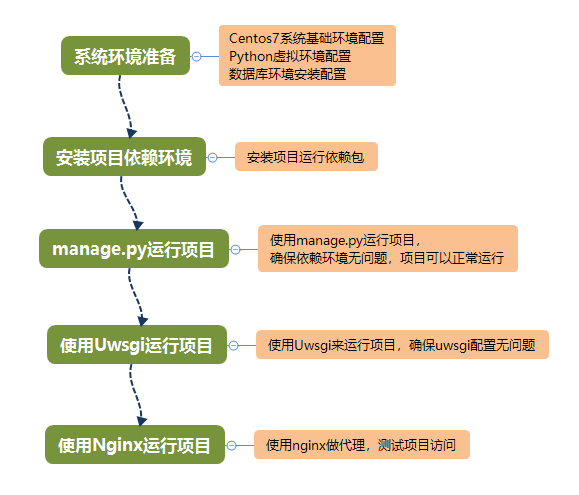
|
||||
|
||||
## 3.1 使用uwsgi运行项目
|
||||
|
||||
经过前面的部署,已经准备好了系统环境、项目以来环,并确认项目可以正常运行,接下来使用uwsgi来运行项目。
|
||||
|
||||
**1、登陆服务器系统,进入虚拟环境,安装uwsgi**
|
||||
|
||||
```
|
||||
[root@sandboxmp ~]# workon sandboxMP
|
||||
(sandboxMP) [root@sandboxmp ~]$ pip install uwsgi
|
||||
|
||||
```
|
||||
|
||||
**2、设置Uwsgi配置文件**
|
||||
|
||||
|
||||
```
|
||||
(sandboxMP) [root@sandboxmp ~]$ vim /etc/smp_uwsgi.ini
|
||||
[uwsgi]
|
||||
http = 172.16.3.200:9000
|
||||
#socket = 127.0.0.1:9000
|
||||
chdir = /opt/app/sandboxMP
|
||||
module = sandboxMP.wsgi
|
||||
static-map=/static=/opt/app/sandboxMP/static
|
||||
#daemonize =/var/log/uwsgi.log
|
||||
master = Ture
|
||||
vacuum = True
|
||||
processes = 4
|
||||
threads = 2
|
||||
buffer-size=32768
|
||||
|
||||
```
|
||||
配置说明:
|
||||
- chdir: 指定项目目录,请设置项目所在目录
|
||||
- static-map:静态文件映射,测试uwsgi配置时为了能够访问到静态资源,所以加上这个配置。在使用nginx时,需要注销掉这个配置,改用nginx来代理静态资源访问。
|
||||
|
||||
注意:配置文件中设置http,是为了方便使用Uswgi启动项目后,进行访问和功能测试。
|
||||
|
||||
**3、使用配置文件启动Uwsgi**
|
||||
|
||||
|
||||
```
|
||||
# 注意:uwsgi是安装在虚拟环境的,要使用uwsgi命令需要先进入虚拟环境
|
||||
(sandboxMP) [root@sandboxmp ~]$ uwsgi /etc/smp_uwsgi.ini
|
||||
[uWSGI] getting INI configuration from /etc/smp_uwsgi.ini
|
||||
[uwsgi-static] added mapping for /static => /opt/app/sandboxMP/static
|
||||
*** Starting uWSGI 2.0.18 (64bit) on [Mon Feb 25 23:21:01 2019] ***
|
||||
compiled with version: 4.8.5 20150623 (Red Hat 4.8.5-36) on 25 February 2019 14:10:29
|
||||
'''中间启动内容省略'''
|
||||
spawned uWSGI master process (pid: 17054)
|
||||
spawned uWSGI worker 1 (pid: 17058, cores: 2)
|
||||
spawned uWSGI worker 2 (pid: 17060, cores: 2)
|
||||
spawned uWSGI worker 3 (pid: 17061, cores: 2)
|
||||
spawned uWSGI worker 4 (pid: 17063, cores: 2)
|
||||
spawned uWSGI http 1 (pid: 17064)
|
||||
```
|
||||
项目运行成功通过服务器地址:http://172.16.3.200:9000就可以访问项目了,使用默认用户名: admin,密码:!qaz@wsx 登陆系统,测试系统功能。
|
||||
|
||||
至此,确认完Uwsgi配置没有问题,可以正常启动项目,然后终止Uwsgi运行(在命令行使用CTRL + C)。
|
||||
|
||||
**4、修改Uwsgi配置文件**
|
||||
|
||||
上面的配置是为了方便测试Uwsgi运行项目,线上部署项目,采用socket模式,使用nginx来处理静态文件访问:
|
||||
|
||||
|
||||
```
|
||||
[uwsgi]
|
||||
#http = 172.16.3.200:9000
|
||||
socket = 127.0.0.1:9000
|
||||
chdir = /opt/app/sandboxMP
|
||||
module = sandboxMP.wsgi
|
||||
#static-map=/static=/opt/app/sandboxMP/static
|
||||
#daemonize =/var/log/uwsgi.log
|
||||
master = Ture
|
||||
vacuum = True
|
||||
processes = 4
|
||||
threads = 2
|
||||
buffer-size=32768
|
||||
```
|
||||
配置中注销了http和static-map配置,同时启用socket配置。这时你也可以在命令行使用新的配置文件启动下uwsgi看看运行状态,不过这时候外面是无法通过uwsgi来直接访问系统了,还需要配置nginx代理。
|
||||
|
||||
**5、使用supervisor来管理uwsgi进程**
|
||||
|
||||
在前面已经使用supervisor来管理celery任务进程和flower进程,同样也可以使用supervisor来管理uwsgi进程:
|
||||
|
||||
```
|
||||
# 1.新建一个进程文件sandboxmp_uwsgi,写入下面配置内容:
|
||||
(sandboxMP) [root@sandboxmp ~]$ vim /etc/supervisord.d/sandboxmp_uwsgi.ini
|
||||
[program:sandboxmp-uwsgi]
|
||||
command=/root/.virtualenvs/sandboxMP/bin/uwsgi /etc/smp_uwsgi.ini
|
||||
stdout_logfile=/var/log/uwsgi/smp_uwsgi.log
|
||||
stderr_logfile=/var/log/uwsgi/smp_uwsgi.log
|
||||
stdout_logfile_maxbytes = 20MB
|
||||
autostart=true
|
||||
autorestart=true
|
||||
priority=905
|
||||
|
||||
# 2.创建一个目录用来存放uwsgi日志
|
||||
(sandboxMP) [root@sandboxmp ~]$ mkdir /var/log/uwsgi
|
||||
|
||||
# 3.启动sandboxmp_uwsgi进程
|
||||
(sandboxMP) [root@sandboxmp ~]# supervisorctl reload
|
||||
Restarted supervisord
|
||||
|
||||
# 4. 稍微等待一会,然后查看进程状态:
|
||||
(sandboxMP) [root@sandboxmp ~]# supervisorctl status
|
||||
celery-flower RUNNING pid 17231, uptime 0:00:05
|
||||
celery-worker RUNNING pid 17232, uptime 0:00:05
|
||||
sandboxmp-uwsgi RUNNING pid 17233, uptime 0:00:05
|
||||
|
||||
# 5.查看服务状态
|
||||
(sandboxMP) [root@sandboxmp ~]# netstat -tnpl
|
||||
Active Internet connections (only servers)
|
||||
Proto Recv-Q Send-Q Local Address Foreign Address State PID/Program name
|
||||
tcp 0 0 127.0.0.1:9000 0.0.0.0:* LISTEN 17233/uwsgi
|
||||
|
||||
```
|
||||
通过上面的配置,已经成功使用supervisor管理了sandboxmp-uwsgi进程。
|
||||
|
||||
## 3.2 使用Nginx做代理访问
|
||||
|
||||
**1、安装nginx**
|
||||
|
||||
|
||||
```
|
||||
(sandboxMP) [root@sandboxmp ~]$ yum -y install nginx
|
||||
```
|
||||
|
||||
**2、修改nginx配置文件**
|
||||
|
||||
|
||||
```
|
||||
(sandboxMP) [root@sandboxmp ~]$ echo "" > /etc/nginx/nginx.conf
|
||||
(sandboxMP) [root@sandboxmp ~]$ vim /etc/nginx/nginx.conf
|
||||
worker_processes 1;
|
||||
events {
|
||||
worker_connections 1024;
|
||||
}
|
||||
http {
|
||||
|
||||
include mime.types;
|
||||
default_type application/octet-stream;
|
||||
server_tokens off;
|
||||
log_format main '$remote_addr - $remote_user [$time_local] "$request" '
|
||||
'$status $body_bytes_sent "$http_referer" '
|
||||
'"$http_user_agent" "$http_x_forwarded_for"';
|
||||
log_format nginxlog '$http_host '
|
||||
'$remote_addr [$time_local] '
|
||||
'"$request" $status $body_bytes_sent '
|
||||
'"$http_referer" "$http_user_agent" '
|
||||
'$request_time '
|
||||
'$upstream_response_time';
|
||||
access_log /var/log/nginx/access.log nginxlog;
|
||||
keepalive_timeout 60;
|
||||
client_header_timeout 10;
|
||||
client_body_timeout 15;
|
||||
client_max_body_size 100M;
|
||||
client_body_buffer_size 1024k;
|
||||
gzip on;
|
||||
gzip_min_length 1;
|
||||
gzip_buffers 4 16k;
|
||||
gzip_http_version 1.1;
|
||||
gzip_comp_level 3;
|
||||
gzip_types text/plain application/javascript application/x-javascript text/css application/xml text/javascript application/x-httpd-php image/jpeg image/gif image/png app lication/vnd.ms-fontobject application/x-font-ttf image/svg+xml;
|
||||
gzip_vary on;
|
||||
|
||||
|
||||
|
||||
upstream sandboxmp {
|
||||
server 127.0.0.1:9000;
|
||||
}
|
||||
|
||||
server {
|
||||
|
||||
listen 80;
|
||||
server_name 0.0.0.0;
|
||||
charset utf-8;
|
||||
client_max_body_size 75M;
|
||||
|
||||
|
||||
|
||||
location /static {
|
||||
|
||||
alias /opt/app/sandboxMP/static;
|
||||
|
||||
}
|
||||
|
||||
location /media {
|
||||
|
||||
alias /opt/app/sandboxMP/media;
|
||||
}
|
||||
|
||||
location / {
|
||||
uwsgi_pass sandboxmp;
|
||||
include /etc/nginx/uwsgi_params;
|
||||
}
|
||||
}
|
||||
}
|
||||
```
|
||||
nginx配置说明:<br>
|
||||
在nginx中配置了日志格式,应用代理和静态文件的代理访问。
|
||||
|
||||
**3、启动nginx服务,设置开机启动**
|
||||
|
||||
```
|
||||
(sandboxMP) [root@sandboxmp ~]# systemctl start nginx
|
||||
(sandboxMP) [root@sandboxmp ~]# systemctl enable nginx
|
||||
Created symlink from /etc/systemd/system/multi-user.target.wants/nginx.service to /usr/lib/systemd/system/nginx.service.
|
||||
```
|
||||
|
||||
## 3.3 项目优化设置
|
||||
|
||||
项目在开发的时候是启用了Debug模式的,现在部署上线了,可以关闭Debug。
|
||||
|
||||
```
|
||||
# 1.修改项目配置文件,将DEBUG内容改成False
|
||||
(sandboxMP) [root@sandboxmp ~]$ vim /opt/app/sandboxMP/sandboxMP/settings.py
|
||||
'''配置文件中内容省略,主要修改下面两个内容'''
|
||||
DEBUG = False
|
||||
|
||||
ALLOWED_HOSTS = ['*']
|
||||
|
||||
# 2.保存修改后,重启项目
|
||||
(sandboxMP) [root@sandboxmp ~]$ supervisorctl restart sandboxmp-uwsgi
|
||||
sandboxmp-uwsgi: stopped
|
||||
sandboxmp-uwsgi: started
|
||||
(sandboxMP) [root@sandboxmp ~]$ systemctl restart nginx
|
||||
(sandboxMP) [root@sandboxmp ~]$
|
||||
```
|
||||
|
||||
> 到这里项目已经部署上线了,可以访问系统地址:http://172.16.3.200 用户名:admin 密码:!qaz@wsx 使用项目功能。本文档中配置文件已经包含在项目master版本文件中:sandboxMP/config。
|
||||
|
||||
|
||||
<br>
|
||||
<br>
|
||||
|
||||
> 更多实战类文档,请关注我的知识星球: https://t.zsxq.com/a6IqBMr (微信中打开链接)<br>
|
||||
轻量级办公管理系统项目开源地址:https://github.com/RobbieHan/gistandard <br>
|
||||
@@ -4,7 +4,7 @@
|
||||
|
||||
from django import forms
|
||||
|
||||
from .models import Code, DeviceInfo, ConnectionInfo
|
||||
from .models import Code, DeviceInfo, ConnectionInfo, DeviceFile
|
||||
|
||||
|
||||
class CodeCreateForm(forms.ModelForm):
|
||||
@@ -97,3 +97,9 @@ class ConnectionInfoForm(forms.ModelForm):
|
||||
raise forms.ValidationError('认证类型为[密码]时,必须设置密码信息!')
|
||||
if auth_type == 'private_key' and len(private_key) == 0:
|
||||
raise forms.ValidationError('认证类型为[密钥]时,必须设置密钥信息!')
|
||||
|
||||
|
||||
class DeviceFileUploadForm(forms.ModelForm):
|
||||
class Meta:
|
||||
model = DeviceFile
|
||||
fields = '__all__'
|
||||
@@ -3,7 +3,7 @@ import os
|
||||
from django.dispatch import receiver
|
||||
from django.db.models.signals import post_delete, post_save
|
||||
|
||||
from .models import DeviceFile, DeviceInfo
|
||||
from .models import DeviceFile, DeviceInfo, ConnectionInfo
|
||||
from utils.db_utils import MongodbDriver
|
||||
|
||||
|
||||
@@ -37,3 +37,10 @@ def auto_compare_diff(sender, instance, **kwargs):
|
||||
mongo.insert(compare_result)
|
||||
except Exception as e:
|
||||
pass
|
||||
|
||||
|
||||
@receiver(post_delete, sender=DeviceInfo)
|
||||
def auto_delete_connection(sender, instance, **kwargs):
|
||||
dev_connection = getattr(instance, 'dev_connection')
|
||||
if dev_connection:
|
||||
ConnectionInfo.objects.filter(id=dev_connection).delete()
|
||||
3
apps/cmdb/templatetags/__init__.py
Normal file
3
apps/cmdb/templatetags/__init__.py
Normal file
@@ -0,0 +1,3 @@
|
||||
# @Time : 2019/2/17 21:28
|
||||
# @Author : RobbieHan
|
||||
# @File : __init__.py.py
|
||||
60
apps/cmdb/templatetags/extra_tags.py
Normal file
60
apps/cmdb/templatetags/extra_tags.py
Normal file
@@ -0,0 +1,60 @@
|
||||
from django import template
|
||||
from django.db.models.query import QuerySet
|
||||
from django.contrib.auth import get_user_model
|
||||
|
||||
from cmdb.models import Code, Cabinet
|
||||
|
||||
register = template.Library()
|
||||
|
||||
User = get_user_model()
|
||||
|
||||
|
||||
@register.simple_tag
|
||||
def get_con(context, arg, field):
|
||||
if isinstance(context, QuerySet):
|
||||
context = context.values()
|
||||
instance = [con for con in context if con['id'] == arg]
|
||||
if instance:
|
||||
return instance[0][field]
|
||||
return ''
|
||||
|
||||
|
||||
@register.filter(name='compare_result')
|
||||
def get_change_compare(changes):
|
||||
change_compare = []
|
||||
for key, value in changes.items():
|
||||
if key in ['network_type', 'service_type', 'operation_type']:
|
||||
log = replace_log(key, value, Code, 'value')
|
||||
elif key == 'dev_cabinet':
|
||||
log = replace_log(key, value, Cabinet, 'number')
|
||||
elif key == 'leader':
|
||||
log = replace_log(key, value, User, 'name')
|
||||
else:
|
||||
log = '字段:"%(field)s",由:"%(old)s",变更为:"%(new)s"。' % {
|
||||
'field': key,
|
||||
'old': value[0],
|
||||
'new': value[1]
|
||||
}
|
||||
change_compare.append(log)
|
||||
return ','.join(str(i) for i in change_compare)
|
||||
|
||||
|
||||
def replace_log(key, value, model, field):
|
||||
old = value[0]
|
||||
new = value[1]
|
||||
log_format = '字段:"%(field)s",由:"%(old)s",变更为:"%(new)s"。'
|
||||
try:
|
||||
data = model.objects.filter(id=old).values()[0]
|
||||
old_data = data[field]
|
||||
except Exception:
|
||||
old_data = old
|
||||
try:
|
||||
data = model.objects.filter(id=new).values()[0]
|
||||
new_data = data[field]
|
||||
except Exception:
|
||||
new_data = new
|
||||
return log_format % {
|
||||
'field': key,
|
||||
'old': old_data,
|
||||
'new': new_data
|
||||
}
|
||||
@@ -33,4 +33,9 @@ urlpatterns = [
|
||||
path('eam/device/list/', views_eam.DeviceListView.as_view(), name='eam-device-list'),
|
||||
path('eam/device/delete/', views_eam.DeviceDeleteView.as_view(), name='eam-device-delete'),
|
||||
path('eam/device/device2connection/', views_eam.Device2ConnectionView.as_view(), name='eam-device-device2connection'),
|
||||
path('eam/device/detail/', views_eam.DeviceDetailView.as_view(), name='eam-device-detail'),
|
||||
path('eam/device/upload/', views_eam.DeviceFileUploadView.as_view(), name='eam-device-upload'),
|
||||
path('eam/device/file_delete/', views_eam.DeviceFileDeleteView.as_view(), name='eam-device-file_delete'),
|
||||
path('eam/device/auto_update_device_info/', views_eam.AutoUpdateDeviceInfo.as_view(),
|
||||
name='eam-device-auto_update_device_info'),
|
||||
]
|
||||
|
||||
@@ -5,12 +5,15 @@ from django.contrib.auth import get_user_model
|
||||
from django.shortcuts import get_object_or_404
|
||||
from django.http import JsonResponse
|
||||
from django.shortcuts import render
|
||||
from django.forms.models import model_to_dict
|
||||
|
||||
from system.mixin import LoginRequiredMixin
|
||||
from custom import (BreadcrumbMixin, SandboxDeleteView,
|
||||
SandboxListView, SandboxUpdateView, SandboxCreateView)
|
||||
from .models import Cabinet, DeviceInfo, Code, ConnectionInfo
|
||||
from .forms import DeviceCreateForm, DeviceUpdateForm, ConnectionInfoForm
|
||||
from .models import Cabinet, DeviceInfo, Code, ConnectionInfo, DeviceFile
|
||||
from .forms import DeviceCreateForm, DeviceUpdateForm, ConnectionInfoForm, DeviceFileUploadForm
|
||||
from utils.db_utils import MongodbDriver
|
||||
from utils.sandbox_utils import LoginExecution
|
||||
|
||||
User = get_user_model()
|
||||
|
||||
@@ -157,4 +160,76 @@ class Device2ConnectionView(LoginRequiredMixin, View):
|
||||
form_errors = str(form.errors)
|
||||
errors = re.findall(pattern, form_errors)
|
||||
res['error'] = errors[0]
|
||||
return JsonResponse(res)
|
||||
return JsonResponse(res)
|
||||
|
||||
|
||||
class DeviceDetailView(LoginRequiredMixin, BreadcrumbMixin, TemplateView):
|
||||
template_name = 'cmdb/deviceinfo_detail.html'
|
||||
|
||||
def get_context_data(self, **kwargs):
|
||||
device = get_object_or_404(DeviceInfo, pk=int(self.request.GET['id']))
|
||||
mongo = MongodbDriver()
|
||||
logs = mongo.find(id=int(self.request.GET['id']), sort_by='history_date')
|
||||
all_file = device.devicefile_set.all()
|
||||
device_public = get_device_public()
|
||||
kwargs['device'] = device
|
||||
kwargs['logs'] = logs
|
||||
kwargs['all_file'] = all_file
|
||||
kwargs.update(device_public)
|
||||
return super().get_context_data(**kwargs)
|
||||
|
||||
|
||||
class DeviceFileUploadView(LoginRequiredMixin, View):
|
||||
|
||||
def get(self, request):
|
||||
ret = dict()
|
||||
device = get_object_or_404(DeviceInfo, pk=request.GET['id'])
|
||||
ret['device'] = device
|
||||
return render(request, 'cmdb/deviceinfo_upload.html', ret)
|
||||
|
||||
def post(self, request):
|
||||
res = dict(result=False)
|
||||
device_file = DeviceFile()
|
||||
upload_form = DeviceFileUploadForm(
|
||||
request.POST, request.FILES, instance=device_file
|
||||
)
|
||||
if upload_form.is_valid():
|
||||
upload_form.save()
|
||||
res['result'] = True
|
||||
return JsonResponse(res)
|
||||
|
||||
|
||||
class DeviceFileDeleteView(SandboxDeleteView):
|
||||
model = DeviceFile
|
||||
|
||||
|
||||
class AutoUpdateDeviceInfo(LoginRequiredMixin, View):
|
||||
|
||||
def post(self, request):
|
||||
res = dict(status='fail')
|
||||
if 'id' in request.POST and request.POST['id']:
|
||||
device = get_object_or_404(DeviceInfo, pk=int(request.POST['id']))
|
||||
con_id = device.dev_connection
|
||||
conn = ConnectionInfo.objects.filter(id=con_id)
|
||||
if con_id and conn:
|
||||
try:
|
||||
conn_info = conn.get()
|
||||
kwargs = model_to_dict(conn_info, exclude=['id', 'auth_type'])
|
||||
auth_type = conn_info.auth_type
|
||||
le = LoginExecution()
|
||||
data = le.login_execution(auth_type=auth_type, **kwargs)
|
||||
conn_info.status = data['status']
|
||||
conn_info.save()
|
||||
if data['status'] == 'succeed':
|
||||
device.sys_hostname = data['sys_hostname']
|
||||
device.mac_address = data['mac_address']
|
||||
device.sn_number = data['sn_number']
|
||||
device.os_type = data['os_type']
|
||||
device.device_type = data['device_type']
|
||||
device.save()
|
||||
res['status'] = 'success'
|
||||
except conn.model.DoesNotExist:
|
||||
res['status'] = 'con_empty'
|
||||
else:
|
||||
res['status'] = 'con_empty'
|
||||
return JsonResponse(res)
|
||||
|
||||
219
config/basic_data_20190225.sql
Normal file
219
config/basic_data_20190225.sql
Normal file
File diff suppressed because one or more lines are too long
19
config/celery_worker.ini
Normal file
19
config/celery_worker.ini
Normal file
@@ -0,0 +1,19 @@
|
||||
[program:celery-worker]
|
||||
command=/root/.virtualenvs/sandboxMP/bin/celery worker -A sandboxMP -l INFO
|
||||
directory=/opt/app/sandboxMP
|
||||
environment=PATH="/root/.virtualenvs/sandboxMP/bin/"
|
||||
stdout_logfile=/opt/app/sandboxMP/slogs/celery_worker.log
|
||||
stderr_logfile=/opt/app/sandboxMP/slogs/celery_worker.log
|
||||
autostart=true
|
||||
autorestart=true
|
||||
priority=901
|
||||
|
||||
[program:celery-flower]
|
||||
command=/root/.virtualenvs/sandboxMP/bin/celery flower --broker=redis://localhost:6379/0
|
||||
directory=/opt/app/sandboxMP
|
||||
environment=PATH="/root/.virtualenvs/sandboxMP/bin/"
|
||||
stdout_logfile=/opt/app/sandboxMP/slogs/celery_flower.log
|
||||
stderr_logfile=/opt/app/sandboxMP/slogs/celery_flower.log
|
||||
autostart=true
|
||||
autorestart=true
|
||||
priority=900
|
||||
64
config/nginx.conf
Normal file
64
config/nginx.conf
Normal file
@@ -0,0 +1,64 @@
|
||||
worker_processes 1;
|
||||
events {
|
||||
worker_connections 1024;
|
||||
}
|
||||
http {
|
||||
|
||||
include mime.types;
|
||||
default_type application/octet-stream;
|
||||
server_tokens off;
|
||||
log_format main '$remote_addr - $remote_user [$time_local] "$request" '
|
||||
'$status $body_bytes_sent "$http_referer" '
|
||||
'"$http_user_agent" "$http_x_forwarded_for"';
|
||||
log_format nginxlog '$http_host '
|
||||
'$remote_addr [$time_local] '
|
||||
'"$request" $status $body_bytes_sent '
|
||||
'"$http_referer" "$http_user_agent" '
|
||||
'$request_time '
|
||||
'$upstream_response_time';
|
||||
access_log /var/log/nginx/access.log nginxlog;
|
||||
keepalive_timeout 60;
|
||||
client_header_timeout 10;
|
||||
client_body_timeout 15;
|
||||
client_max_body_size 100M;
|
||||
client_body_buffer_size 1024k;
|
||||
gzip on;
|
||||
gzip_min_length 1;
|
||||
gzip_buffers 4 16k;
|
||||
gzip_http_version 1.1;
|
||||
gzip_comp_level 3;
|
||||
gzip_types text/plain application/javascript application/x-javascript text/css application/xml text/javascript application/x-httpd-php image/jpeg image/gif image/png app lication/vnd.ms-fontobject application/x-font-ttf image/svg+xml;
|
||||
gzip_vary on;
|
||||
|
||||
|
||||
|
||||
upstream sandboxmp {
|
||||
server 127.0.0.1:9000;
|
||||
}
|
||||
|
||||
server {
|
||||
|
||||
listen 80;
|
||||
server_name 0.0.0.0;
|
||||
charset utf-8;
|
||||
client_max_body_size 75M;
|
||||
|
||||
|
||||
|
||||
location /static {
|
||||
|
||||
alias /opt/app/sandboxMP/static;
|
||||
|
||||
}
|
||||
|
||||
location /media {
|
||||
|
||||
alias /opt/app/sandboxMP/media;
|
||||
}
|
||||
|
||||
location / {
|
||||
uwsgi_pass sandboxmp;
|
||||
include /etc/nginx/uwsgi_params;
|
||||
}
|
||||
}
|
||||
}
|
||||
8
config/sandboxmp_uwsgi.ini
Normal file
8
config/sandboxmp_uwsgi.ini
Normal file
@@ -0,0 +1,8 @@
|
||||
[program:sandboxmp-uwsgi]
|
||||
command=/root/.virtualenvs/sandboxMP/bin/uwsgi /etc/smp_uwsgi.ini
|
||||
stdout_logfile=/var/log/uwsgi/smp_uwsgi.log
|
||||
stderr_logfile=/var/log/uwsgi/smp_uwsgi.log
|
||||
stdout_logfile_maxbytes = 20MB
|
||||
autostart=true
|
||||
autorestart=true
|
||||
priority=905
|
||||
12
config/smp_uwsgi.ini
Normal file
12
config/smp_uwsgi.ini
Normal file
@@ -0,0 +1,12 @@
|
||||
[uwsgi]
|
||||
#http = 172.16.3.200:9000
|
||||
socket = 127.0.0.1:9000
|
||||
chdir = /opt/app/sandboxMP
|
||||
module = sandboxMP.wsgi
|
||||
#static-map=/static=/opt/app/sandboxMP/static
|
||||
#daemonize =/var/log/uwsgi.log
|
||||
master = Ture
|
||||
vacuum = True
|
||||
processes = 4
|
||||
threads = 2
|
||||
buffer-size=32768
|
||||
BIN
document/images/stepww.png
Normal file
BIN
document/images/stepww.png
Normal file

Binary file not shown.
|
After Width: | Height: | Size: 25 KiB |
@@ -44,6 +44,7 @@ INSTALLED_APPS = [
|
||||
'simple_history',
|
||||
'system',
|
||||
'cmdb',
|
||||
'cmdb.templatetags',
|
||||
]
|
||||
|
||||
MIDDLEWARE = [
|
||||
|
||||
0
slogs/sandbox_err.log
Normal file
0
slogs/sandbox_err.log
Normal file
0
slogs/sandbox_info.log
Normal file
0
slogs/sandbox_info.log
Normal file
2462
static/plugins/masonry/masonry.js
Normal file
2462
static/plugins/masonry/masonry.js
Normal file
File diff suppressed because it is too large
Load Diff
@@ -339,5 +339,9 @@
|
||||
}
|
||||
});
|
||||
}
|
||||
|
||||
function doDetail(id){
|
||||
window.location.href="{% url 'cmdb:eam-device-detail' %}?id="+id;
|
||||
}
|
||||
</script>
|
||||
{% endblock %}
|
||||
316
templates/cmdb/deviceinfo_detail.html
Normal file
316
templates/cmdb/deviceinfo_detail.html
Normal file
@@ -0,0 +1,316 @@
|
||||
{% extends "base-left.html" %}
|
||||
{% load staticfiles %}
|
||||
{% load extra_tags %}
|
||||
|
||||
{% block css %}
|
||||
<link rel="stylesheet" href="{% static 'js/plugins/layer/skin/layer.css' %}">
|
||||
{% endblock %}
|
||||
|
||||
{% block content %}
|
||||
|
||||
<section class="content">
|
||||
|
||||
<div class="nav-tabs-custom">
|
||||
<ul class="nav nav-tabs">
|
||||
<li class="active"><a href="#activity" data-toggle="tab">设备详情</a></li>
|
||||
<li><a href="#history" data-toggle="tab">历史纪录</a></li>
|
||||
</ul>
|
||||
<div class="tab-content">
|
||||
<div class="active tab-pane" id="activity">
|
||||
<div class="box-body no-padding">
|
||||
<div class="btn-group pull-right margin">
|
||||
<button type="button" class="btn btn-primary btn-sm margin-r-5"
|
||||
onclick="doUpload({{ device.id }})">
|
||||
<i class="fa fa-cloud-upload"> 上传资料</i>
|
||||
</button>
|
||||
<button type="button" class="btn btn-primary btn-sm margin-r-5" title="认证管理" onclick="doDevice2Connection({{ device.id }})">
|
||||
<i class="fa fa-user"> 认证管理</i>
|
||||
</button>
|
||||
<button type="button" class="btn btn-primary btn-sm margin-r-5" title="自动更新" onclick="doAutoUpdate({{ device.id }})">
|
||||
<i class="fa fa-circle-o-notch"> 自动更新</i>
|
||||
</button>
|
||||
<button type="button" class="btn btn-primary btn-sm margin-r-5" title="编辑" onclick="doUpdate({{ device.id }})">
|
||||
<i class="fa fa-pencil"> 编辑</i>
|
||||
</button>
|
||||
<button type="button" id="btnReturn" class="btn btn-primary btn-sm">
|
||||
<i class="fa fa-arrow-left"></i> 返回
|
||||
</button>
|
||||
</div>
|
||||
</div>
|
||||
<div class="table-responsive mailbox-messages">
|
||||
<table class="table" id="tbWorkList" style="white-space: nowrap;">
|
||||
<tbody>
|
||||
<tr class="info">
|
||||
<td width="10%"><strong>主机名</strong></td>
|
||||
<td class="text-left">{{ device.sys_hostname }}</td>
|
||||
<td width="10%"><strong>SN编号</strong></td>
|
||||
<td class="text-left">{{ device.sn_number }}</td>
|
||||
</tr>
|
||||
<tr>
|
||||
<td><strong>系统类型</strong></td>
|
||||
<td>{{ device.os_type }}</td>
|
||||
<td><strong>设备类型</strong></td>
|
||||
<td>{{ device.device_type }}</td>
|
||||
</tr>
|
||||
<tr class="info">
|
||||
<td><strong>设备地址</strong></td>
|
||||
<td>{{ device.hostname }}</td>
|
||||
<td><strong>MAC地址</strong></td>
|
||||
<td>{{ device.mac_address }}</td>
|
||||
</tr>
|
||||
<tr>
|
||||
<td><strong>网络类型</strong></td>
|
||||
<td>{% get_con all_code device.network_type 'value' %}</td>
|
||||
<td><strong>服务类型</strong></td>
|
||||
<td>{% get_con all_code device.service_type 'value' %}</td>
|
||||
</tr>
|
||||
<tr class="info">
|
||||
<td><strong>业务类型</strong></td>
|
||||
<td>{% get_con all_code device.operation_type 'value' %}</td>
|
||||
<td><strong>机柜信息</strong></td>
|
||||
<td>{% get_con all_cabinet device.dev_cabinet 'number' %}</td>
|
||||
</tr>
|
||||
<tr>
|
||||
<td><strong>购买日期</strong></td>
|
||||
<td>{{ device.buyDate }}</td>
|
||||
<td><strong>质保日期</strong></td>
|
||||
<td>{{ device.warrantyDate }}</td>
|
||||
</tr>
|
||||
<tr class="info">
|
||||
<td><strong>所属</strong></td>
|
||||
<td>{% if device.parent %}
|
||||
{{ device.parent.sys_hostname }}({{ device.parent.hostname }})
|
||||
{% endif %}
|
||||
</td>
|
||||
<td><strong>责任人</strong></td>
|
||||
<td>{% get_con all_user device.leader 'name' %}</td>
|
||||
</tr>
|
||||
<tr>
|
||||
<td><strong>入库时间</strong></td>
|
||||
<td>{{ device.add_time }}</td>
|
||||
<td><strong>最后变更</strong></td>
|
||||
<td>{{ device.modify_time }}</td>
|
||||
</tr>
|
||||
<tr class="info">
|
||||
<td><strong>最后操作人</strong></td>
|
||||
<td>{{ device.changed_by.name }}</td>
|
||||
<td><strong></strong></td>
|
||||
<td></td>
|
||||
</tr>
|
||||
<tr>
|
||||
<td><strong>备注信息</strong></td>
|
||||
<td colspan="3">{{ device.desc }}</td>
|
||||
</tr>
|
||||
</tbody>
|
||||
</table>
|
||||
</div>
|
||||
<br>
|
||||
<div class="box-footer">
|
||||
|
||||
<ul class="mailbox-attachments clearfix" id="imageContainer">
|
||||
{% for file in all_file %}
|
||||
<li class="imageItem">
|
||||
<div class="mailbox-attachment-info">
|
||||
<a href="/media/{{ file.file_content }}" target="_blank"><i
|
||||
class="fa fa-file-text"></i>
|
||||
<small>{{ file.file_content|cut:'asset_file/' }}</small>
|
||||
</a>
|
||||
<span class="mailbox-attachment-size">
|
||||
<b>上传人</b>:{{ file.upload_user }}
|
||||
<a href="/media/{{ file.file_content }}" download="{{ file.file_content }}"
|
||||
class="btn btn-primary btn-xs pull-right">
|
||||
<i class="fa fa-cloud-download" title="下载文件"></i>
|
||||
</a>
|
||||
<button class="btn btn-adn btn-xs pull-right margin-r-5"
|
||||
onclick="doDelete({{ file.id }})">
|
||||
<i class="fa fa-trash" title="删除文件"> </i>
|
||||
</button>
|
||||
</span>
|
||||
</div>
|
||||
</li>
|
||||
{% endfor %}
|
||||
</ul>
|
||||
</div>
|
||||
</div>
|
||||
<!-- /.tab-pane -->
|
||||
<div class="tab-pane" id="history">
|
||||
<div class="box-body">
|
||||
<ul class="todo-list">
|
||||
{% for log in logs %}
|
||||
<li>
|
||||
<!-- drag handle -->
|
||||
<span class="handle">
|
||||
<small class="text-maroon">
|
||||
<i class="glyphicon glyphicon-time"></i>
|
||||
{{ log.history_date }}
|
||||
|
||||
{{ log.changed_by }}
|
||||
|
||||
{{ log.history_type }}
|
||||
</small>
|
||||
</span>
|
||||
<span class="text-sm">
|
||||
{{ log.changes | compare_result }}
|
||||
</span>
|
||||
<!--
|
||||
<button class="btn btn-xs btn-danger pull-right">还原数据</button>
|
||||
-->
|
||||
</li>
|
||||
{% endfor %}
|
||||
</ul>
|
||||
</div>
|
||||
</div>
|
||||
|
||||
<!-- /.tab-pane -->
|
||||
</div>
|
||||
<!-- /.tab-content -->
|
||||
</div>
|
||||
</section>
|
||||
|
||||
<!-- /.content -->
|
||||
|
||||
{% endblock %}
|
||||
|
||||
{% block javascripts %}
|
||||
<script src="{% static 'js/plugins/layer/layer.js' %}"></script>
|
||||
<script src="{% static 'plugins/masonry/masonry.js' %}"></script>
|
||||
<script type="text/javascript">
|
||||
$(function () {
|
||||
$('#CMDB-EAM').addClass('active');
|
||||
$('#CMDB-EAM-DEVICE').addClass('active');
|
||||
|
||||
});
|
||||
|
||||
$("#btnReturn").click(function(){
|
||||
history.back();
|
||||
});
|
||||
|
||||
// 资产文件瀑布流
|
||||
|
||||
$('#imageContainer').masonry({
|
||||
columnWidth: 10,
|
||||
itemSelector: '.imageItem'
|
||||
});
|
||||
|
||||
//上传资料
|
||||
function doUpload(id) {
|
||||
var div = layer.open({
|
||||
type: 2,
|
||||
title: '上传设备文件',
|
||||
shadeClose: false,
|
||||
maxmin: true,
|
||||
area: ['770px', '400px'],
|
||||
content: ["/cmdb/eam/device/upload/" + '?id=' + id],
|
||||
end: function () {
|
||||
window.location.reload();
|
||||
|
||||
}
|
||||
});
|
||||
layer.full(div)
|
||||
}
|
||||
|
||||
//删除文件
|
||||
function doDelete(id) {
|
||||
layer.alert('确定删除吗?', {
|
||||
title: '提示'
|
||||
, icon: 3
|
||||
, time: 0
|
||||
, btn: ['YES', 'NO']
|
||||
, yes: function (index) {
|
||||
layer.close(index);
|
||||
$.ajax({
|
||||
type: "POST",
|
||||
url: "{% url 'cmdb:eam-device-file_delete' %}",
|
||||
data: {"id": id, csrfmiddlewaretoken: '{{ csrf_token }}'},
|
||||
cache: false,
|
||||
success: function (msg) {
|
||||
if (msg.result) {
|
||||
layer.alert('删除成功', {icon: 1}, function () {
|
||||
parent.location.reload()
|
||||
});
|
||||
} else {
|
||||
//alert(msg.message);
|
||||
layer.alert('删除失败', {icon: 2});
|
||||
}
|
||||
return;
|
||||
}
|
||||
});
|
||||
}
|
||||
});
|
||||
|
||||
}
|
||||
|
||||
//自动更新设备信息
|
||||
function doAutoUpdate(id) {
|
||||
layer.alert('确定自动更新设备信息?', {
|
||||
title: '提示'
|
||||
, icon: 3 //0:感叹号 1:对号 2:差号 3:问号 4:小锁 5:哭脸 6:笑脸
|
||||
, time: 0 //不自动关闭
|
||||
, btn: ['YES', 'NO']
|
||||
, yes: function (index) {
|
||||
layer.close(index);
|
||||
$.ajax({
|
||||
type: "POST",
|
||||
data: {"id": id, csrfmiddlewaretoken: '{{ csrf_token }}'},
|
||||
url: "{% url 'cmdb:eam-device-auto_update_device_info' %}",
|
||||
cache: false,
|
||||
beforeSend:function(){
|
||||
this.layerIndex = layer.load(2, {
|
||||
shade: [0.1,'#fff']
|
||||
});
|
||||
},
|
||||
success: function (msg) {
|
||||
layer.closeAll('loading');
|
||||
if (msg.status == 'success') {
|
||||
layer.alert('设备信息更新成功!', {icon: 1}, function(){
|
||||
parent.location.reload()
|
||||
});
|
||||
}
|
||||
else if (msg.status == 'con_empty') {
|
||||
layer.alert('请先添加认证信息!', {icon: 4});
|
||||
|
||||
}
|
||||
else {
|
||||
//alert(msg.message);
|
||||
layer.alert('设备信息更新失败!', {icon: 2});
|
||||
}
|
||||
return;
|
||||
}
|
||||
|
||||
});
|
||||
}
|
||||
});
|
||||
}
|
||||
|
||||
//修改数据
|
||||
function doUpdate(id) {
|
||||
var div=layer.open({
|
||||
type: 2,
|
||||
title: '编辑',
|
||||
shadeClose: false,
|
||||
maxmin: true,
|
||||
area: ['800px', '400px'],
|
||||
content: ["{% url 'cmdb:eam-device-update' %}" + '?id=' + id, 'no'],
|
||||
end: function () {
|
||||
window.location.reload();
|
||||
}
|
||||
});
|
||||
layer.full(div )
|
||||
}
|
||||
|
||||
function doDevice2Connection(id) {
|
||||
layer.open({
|
||||
type: 2,
|
||||
title: '认证管理',
|
||||
shadeClose: false,
|
||||
maxmin: true,
|
||||
area: ['800px', '400px'],
|
||||
content: ["{% url 'cmdb:eam-device-device2connection' %}" + '?id=' + id, 'no'],
|
||||
end: function () {
|
||||
oDataTable.ajax.reload();
|
||||
}
|
||||
});
|
||||
}
|
||||
</script>
|
||||
|
||||
{% endblock %}
|
||||
65
templates/cmdb/deviceinfo_upload.html
Normal file
65
templates/cmdb/deviceinfo_upload.html
Normal file
@@ -0,0 +1,65 @@
|
||||
{% extends 'base-layer.html' %}
|
||||
{% load staticfiles %}
|
||||
|
||||
{% block css %}
|
||||
<link rel="stylesheet" href="{%static 'plugins/select2/select2.min.css' %}">
|
||||
<link rel="stylesheet" href="{% static 'js/plugins/layer/skin/layer.css' %}">
|
||||
<link rel="stylesheet" href="{% static 'bootstrap/css/bootstrap-datetimepicker.min.css' %}">
|
||||
<link rel="stylesheet" href="{% static 'plugins/fileinput/fileinput.css' %}">
|
||||
|
||||
{% endblock %}
|
||||
{% block main %}
|
||||
<div class="box box-danger">
|
||||
<form class="form-horizontal" id="addForm" method="post">
|
||||
{% csrf_token %}
|
||||
<div class="box-body">
|
||||
<fieldset>
|
||||
<div class="form-group has-feedback">
|
||||
<div class="col-sm-12">
|
||||
<div class="file-loading">
|
||||
<input id="file_content" name="file_content" type="file" multiple="multiple"/>
|
||||
</div>
|
||||
</div>
|
||||
</div>
|
||||
</fieldset>
|
||||
<fieldset>
|
||||
<div class="form-group has-feedback">
|
||||
<label class="col-sm-2 control-label"></label>
|
||||
<div class="col-sm-12">
|
||||
<p class="text-red">同时最多可上传4个文件,支持文件格式:png", "jpg", "gif", "zip", "rar",大小不得超过10M</p>
|
||||
</div>
|
||||
</div>
|
||||
</fieldset>
|
||||
</div>
|
||||
</form>
|
||||
</div>
|
||||
|
||||
{% endblock %}
|
||||
|
||||
{% block javascripts %}
|
||||
<script src="{% static 'plugins/fileinput/fileinput.js' %}"></script>
|
||||
<script src="{% static 'plugins/fileinput/zh.js' %}"></script>
|
||||
<script type="text/javascript">
|
||||
|
||||
//上传文件
|
||||
|
||||
$(document).on('ready', function() {
|
||||
$("#file_content").fileinput({
|
||||
language: "zh",
|
||||
showUpload: true,
|
||||
allowedFileExtensions: ["png", "jpg", "gif", "zip", "rar"],
|
||||
uploadUrl: "{% url 'cmdb:eam-device-upload' %}",
|
||||
uploadExtraData: {
|
||||
'csrfmiddlewaretoken': '{{ csrf_token }}',
|
||||
'device': '{{ device.id }}',
|
||||
'upload_user': '{{ request.user.name }}',
|
||||
},
|
||||
maxFileCount: 4,
|
||||
autoReplace: true,
|
||||
maxFileSize: 10240,
|
||||
});
|
||||
});
|
||||
|
||||
</script>
|
||||
|
||||
{% endblock %}
|
||||
Reference in New Issue
Block a user