 ca1267d82a
* Add targeted TCP connection quarantine tool

* Document TCP quarantine workflow

* Refresh package indexes before CI install

* Document TCP quarantine namespace scope

* Require BPF events for TCP iterator

* Add production fsession latency tracer

* Document fsession latency workflow

* Reject empty fsession CLI values

* Preserve successful fsession exit status

* Document fsession deadline regression test

* Drain fsession events before summary

* Document fsession PID and shutdown semantics

* Simplify fsession polling control flow

* Add bounded BPF egress pacer tutorial

* Test queued packet cleanup on signal

* Document the BPF egress pacer

* Polish and review the BPF egress pacer

* Refactor egress pacer option parsing

* Add executable image inspector lesson

* Build the exec image inspector in CI

* Document executable image inspection

* Handle re-exec chains in the image inspector

* Polish exec image inspector guidance

* Reduce exec inspector wait complexity

* Rewrite the egress pacer tutorial

* Rewrite the exec image inspector tutorial

* Polish the exec image inspector tutorial

* Correct the egress pacer tutorial

* Make the exec tutorial Chinese natural

* Fix egress tutorial prose checks

* Finish the exec tutorial style pass

* Clarify exec tutorial runtime evidence

* Polish exec tutorial scope wording

* Rewrite the egress pacer tutorial for readers

* Regenerate tutorial indexes

* Teach the egress pacer component by component

* Use standard Markdown in the egress tutorial

* Strengthen the egress pacer tutorial narrative

* jiji

* Use positive framing in the egress tutorial

* Rewrite the exec image inspector tutorial

* Rewrite the TCP quarantine tutorial

* Add the egress pacer lifecycle diagram

* Refresh TCP tutorial indexes

* Add the exec image inspection flow diagram

* Use one source directory link

* Rewrite the fsession latency tutorial

* Add fsession feature background

* Add BPF qdisc feature background

* Add TCP iterator feature background

* Add exec inspection feature background

* Require feature background in tutorial openings

* Polish fsession background prose

* Simplify repository tutorial skills

* Update exec inspector tooling revisions

* Restructure tutorials 51-54 following advanced guideline

- Update SKILL.md with strict section ordering and "why" requirements
- Rewrite README.zh.md for tutorials 51-54:
  - Add background sections explaining why traditional approaches fail
  - Move compilation/execution sections after code analysis
  - Add high-level mechanism explanation before code
  - Use paragraph style instead of bullet lists

* Consolidate skill guidelines and remove duplicates

- Update write-bpf-production-tutorial skill to reference 47, 48, 49
- Add structure requirements section with "Why" section emphasis
- Remove duplicate advanced-tutorial-guidelines.md (use scripts/guideline_advance.md instead)

* Rewrite English READMEs 51-54 to match Chinese structure

Restructure all four English tutorials to match their Chinese counterparts:
- Add "Why this approach is needed" sections explaining traditional limitations
- Add high-level mechanism sections before code
- Move compilation/execution sections after code analysis
- Add environment requirements tables
- Use consistent section ordering across all tutorials

* Regenerate TOC after tutorial title changes

Run generate_toc.py to sync SUMMARY and README files with
updated tutorial titles from the restructuring.

* Regenerate compatibility tables after title changes

---------

Co-authored-by: LinuxDev9002 <i@littlefisher.me>
14 KiB
eBPF Developer Tutorial: Learning eBPF Step by Step with Examples


This is a development tutorial for eBPF based on CO-RE (Compile Once, Run Everywhere). It provides practical eBPF development practices from beginner to advanced, including basic concepts, code examples, and real-world applications. Unlike BCC, we use frameworks like libbpf, Cilium, libbpf-rs, and eunomia-bpf for development, with examples in languages such as C, Go, and Rust.
This tutorial does not cover complex concepts and scenario introductions. Its main purpose is to provide examples of eBPF tools (very short, starting with twenty lines of code!) to help eBPF application developers quickly grasp eBPF development methods and techniques. The tutorial content can be found in the directory, with each directory being an independent eBPF tool example.
The tutorial focuses on eBPF examples in observability, networking, security, and more.
Table of Contents
Getting Started Examples
This section contains simple eBPF program examples and introductions. It primarily utilizes the eunomia-bpf framework to simplify development and introduces the basic usage and development process of eBPF.
- lesson 0-introduce Introduction to Core Concepts and Tools
- lesson 1-helloworld Hello World, Framework and Development
- lesson 2-kprobe-unlink Monitoring unlink System Calls with kprobe
- lesson 3-fentry-unlink Monitoring unlink System Calls with fentry
- lesson 4-opensnoop Capturing Opening Files and Filter with Global Variables
- lesson 5-uprobe-bashreadline Capturing readline Function Calls with Uprobe
- lesson 6-sigsnoop Capturing Signal Sending and Store State with Hash Maps
- lesson 7-execsnoop Capturing Process Execution, Output with perf event array
- lesson 8-exitsnoop Monitoring Process Exit Events, Output with Ring Buffer
- lesson 9-runqlat Capturing Scheduling Latency and Recording as Histogram
- lesson 10-hardirqs Capturing Interrupts with hardirqs or softirqs
Advanced Documents and Examples
We start to build complete eBPF projects mainly based on libbpf and combine them with various application scenarios for practical use.
- lesson 11-bootstrap Develop User-Space Programs with libbpf and Trace exec() and exit()
- lesson 12-profile Using eBPF Program Profile for Performance Analysis
- lesson 13-tcpconnlat Statistics of TCP Connection Delay with libbpf
- lesson 14-tcpstates Recording TCP Connection Status and TCP RTT
- lesson 15-javagc Capturing User-Space Java GC Duration Using USDT
- lesson 16-memleak Monitoring Memory Leaks
- lesson 17-biopattern Count Random/Sequential Disk I/O
- lesson 18-further-reading More Reference Materials: papers, projects
- lesson 19-lsm-connect Security Detection and Defense using LSM
- lesson 20-tc tc Traffic Control
- lesson 21-xdp Programmable Packet Processing with XDP
In-Depth Topics
This section covers advanced topics related to eBPF, including using eBPF programs on Android, possible attacks and defenses using eBPF programs, and complex tracing. Combining the user-mode and kernel-mode aspects of eBPF can bring great power (as well as security risks).
GPU:
- lesson 47-cuda-events Tracing CUDA GPU Operations
- xpu flamegraph Building a GPU Flamegraph Profiler with CUPTI
- lesson xpu/gpu-kernel-driver Monitoring GPU Driver Activity with Kernel Tracepoints
- lesson xpu/npu-kernel-driver Tracing Intel NPU Kernel Driver Operations
Scheduler:
- lesson 44-scx-simple Introduction to the BPF Scheduler
- lesson 45-scx-nest Implementing the
scx_nestScheduler
Networking:
- lesson 23-http L7 Tracing with eBPF: HTTP and Beyond via Socket Filters and Syscall Tracepoints
- lesson 29-sockops Accelerating Network Request Forwarding with Sockops
- lesson 41-xdp-tcpdump Capturing TCP Information with XDP
- lesson 42-xdp-loadbalancer XDP Load Balancer
- lesson 46-xdp-test Building a High-Performance XDP Packet Generator
- lesson 50-tcx Composable Traffic Control with TCX Links
- lesson 53-egress-pacer Building an Egress Pacer with BPF Qdisc
Tracing:
- lesson 30-sslsniff Capturing SSL/TLS Plain Text Data Using uprobe
- lesson 31-goroutine Using eBPF to Trace Go Routine States
- lesson 33-funclatency Measuring Function Latency with eBPF
- lesson 37-uprobe-rust Tracing User Space Rust Applications with Uprobe
- lesson 39-nginx Using eBPF to Trace Nginx Requests
- lesson 40-mysql Using eBPF to Trace MySQL Queries
- lesson 48-energy Energy Monitoring for Process-Level Power Analysis
- lesson 52-fsession-latency Tracing Slow vfs_read Calls with fsession
Security:
- lesson 24-hide Hiding Process or File Information
- lesson 25-signal Using bpf_send_signal to Terminate Malicious Processes in eBPF
- lesson 26-sudo Privilege Escalation via File Content Manipulation
- lesson 27-replace Transparent Text Replacement in File Reads
- lesson 28-detach Running eBPF After Application Exits: The Lifecycle of eBPF Programs
- lesson 34-syscall Modifying System Call Arguments with eBPF
- lesson 51-tcp-quarantine Precisely Isolating Established TCP Connections
- lesson 54-exec-image-inspector Inspecting the Executable Image After exec
Features:
- lesson 35-user-ringbuf Asynchronously Send to Kernel with User Ring Buffer
- lesson 36-userspace-ebpf Userspace eBPF Runtimes: Overview and Applications
- lesson 38-btf-uprobe Expanding eBPF Compile Once, Run Everywhere(CO-RE) to Userspace Compatibility
- lesson 43-kfuncs Extending eBPF Beyond Its Limits: Custom kfuncs in Kernel Modules
- features bpf_arena BPF Arena for Zero-Copy Shared Memory
- features bpf_iters BPF Iterators for Kernel Data Export
- features bpf_token BPF Token for Delegated Privilege and Secure Program Loading
- features bpf_wq BPF Workqueues for Asynchronous Sleepable Tasks
- features dynptr BPF Dynamic Pointers for Variable-Length Data
- features struct_ops Extending Kernel Subsystems with BPF struct_ops
Other:
- lesson 49-hid Fixing Broken HID Devices Without Kernel Patches
- cgroup cgroup-based Policy Control
Android:
- lesson 22-android Using eBPF Programs on Android
Continuously updating...
Why write this tutorial?
In the process of learning eBPF, we have been inspired and helped by the bcc Python developer tutorial. However, from the current perspective, using libbpf to develop eBPF applications is a relatively better choice.
This project is mainly based on libbpf frameworks.
- We also provide a small tool called GPTtrace, which uses ChatGPT to automatically write eBPF programs and trace Linux systems through natural language descriptions. This tool allows you to interactively learn eBPF programs: GPTtrace
- Feel free to raise any questions or issues related to eBPF learning, or bugs encountered in practice, in the issue or discussion section of this repository. We will do our best to help you!
Install deps and Compile
- For libbpf based: see src/11-bootstrap
- For eunomia-bpf based: see src/1-helloworld
GitHub Templates: Easily build eBPF projects and development environments, compile and run eBPF programs online with one click
When starting a new eBPF project, are you confused about how to set up the environment and choose a programming language? Don't worry, we have prepared a series of GitHub templates for you to quickly start a brand new eBPF project. Just click the Use this template button on GitHub to get started.
- https://github.com/eunomia-bpf/libbpf-starter-template: eBPF project template based on the C language and libbpf framework
- https://github.com/eunomia-bpf/cilium-ebpf-starter-template: eBPF project template based on the Go language and cilium/ framework
- https://github.com/eunomia-bpf/libbpf-rs-starter-template: eBPF project template based on the Rust language and libbpf-rs framework
- https://github.com/eunomia-bpf/eunomia-template: eBPF project template based on the C language and eunomia-bpf framework
These starter templates include the following features:
- A Makefile to build the project with a single command
- A Dockerfile to automatically create a containerized environment for your eBPF project and publish it to GitHub Packages
- GitHub Actions to automate the build, test, and release processes
- All dependencies required for eBPF development
By setting an existing repository as a template, you and others can quickly generate new repositories with the same basic structure, eliminating the need for manual creation and configuration. With GitHub template repositories, developers can focus on the core functionality and logic of their projects without wasting time on the setup and structure. For more information about template repositories, see the official documentation: https://docs.github.com/en/repositories/creating-and-managing-repositories/creating-a-template-repository
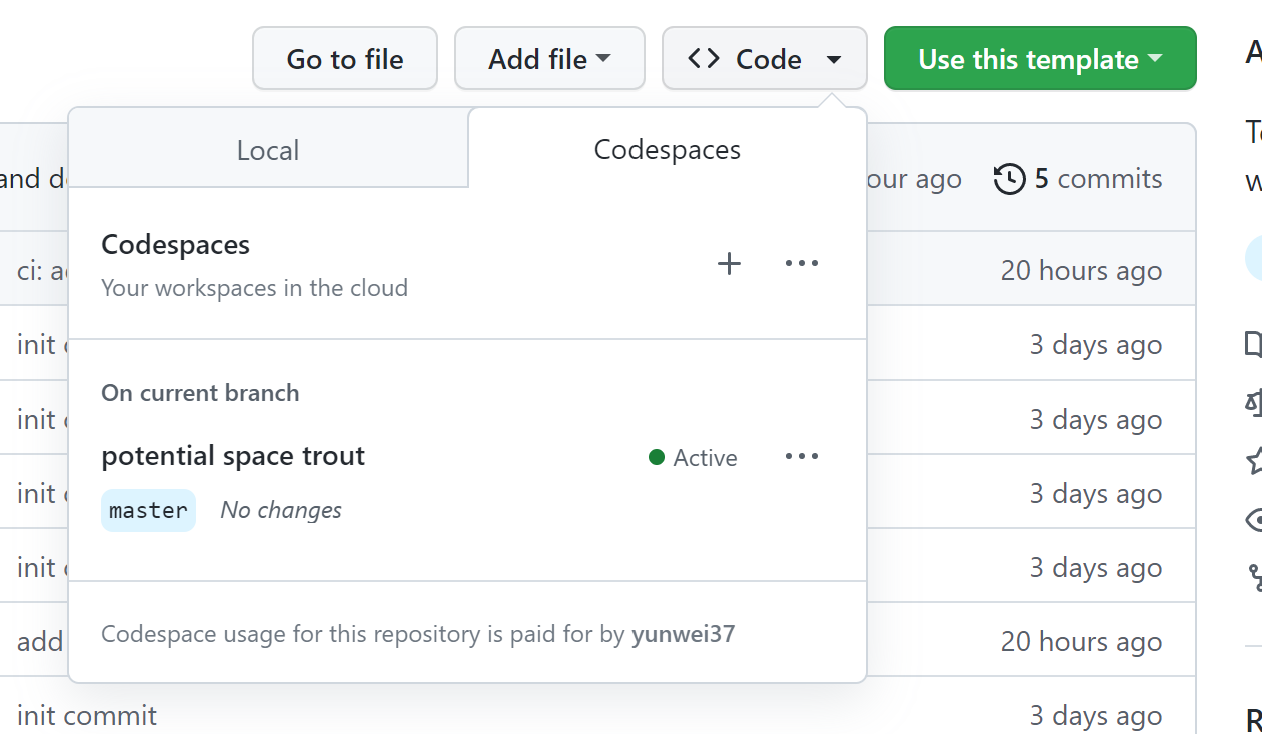
When you create a new repository using one of the eBPF project templates mentioned above, you can easily set up and launch an online development environment with GitHub Codespaces. Here are the steps to compile and run eBPF programs using GitHub Codespaces:
-
Click the Code button in your new repository and select the Open with Codespaces option:
-
GitHub will create a new Codespace for you, which may take a few minutes depending on your network speed and the size of the repository.
-
Once your Codespace is launched and ready to use, you can open the terminal and navigate to your project directory.
-
You can follow the instructions in the corresponding repository to compile and run eBPF programs:
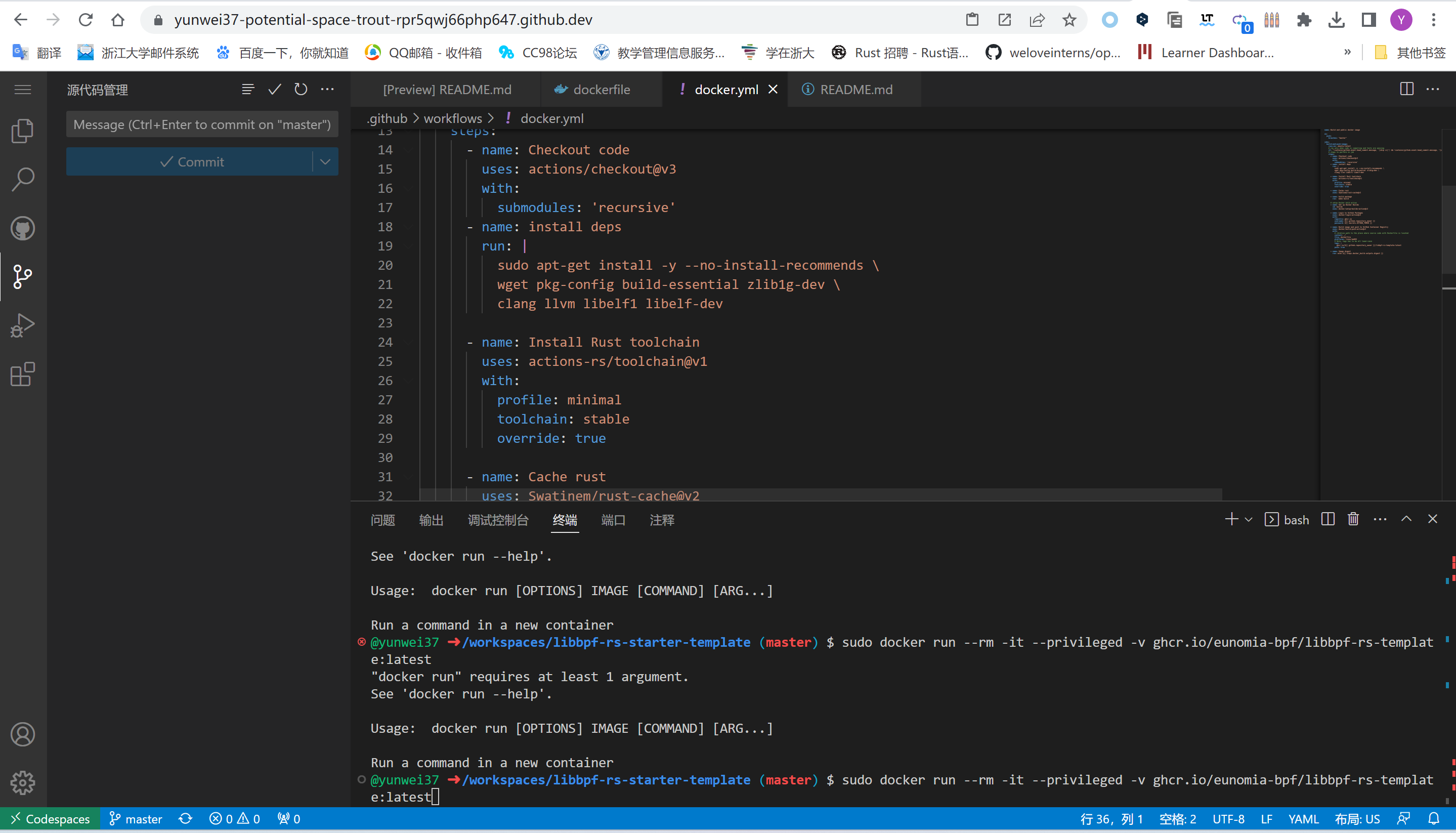


With Codespaces, you can easily create, manage, and share cloud-based development environments, speeding up and making your development process more reliable. You can develop with Codespaces anywhere, on any device, just need a computer with a web browser. Additionally, GitHub Codespaces supports pre-configured environments, customized development containers, and customizable development experiences to meet your development needs.
After writing code in a codespace and making a commit, GitHub Actions will compile and automatically publish the container image. Then, you can use Docker to run this eBPF program anywhere with just one command, for example:
$ sudo docker run --rm -it --privileged ghcr.io/eunomia-bpf/libbpf-rs-template:latest
[sudo] password for xxx:
Tracing run queue latency higher than 10000 us
TIME     COMM             TID     LAT(us)
12:09:19 systemd-udevd    30786   18300
12:09:19 systemd-udevd    30796   21941
12:09:19 systemd-udevd    30793   10323
12:09:19 systemd-udevd    30795   14827
12:09:19 systemd-udevd    30790   17973
12:09:19 systemd-udevd    30793   12328
12:09:19 systemd-udevd    30796   28721

build
The example of local compilation is shown as follows:
git clone https://github.com/eunomia-bpf/bpf-developer-tutorial.git
cd bpf-developer-tutorial
git submodule update --init --recursive # Synchronize submodule
cd src/24-hide
make
LICENSE
MIT